
1. Introduction
This manual provides instructions for the installation, operation, and maintenance of the NPAUTO Exterior Front Driver Side Door Handle, Model 80532. This replacement part is designed for specific vehicle models to restore proper door functionality and appearance.
1.1. Compatibility
This door handle is compatible with the following vehicle models and years:
- 2005-2009 Buick LaCrosse
- 2006-2011 Buick Lucerne
- 2005-2010 Chevy Cobalt
- 2007-2013 Chevy Impala
- 2007-2009 Pontiac G5
- 2006-2009 Pontiac Solstice
- 2007-2010 Saturn Sky

Image: List of compatible vehicle models for the door handle.
2. Safety Information
Always prioritize safety when working on your vehicle. Failure to follow safety precautions can result in injury or damage to the vehicle.
- Wear appropriate personal protective equipment, such as gloves and eye protection.
- Ensure the vehicle is parked on a level surface with the parking brake engaged.
- If unsure about any step, consult a professional mechanic.
- Keep small parts away from children.
3. Package Contents
Verify that all components are present before beginning installation:
- 1 x NPAUTO Exterior Front Driver Side Door Handle (Chrome finish)
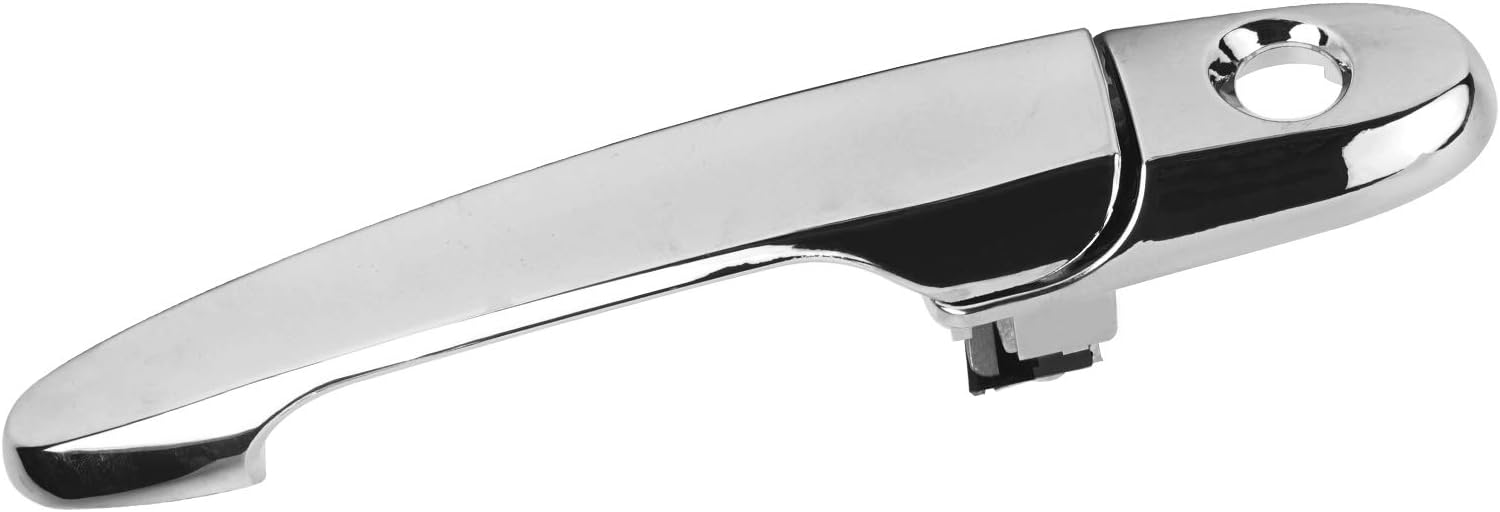
Image: Front view of the NPAUTO exterior door handle.
4. Installation (Setup)
This section outlines the general steps for replacing the exterior front driver side door handle. Specific procedures may vary slightly by vehicle model. Refer to your vehicle's service manual for detailed instructions if needed.
4.1. Tools Required (Not Included)
- Screwdrivers (Phillips and flathead)
- Socket wrench set
- Trim removal tools (plastic pry tools)
- Flashlight
4.2. Installation Steps
- Prepare the Vehicle: Ensure the vehicle is off and the driver's side window is fully rolled down.
- Remove Door Panel: Carefully remove the interior door panel. This typically involves removing screws hidden behind trim pieces, door handle bezels, or window switch panels. Use trim removal tools to pry off the panel without damaging clips.
- Disconnect Cables/Wiring: Disconnect any electrical connectors (e.g., for window switches, door locks) and door handle cables from the interior door handle mechanism.
- Access Exterior Handle: Locate the bolts or screws securing the exterior door handle from inside the door cavity. These are often accessible through access holes in the door frame.
- Remove Old Handle: Unscrew the retaining bolts/screws and carefully detach the old exterior door handle from the door. Disconnect any remaining linkages or cables.
- Install New Handle: Position the new NPAUTO door handle (Model 80532) into the exterior opening. Connect the door handle linkages and cables to the new handle.
- Secure New Handle: Fasten the new handle using the retaining bolts/screws from inside the door. Ensure it is securely mounted and operates smoothly.
- Test Functionality: Before reassembling the door panel, test the new exterior door handle, interior door handle, and door lock mechanisms to ensure they function correctly.
- Reassemble Door Panel: Reconnect all electrical connectors and door handle cables. Carefully reattach the interior door panel, ensuring all clips align and screws are tightened.

Image: Rear view of the door handle, illustrating the attachment points.
5. Operation
Once installed, the NPAUTO Exterior Front Driver Side Door Handle operates identically to the original equipment. To open the door, pull the handle outwards. Ensure the door is unlocked before attempting to open it.
- Opening the Door: Gently pull the handle away from the vehicle body.
- Closing the Door: Push the door shut until it latches securely.

Image: NPAUTO door handle installed on a vehicle.
6. Maintenance
The NPAUTO door handle is constructed from durable materials designed for longevity. Minimal maintenance is required.
- Cleaning: Clean the chrome finish with a soft cloth and mild automotive cleaner. Avoid abrasive cleaners or harsh chemicals that could damage the finish.
- Lubrication: Periodically, a small amount of silicone spray lubricant can be applied to the internal moving parts of the handle mechanism (accessible from inside the door) to ensure smooth operation.
- Inspection: Regularly inspect the handle for any signs of damage, looseness, or unusual operation.
7. Troubleshooting
If you encounter issues with your NPAUTO door handle, refer to the following common problems and solutions:
| Problem | Possible Cause | Solution |
|---|---|---|
| Handle feels loose or wobbly | Mounting screws are loose. | Access the inside of the door and tighten the mounting screws. |
| Door does not open when handle is pulled | Cable or linkage disconnected/damaged. | Re-access the door interior to inspect and reattach or replace the cable/linkage. Ensure the door is unlocked. |
| Handle is stiff or difficult to pull | Lack of lubrication; debris in mechanism. | Apply silicone lubricant to moving parts. Clean any visible debris. |
| Chrome finish is dull or scratched | Exposure to harsh elements; improper cleaning. | Clean with a mild automotive chrome cleaner and soft cloth. Minor scratches may be polished. |
8. Specifications
| Feature | Detail |
|---|---|
| Part Number | 80532 |
| Manufacturer Part Number | KIT-10551 |
| OEM Part Numbers | 15773795, 15936039, 25865676, 25869324, 25947661, 336-50005-112 |
| Material | Acrylonitrile Butadiene Styrene (ABS) |
| Color/Finish | Chrome |
| Hand Orientation | Left (Driver Side) |
| Unit Count | 1 Count |
| Item Weight | 0.17 Ounces (approx. 4.8 grams) |
| Lock Type | Key Lock Compatible |
| Attachment Mechanism | Screws |
| UPC | 725766985315 |
9. Warranty and Support
9.1. Warranty Information
This NPAUTO product comes with a 2-Year Warranty from the date of purchase. This warranty covers manufacturing defects and material flaws under normal use. It does not cover damage due to improper installation, accident, misuse, or unauthorized modifications.
9.2. Customer Support
For any concerns, problems, or warranty claims, please contact our customer service team. Provide your purchase details and a description of the issue for prompt assistance.
Contact information can typically be found on the retailer's website or your purchase invoice.