
YHAAVALE X5UB
YHAAVALE X5UB Car Electronic Siren System User Manual
Model: X5UB
1. Product Overview
The YHAAVALE X5UB is a multi-function 100W car electronic siren alarm system designed for emergency and public address applications. It integrates an amplifier, a metal ultra-slim octagon compact flat speaker, and a wireless remote control with a handheld microphone. This system provides clear and audible sound output with multiple siren tones and PA capabilities.

Figure 1.1: Overview of the YHAAVALE X5UB Car Electronic Siren System components, including the amplifier, speaker, wireless remote, and various cables and accessories.
2. Safety Information
- Ensure the system is installed by a qualified professional to prevent electrical hazards.
- Always disconnect the vehicle's battery before installation or maintenance.
- Do not operate the siren in residential areas or where prohibited by law.
- Keep the system away from water and excessive heat.
- Use only the specified power input (DC12V) to avoid damage.
- The siren produces high decibel levels; prolonged exposure without hearing protection may cause damage.
3. Specifications
| Feature | Description |
|---|---|
| Model | X5UB |
| Power Output | 100W |
| Voltage | DC12V |
| Sound Level | 115-122dB (Speaker) |
| Operation Modes | 20+ siren tones (Ambassador, Air defense, Rescue, Police, Fire), Manual Horn, Manual Siren, PA System |
| Control | Wireless Remote Control with Handheld Microphone |
| Auxiliary Outputs | Two-channel 12V LED light control (fused with 20 amp AGC fuse) |
| Material | Metal (Amplifier, Speaker) |

Figure 3.1: Illustration of the loudspeaker's decibel output (118-124dB) compared to other loud sounds like a jet engine, F1 race car, chainsaw, and motorcycle.
4. Setup and Installation
Proper installation is crucial for the optimal performance and safety of the YHAAVALE X5UB system. It is recommended that installation be performed by a professional.
4.1 Component Identification
- Amplifier Unit: The main control unit for the siren and PA system.
- Speaker: The octagon-shaped speaker for sound output.
- Wireless Remote Control: Used to select siren tones, control PA, and auxiliary lights.
- Handheld Microphone: Integrated into the remote for PA functionality.
- Wiring Harness: For power, speaker, and auxiliary connections.
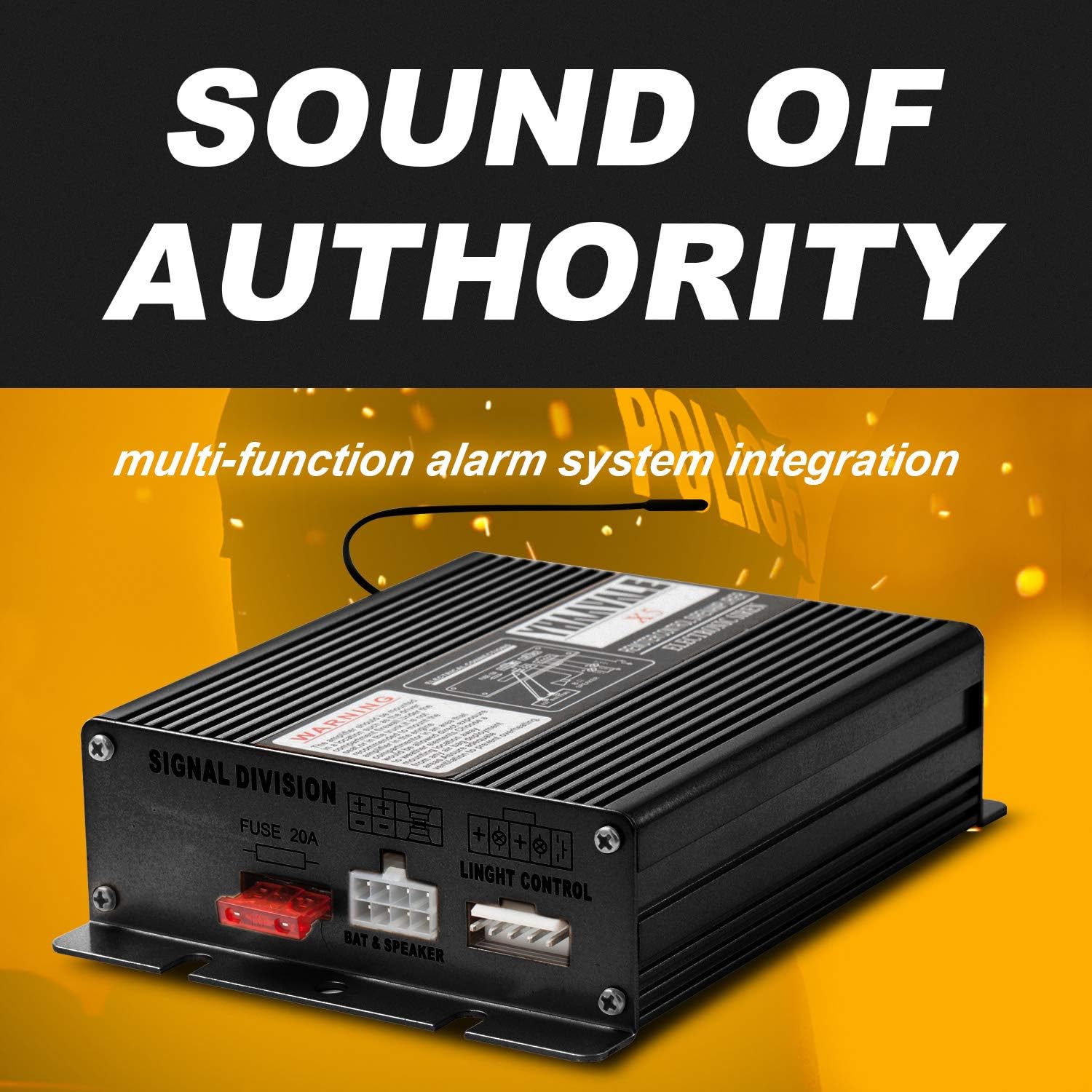
Figure 4.1: Close-up view of the YHAAVALE X5UB amplifier unit, showing the fuse (20A) and connection ports for battery, speaker, and light control.
4.2 Wiring Diagram (General Guidance)
- Power Connection: Connect the red wire from the amplifier to the vehicle's positive (+) 12V battery terminal (preferably through a fused circuit). Connect the black wire to the vehicle's chassis ground (-).
- Speaker Connection: Connect the speaker wires to the designated speaker output terminals on the amplifier. Ensure correct polarity.
- Auxiliary Light Control: If using, connect your 12V LED lights to the auxiliary output channels on the amplifier. These are controlled via the remote. Each auxiliary switch is fused with a 20 amp AGC fuse.
- Remote Control Pairing: The wireless remote is typically pre-paired. If re-pairing is needed, refer to the specific instructions provided with the unit (not detailed here).

Figure 4.2: The auxiliary switches on the remote control are designed to power external devices like strobe lights. Each switch is protected by a 20 amp AGC fuse.
4.3 Mounting
- Amplifier: Mount the amplifier in a dry, secure location within the vehicle, away from excessive heat or vibration.
- Speaker: Mount the speaker in an unobstructed location, typically behind the grille or bumper, ensuring sound projection is clear and directed forward.
- Remote Control: The remote control can be mounted using its magnetic base or 3M metal adhesive for convenient access within the vehicle cabin.

Figure 4.3: The wireless remote control can be conveniently mounted using its magnetic base or the included 3M metal adhesive for easy access.
5. Operating Instructions
The YHAAVALE X5UB system is operated primarily via the wireless remote control.
5.1 Remote Control Functions

Figure 5.1: Detailed view of the YHAAVALE X5UB wireless remote control, highlighting buttons for siren tones, horn, PA, and auxiliary light control.
- Power ON/OFF: Press the ON/OFF button to activate or deactivate the system.
- Siren Tones: The remote features buttons for various siren tones such as WAIL, YELP, HI-LO, CO, CO, A, B, C, D. Press the desired button to activate the corresponding tone.
- Manual Horn: Press the HORN button for a momentary horn sound.
- Manual Siren: Press the SIREN button for a manual siren sound.
- PA System: To use the Public Address (PA) system, press and hold the MIC button on the handheld microphone and speak clearly. The pre-wired push-to-talk microphone overrides any activated warning tone when in use.
- Volume Control: Use the VOL+ and VOL- buttons to adjust the volume of the PA system.
- Auxiliary Light Control: The remote has buttons (e.g., RIO, DIS, AUTO) to control connected 12V LED lights. Refer to your specific light setup for exact functionality.
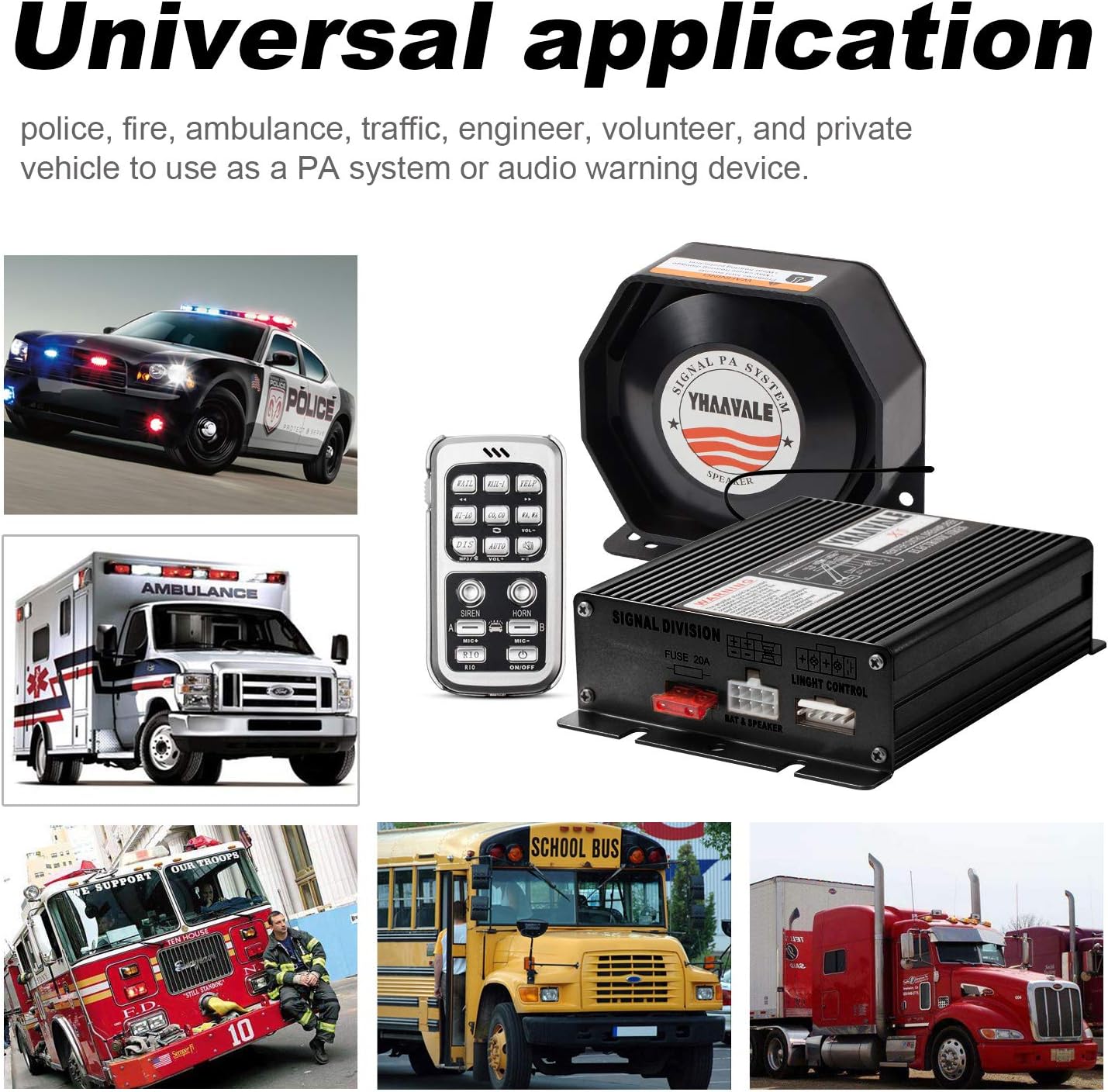
Figure 5.2: The handheld microphone allows for public address functionality. Pressing the MIC button overrides any active siren tone for clear communication.
5.2 Charging the Remote Control
The wireless remote control is rechargeable. It supports charging via a Micro USB port. Any standard Micro USB charger can be used.
Figure 5.3: The remote control features a Micro USB port for convenient charging. A standard USB 2.0 cable and vehicle charging adapter are typically included.
6. Maintenance
- Regular Cleaning: Keep the amplifier, speaker, and remote control clean and free from dust and debris. Use a soft, dry cloth.
- Wiring Inspection: Periodically check all wiring connections for tightness and signs of wear or corrosion.
- Fuse Replacement: If an auxiliary light channel stops working, check and replace the 20 amp AGC fuse associated with that channel on the amplifier unit. Always replace with a fuse of the same rating.
- Battery Health: Ensure your vehicle's battery is in good condition to provide stable power to the siren system.
7. Troubleshooting
| Problem | Possible Cause | Solution |
|---|---|---|
| No sound from speaker | No power to amplifier; Loose speaker connection; Damaged speaker; Amplifier malfunction. | Check power connections and vehicle fuse. Verify speaker wiring. Test speaker with another audio source if possible. Contact support if amplifier is suspected. |
| Remote control not responding | Low battery in remote; Remote not paired; Interference. | Charge the remote control. Attempt to re-pair the remote (refer to specific pairing instructions if available). Move away from strong electromagnetic fields. |
| PA system not working | Microphone not connected/damaged; Volume too low; Siren tone active. | Ensure microphone is properly connected. Increase PA volume using VOL+ button. Deactivate any active siren tones before using PA. |
| Auxiliary lights not working | Blown fuse; Loose wiring; Damaged lights. | Check and replace the 20 amp AGC fuse for the specific auxiliary channel. Verify wiring to the lights. Test lights independently. |
8. Warranty and Support
For warranty information and technical support, please contact YHAAVALE customer service. Keep your purchase receipt as proof of purchase.
Brand: YHAAVALE
Website: YHAAVALE Amazon Store
Note: Specific warranty terms and contact details may vary. Please refer to the packaging or official YHAAVALE website for the most up-to-date information.
Ask a question about this manual
Ask about setup, troubleshooting, compatibility, parts, safety, or missing instructions. Manuals+ will review the question and use this page’s manual context to help answer it.