
yan 5V 2A USB Charger Cable
yan 5V 2A USB Home AC Power Charger Cable
User Manual
1. Introduction
This user manual provides essential information for the safe and effective use of your yan 5V 2A USB Home AC Power Charger Cable. Please read this manual thoroughly before using the product to ensure optimal performance and longevity. This charger and cable set is specifically designed for compatibility with EVISTR L57 and L157 MP3 Voice Recorders, providing reliable power for charging and operation.
2. Product Overview
The yan 5V 2A USB Home AC Power Charger Cable is a high-quality, third-party accessory designed to power and charge compatible devices. It consists of an AC wall adapter with a USB port and a USB cable. The cable measures approximately 3 feet in length, offering convenient reach for various charging scenarios.
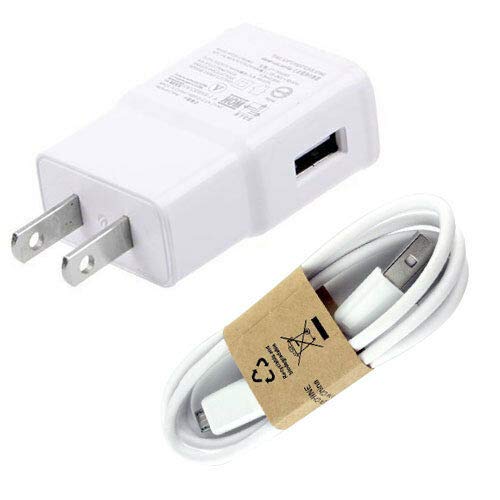
Image: The yan 5V 2A USB Home AC Power Charger (wall adapter) and its accompanying USB cable. The wall adapter is white with two flat prongs for standard US outlets, and a single USB-A output port. The white USB cable is coiled and secured with a brown paper band, showing a USB-A connector on one end and a micro-USB connector on the other.
Key Features:
- 100% Brand New, High Quality construction.
- High Quality 3rd Party Charger with a 3-foot cable for convenient use.
- Provides 5V 2A output for efficient charging.
- Compatible with EVISTR L57 and L157 MP3 Voice Recorders.
3. Setup
Follow these steps to set up your charger and cable for use:
- Unpack the Components: Carefully remove the AC power charger and USB cable from their packaging.
- Connect the Cable to the Charger: Insert the standard USB-A end of the cable into the USB output port on the AC power charger. Ensure it is firmly seated.
- Connect to Your Device: Insert the micro-USB end of the cable into the charging port of your EVISTR L57 or L157 MP3 Voice Recorder.
- Plug into Power Outlet: Insert the prongs of the AC power charger into a standard wall power outlet (100-240V AC, 50/60Hz).
Once connected, your device should indicate that it is receiving power or charging.
4. Operating Instructions
The yan 5V 2A USB Home AC Power Charger Cable is designed for straightforward operation:
- Charging: After connecting the charger to a power outlet and your device, the device will begin to charge. Monitor your device's charging indicator (e.g., LED light, screen icon) to confirm charging status.
- Power Supply: The charger can also provide continuous power to your device while it is in use, provided the device supports this functionality.
- Disconnection: To disconnect, first unplug the AC power charger from the wall outlet, then disconnect the micro-USB cable from your device, and finally, if desired, disconnect the USB-A cable from the charger.
Important Safety Note: Do not use the charger or cable if they appear damaged. Avoid exposing the charger to moisture or extreme temperatures.
5. Maintenance
Proper maintenance ensures the longevity and safe operation of your charger and cable:
- Cleaning: Disconnect the charger from the power outlet and your device before cleaning. Use a soft, dry cloth to wipe the surfaces. Do not use liquid cleaners or abrasive materials.
- Storage: When not in use, store the charger and cable in a cool, dry place, away from direct sunlight and excessive heat. Avoid tightly coiling the cable to prevent damage to the internal wires.
- Handling: Always grasp the plug when inserting or removing the charger from an outlet. Avoid pulling the cable itself, as this can damage the connections.
6. Troubleshooting
If you encounter issues with your charger, refer to the following common problems and solutions:
| Problem | Possible Cause | Solution |
|---|---|---|
| Device not charging. | Loose connection, faulty outlet, damaged cable/charger, incompatible device. | Ensure all connections are secure. Try a different wall outlet. Inspect the cable and charger for visible damage; replace if damaged. Confirm your device is compatible with 5V 2A charging. |
| Slow charging. | Device drawing more power than supplied, background apps, cable resistance. | Ensure no heavy applications are running on your device. Use only the provided cable. Avoid using the device heavily while charging. |
| Charger feels warm. | Normal operation, excessive load. | A slight warmth is normal during operation. If it becomes excessively hot or emits smoke/smell, immediately unplug it and discontinue use. |
If the problem persists after trying these solutions, please contact customer support.
7. Specifications
Detailed technical specifications for the yan 5V 2A USB Home AC Power Charger Cable:
| Attribute | Detail |
|---|---|
| Brand | yan |
| Model | 5V 2A USB Home AC Power Charger Cable |
| Connectivity Technology | USB |
| Connector Type | USB Type A (charger output), Micro USB (cable device end) |
| Compatible Devices | Music Player (specifically EVISTR L57 series, L157 series) |
| Output Current | 2 Amps |
| Input Voltage | AC 100-240V (standard wall outlet) |
| Cable Length | Approximately 3 feet |
| Included Components | 1 x AC Power Charger, 1 x USB Cable |
8. Warranty and Support
For warranty information or technical support regarding your yan 5V 2A USB Home AC Power Charger Cable, please refer to the seller's return policy or contact the manufacturer directly through their official channels. Keep your purchase receipt as proof of purchase for any warranty claims.
Related Documents - 5V 2A USB Charger Cable
 |
EVISTR L357 Digital Voice Recorder User Manual Comprehensive user manual for the EVISTR L357 Digital Voice Recorder, covering button functions, recording settings, playback options, music playback, system settings, troubleshooting, and warranty information. |
 |
EVISTR V508 Digital Voice Recorder User Manual Comprehensive user manual for the EVISTR V508 digital voice recorder, covering setup, operation, features, settings, troubleshooting, and technical specifications. Learn how to record, play, manage files, and customize device settings. |
 |
EVISTR L357 Digital Voice Recorder User Manual Comprehensive user manual for the EVISTR L357 Digital Voice Recorder, covering setup, recording, playback, music management, system settings, and technical specifications. Learn how to use all features of your voice recorder. |
 |
TCTEC Digital Voice Recorder User Manual: Features, Operation, and Specifications Comprehensive user manual for the TCTEC Digital Voice Recorder. Learn about its features, product description, key functions, recording modes, settings, connecting to a computer, charging, specifications, and troubleshooting. |
 |
Q91 Professional Voice Recording Pen: MP3 Player, USB Drive, Noise Reduction Explore the Q91 Professional Voice Recording Pen, a multifunctional device featuring high-quality audio recording, MP3 playback, and USB storage. With DSP noise reduction, voice activation, and a 15-hour recording capacity, it's perfect for professionals and students. |
 |
DDJ Digital Voice Recorder User Manual Comprehensive user manual for the DDJ Digital Voice Recorder. Learn about features, setup, operation, troubleshooting, and technical specifications for this voice-activated audio recorder. |
Ask a question about this manual
Ask about setup, troubleshooting, compatibility, parts, safety, or missing instructions. Manuals+ will review the question and use this page’s manual context to help answer it.