
Introduction
Thank you for choosing the Alltripal Bamboo Charging Station, Model 6955. This multi-functional device is designed to organize and charge your electronic devices efficiently while providing additional features such as a night light and an alarm clock. Crafted from sustainable bamboo, it offers a blend of functionality and aesthetic appeal for your home or office environment. Please read this manual thoroughly to ensure proper setup, operation, and maintenance of your charging station.

Image: The Alltripal Bamboo Charging Station, showcasing its compact design and multiple charging points for various devices.
Product Features
- 15W Fast Wireless Charging: Equipped with smart charging technology for efficient and secure power delivery to iOS and Android devices. Compatible with cases up to 5mm thick (non-metal).
- Upgraded Digital Alarm Clock: Features a 4-brightness adjustable display and 2 volume levels. Includes a 9-minute snooze function and a 3-minute wake-up alarm.
- Adjustable Night Light: Offers 3 color modes and 4 adjustable brightness levels, controlled by touch.
- Universal Compatibility: Supports various iPhone models (12-17 series), Apple Watch (Series 2-10, SE, Ultra), and AirPods (1st/2nd Gen, Pro 1st Gen).
- Sustainable Bamboo Design: Constructed from 100% natural bamboo, providing a stylish and eco-friendly addition to any space.
- Multiple Smart Protection: Incorporates overvoltage, overtemperature, over-current, intelligent identification, short circuit, and overcurrent protection for device safety.
- Integrated Cable Management: Designed to reduce cable clutter and keep your nightstand or desk tidy.

Image: Overview of the bamboo charging station's key features, including wireless charging, alarm clock, night light, and dedicated slots for devices.
Package Contents
Upon opening the package, please verify that all items listed below are present and in good condition:
- Alltripal Bamboo Charging Station (Model 6955)
- Charging Adapter
- Watch Holder (Note: Apple Watch charger cable is NOT included)
- User Manual

Image: The Alltripal Bamboo Charging Station, showing the main unit, power adapter, and watch holder.
Setup Instructions
- Unpack Components: Carefully remove all items from the packaging.
- Assemble Watch Holder: Insert your Apple Watch charging cable (not included) into the designated watch holder. Route the cable through the provided channels to keep it tidy.
- Connect Power: Plug the provided charging adapter into the DC input port on the back of the charging station. Then, plug the adapter into a standard wall outlet.
- Initial Power-On: The digital clock display will illuminate.
- Set Time: Use the 'H+' and 'M+' buttons on the back of the unit to adjust the hour and minute respectively.
- Place Devices: Position your smartphone on the wireless charging pad, place your Apple Watch on its holder, and insert AirPods into the dedicated charging port.
Operating Instructions
Wireless Charging
- Place your compatible smartphone directly onto the wireless charging pad located on the top surface of the station.
- Ensure the phone is centered on the pad for optimal charging. A charging indicator may appear on your phone's screen.
- The 15W fast wireless charging supports devices with non-metal cases up to 5mm thick.
Alarm Clock Functions
- Setting Alarm: Refer to the detailed instructions in the included User Manual for specific alarm setting procedures using the buttons on the back.
- Adjusting Display Brightness: Touch the 'H+' button to cycle through 4 brightness levels for the digital display.
- Adjusting Alarm Volume: Touch the 'M+' button to select between 2 volume levels for the alarm sound.
- Snooze Function: When the alarm sounds, press the designated snooze button (refer to manual for exact button) for a 9-minute snooze.
- Wake-up Alarm: The alarm duration is 3 minutes.
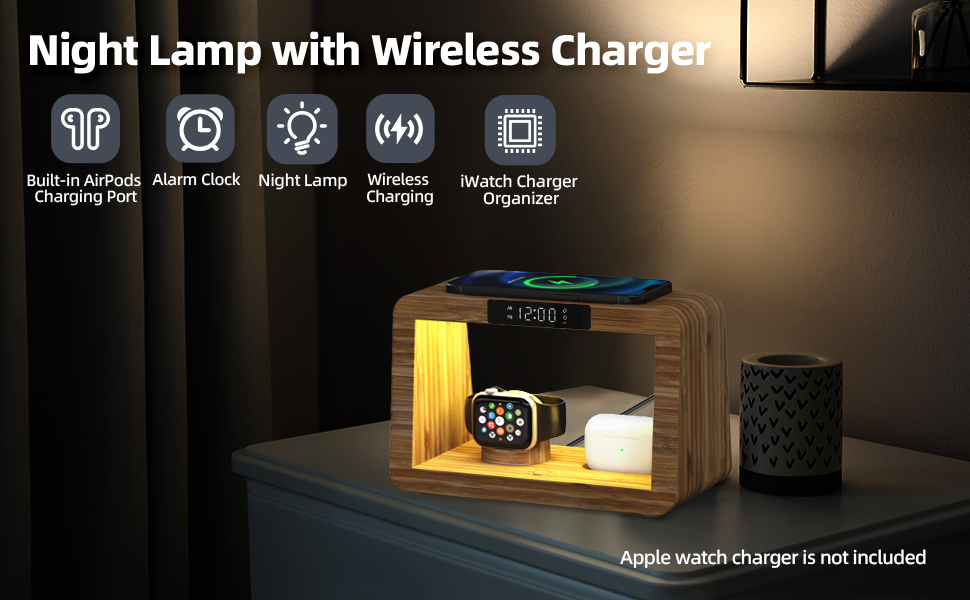
Image: The charging station's alarm clock display, indicating its features for waking up.
Night Light Functions
- Turning On/Off: Locate the touch-sensitive light icon on the unit (refer to manual for exact location). Tap once to turn the light on or off.
- Changing Color Modes: With the light on, tap the light icon repeatedly to cycle through 3 different color modes (warm, cool, natural).
- Adjusting Brightness: Long press the light icon to adjust the brightness level. There are 4 adjustable brightness settings.

Image: The night light feature demonstrating various adjustable color and brightness options.
Wired Charging
- The station includes dedicated ports for AirPods (1st/2nd Gen, Pro 1st Gen) and a holder for your Apple Watch charger.
- Additional USB ports are available on the back for charging other devices using your own cables.
Compatibility
The Alltripal Bamboo Charging Station is compatible with a wide range of devices:
- iPhones: 17/16/15/Pro/Plus/Pro Max/14/13/12/Pro/Plus/Mini/Pro Max.
- Samsung: S24/S23/S22/S21/S10/S10+/Note 10S9/ S9+/Galaxy Note9/ S8/S8+/Galaxy Note 8/Galaxy Note7.
- Apple Watch: Series 10/9/8/Ultra/Ultra 2/7/6/SE/5/4/3/2 (requires user's own charger cable).
- AirPods: 1/2/ and AirPods Pro 1.
- Other Devices: Amazon Kindle (Kindle Fire, Kindle Fire HDX, and Kindle Paperwhite), Nintendo Switch.
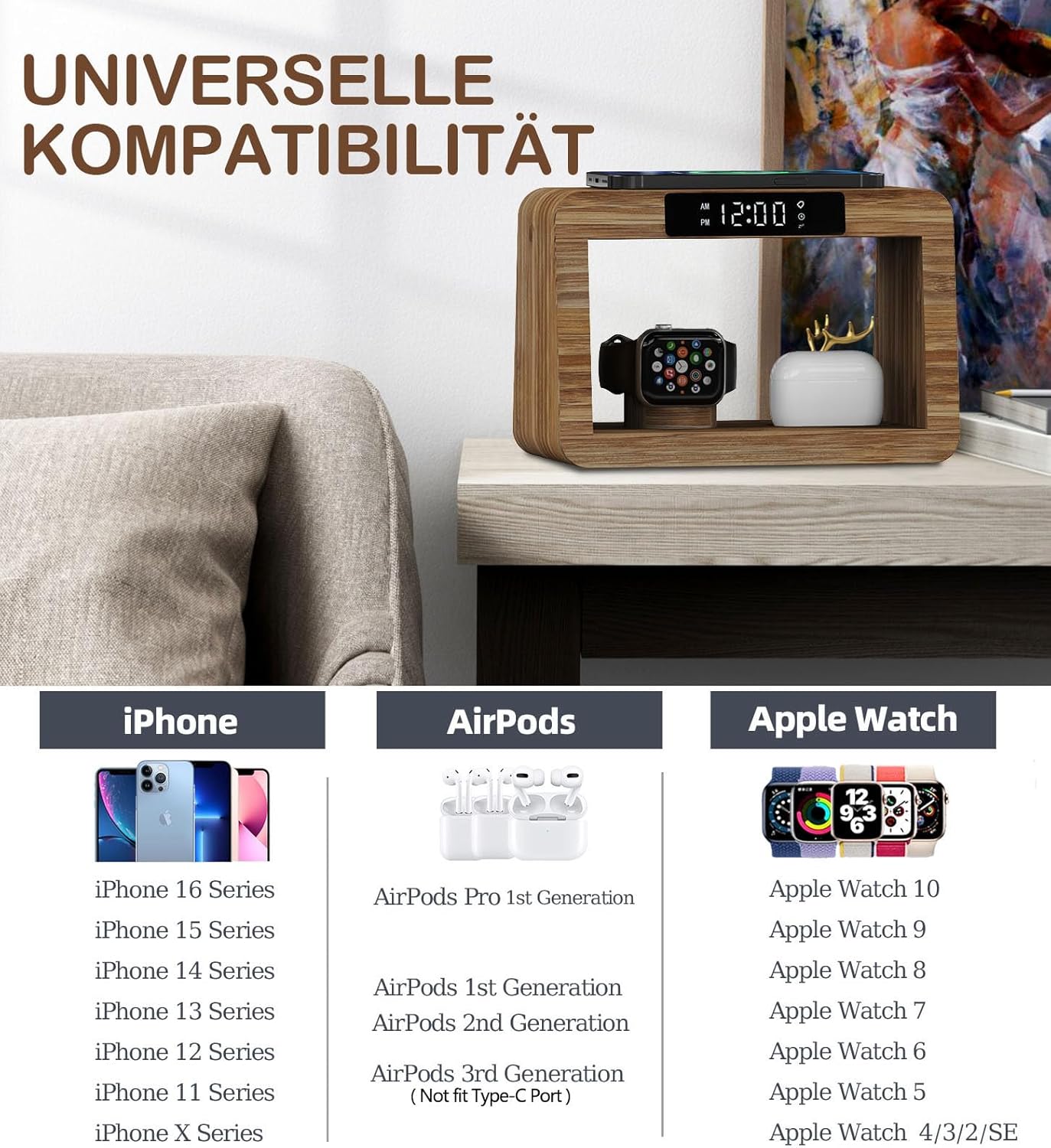
Image: A visual representation of the charging station's broad compatibility with different Apple devices.
Safety Information
Your Alltripal Bamboo Charging Station is designed with multiple safety features to protect your devices and ensure safe operation. These include:
- Overvoltage Protection
- Overtemperature Protection
- Over-Current Protection
- Intelligent Identification
- Short Circuit Protection
- Overcurrent Protection
To maintain optimal safety and performance:
- Do not expose the device to water or excessive moisture.
- Avoid disassembling or modifying the charging station.
- Use only the provided charging adapter.
- Ensure proper ventilation around the unit during operation.

Image: Diagram illustrating the various safety protections integrated into the charging station.
Maintenance
To ensure the longevity and appearance of your bamboo charging station, follow these simple maintenance guidelines:
- Cleaning: Wipe the bamboo surface with a soft, dry cloth. For stubborn spots, a slightly damp cloth can be used, followed immediately by a dry cloth. Avoid abrasive cleaners or harsh chemicals.
- Dust Removal: Regularly dust the charging ports and crevices to prevent accumulation that could affect performance.
- Cable Management: Periodically check and re-organize cables to prevent tangling and wear.
- Environmental Conditions: Store the charging station in a cool, dry place away from direct sunlight and extreme temperatures.
Troubleshooting
| Problem | Possible Cause | Solution |
|---|---|---|
| Device not charging wirelessly. | Device not properly aligned; phone case too thick or metallic; device not Qi-compatible. | Reposition device on the charging pad; remove phone case; verify device supports Qi wireless charging. |
| Alarm clock display is too bright/dim. | Brightness setting needs adjustment. | Press the 'H+' button to cycle through the 4 brightness levels. |
| Night light turns on randomly. | Accidental touch of the sensor; electrical interference. | Ensure the touch sensor is not obstructed or accidentally activated. Try relocating the unit if interference is suspected. |
| Watch not charging. | Watch charger not properly installed or connected; faulty watch charger. | Ensure your own Apple Watch charger is securely fitted into the holder and connected to a USB port. Test with another charger if available. |
| No power to the unit. | Power adapter not connected; wall outlet not functioning. | Check that the power adapter is securely plugged into both the unit and a working wall outlet. |
Specifications
| Feature | Detail |
|---|---|
| Product Dimensions | 8.35 x 4.53 x 5.59 inches |
| Item Weight | 2.05 pounds |
| Wireless Charging Output | 15W (Fast Wireless Charging) |
| Input Voltage | 220 Volts |
| Amperage | 2.4 Amps |
| Total USB Ports | 6 (for internal connections and external charging) |
| Material | 100% Natural, Sustainable Bamboo |
| Special Features | 3-in-1 Wireless Charging, Night Light (3 colors, 4 brightness), Digital Alarm Clock (4 brightness, 2 volume, snooze), Watch Holder, Cable Management, Multiple Safety Protections |
Warranty and Support
For any questions, concerns, or support needs regarding your Alltripal Bamboo Charging Station, please refer to the contact information provided with your purchase or visit the official Alltripal website. The manufacturer, Shenzhen Odebo Technology Co., Ltd Alltripal, is committed to customer satisfaction.
Please retain your proof of purchase for any warranty claims.


