
XiaoR Geek XR-F2
XiaoR Geek AI Racing Robot XR-F2 User Manual
Model: XR-F2
1. Introduction
This manual provides comprehensive instructions for the setup, operation, maintenance, and troubleshooting of your XiaoR Geek AI Racing Robot XR-F2. This robot is designed for educational purposes, focusing on artificial intelligence, deep learning, and autonomous driving concepts using the Jetson Nano platform.
2. Product Overview
The XiaoR Geek AI Racing Robot XR-F2 is an advanced educational kit that supports the Donkey Car open-source project. It integrates deep learning frameworks like Keras/TensorFlow and computer vision libraries such as OpenCV to enable self-driving and line-following functionalities.
2.1 Key Features
- AI Racing Robot: Powered by Jetson Nano for deep learning, self-driving, and vision-based line following.
- Donkey Car Open Source Project Support: Utilizes Keras/TensorFlow and OpenCV for autonomous driving.
- High-Resolution Camera: Features an 8MP Sony IMX219 sensor with a 160° FOV (Field of View) and 3280 x 2464 resolution.
- Dual Mode Wireless NIC AC8265: Provides high-speed WiFi connectivity and stable Bluetooth communication with low latency.
- Pre-assembled Kit: The robot car is delivered pre-assembled, allowing users to begin AI learning immediately.
- Customized Training Map: Includes a 300 x 200 cm training map for practical application.
2.2 Component Identification
Refer to the diagram below for a detailed identification of the main components of the AI Racing Robot.
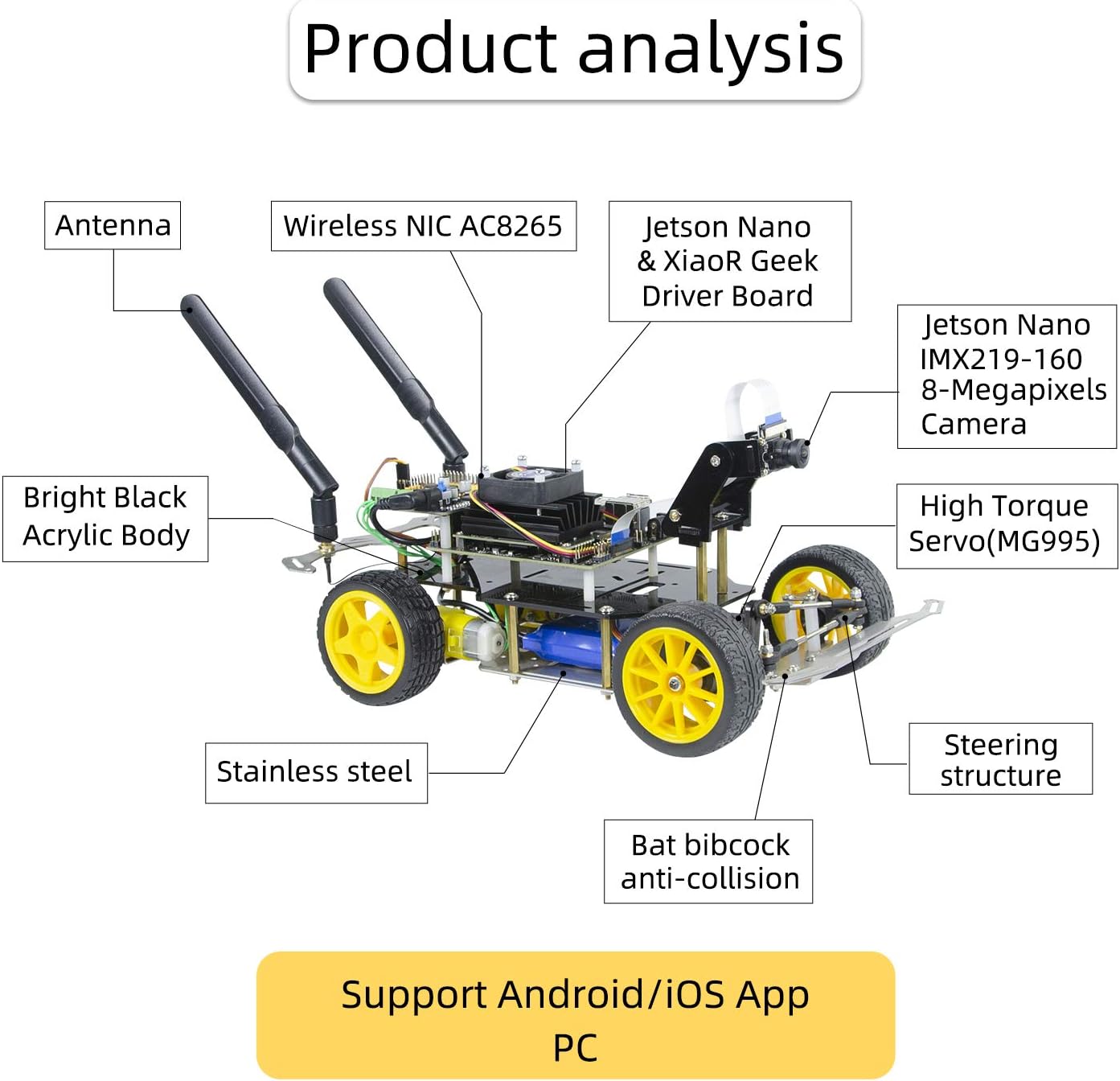
Image Description: This image displays the XiaoR Geek AI Racing Robot XR-F2 with various components labeled. Key components include the Antenna, Wireless NIC AC8265, Jetson Nano & XiaoR Geek Driver Board, Jetson Nano IMX219-160 8-Megapixels Camera, High Torque Servo (MG995), Bright Black Acrylic Body, Stainless Steel chassis, Steering Structure, and Bat bibcock anti-collision bar. The diagram also indicates support for Android/iOS App and PC control.

Image Description: A close-up view of the Dual Mode Wireless NIC AC8265 module connected to two antennas, highlighting its high-speed WiFi connection capability.
3. Setup
The XiaoR Geek AI Racing Robot XR-F2 is provided in a pre-assembled state to facilitate immediate learning. This section outlines the initial steps to get your robot operational.
3.1 Initial Power-Up
- Ensure all connections are secure, particularly the power supply to the Jetson Nano and the motor/servo connections.
- Connect the required power source to the robot. The robot uses 1 Lithium Ion battery (included).
- Observe the indicator lights on the Jetson Nano and driver board to confirm power is supplied correctly.
3.2 Software Configuration
The robot operates on the Jetson Nano platform, utilizing deep learning frameworks. Detailed software setup instructions, including operating system installation (if not pre-installed), driver setup, and environment configuration for Donkey Car, TensorFlow, and OpenCV, are typically provided in the accompanying digital documentation or online resources. Please refer to the official XiaoR Geek support website for the most up-to-date software guides.

Image Description: This image shows the AI Racing Robot kit alongside a computer screen displaying logos for TensorFlow, OpenCV, Python, and Keras, indicating the software environment. A physical instruction manual is also depicted.
3.3 Training Map Deployment
Unroll the provided 300 x 200 cm training map on a flat, clear surface. This map is designed for practicing line-following and autonomous driving algorithms. Ensure the map is free of wrinkles or obstructions that could interfere with the robot's sensors.

Image Description: The AI Racing Robot is shown positioned on a white track with a black line, demonstrating its line-following capability.
4. Operating Instructions
The AI Racing Robot XR-F2 is capable of various autonomous functions, primarily focusing on deep learning-based self-driving and line following.
4.1 Deep Learning for Autonomous Driving
The core functionality of the robot involves a three-step process for achieving autonomous driving:
- Data Collection: The robot's 8MP camera collects visual data (images/video) as it is manually driven or guided along a desired path. This data is crucial for training the neural network.
- Model Training: The collected data is used to train a deep learning model (e.g., using TensorFlow) on a computer. The model learns the correlation between visual input and steering/throttle commands.
- Autonomous Driving: Once trained, the model is deployed onto the Jetson Nano. The robot then uses its camera to perceive its environment and applies the learned model to make real-time driving decisions, enabling autonomous navigation.

Image Description: A diagram titled "Deep Learning Pilotless Driving" illustrates three steps: 1) Collecting data by camera (showing a robot on a track and a phone screen), 2) Training the driving model (showing code and neural network diagrams), and 3) Using training models to achieve autonomous driving (showing the robot autonomously navigating a track).
4.2 Control Methods
The robot supports multiple methods for control and interaction:
- Mobile Gravity Sensing Control: Control the robot using a mobile application that leverages your phone's accelerometer for steering.
- PC Computer Web Control: Access a web interface from your computer to control the robot, monitor its status, and manage data collection/training.
- Joystick Control: Utilize a compatible joystick (e.g., PS4 controller) for precise manual control.

Image Description: A diagram titled "Multiple control methods" illustrates three ways to control the robot: Mobile Gravity sensing control (via a smartphone), Computer web control (via a desktop monitor), and Joystick control (showing a PS4 controller).
5. Maintenance
Regular maintenance ensures the longevity and optimal performance of your AI Racing Robot.
- Cleaning: Keep the robot free from dust and debris. Use a soft, dry cloth to clean the body and components. Avoid using liquids directly on electronic parts.
- Camera Lens: Gently clean the camera lens with a microfiber cloth to ensure clear image capture for optimal deep learning performance.
- Battery Care: Follow the manufacturer's guidelines for charging and storing the Lithium Ion battery. Avoid overcharging or fully discharging the battery.
- Software Updates: Periodically check the XiaoR Geek official website or the Donkey Car project repository for software and firmware updates to ensure you have the latest features and bug fixes.
- Component Inspection: Regularly inspect wires, connectors, wheels, and the steering mechanism for any signs of wear or damage. Tighten any loose screws.
6. Troubleshooting
This section addresses common issues you might encounter with your AI Racing Robot.
- Robot Not Powering On:
- Check battery charge level and ensure it is properly connected.
- Verify power adapter connection if using external power.
- Inspect power cables for damage.
- No Connection to Control Device (Mobile/PC):
- Ensure the robot's WiFi is enabled and you are connected to its network or the same local network.
- Verify the Wireless NIC AC8265 is functioning correctly.
- Check firewall settings on your PC if using web control.
- Restart both the robot and the control device.
- Camera Feed Issues:
- Ensure the camera ribbon cable is securely connected to both the camera module and the Jetson Nano.
- Check for any physical obstructions or dirt on the camera lens.
- Verify camera drivers and software configuration are correct.
- Robot Not Moving or Responding to Commands:
- Check motor and servo connections.
- Ensure the control software is running and correctly configured.
- Verify battery has sufficient charge to power motors.
- If using autonomous mode, ensure a trained model is loaded and active.
- Inaccurate Autonomous Driving/Line Following:
- Review the quality and quantity of your training data. More diverse and accurate data leads to better performance.
- Ensure the training environment (lighting, track conditions) is similar to the operating environment.
- Recalibrate the camera or sensors if necessary.
- Consider retraining the deep learning model with updated data.
For more detailed troubleshooting or specific technical issues, please refer to the official XiaoR Geek support resources or the Donkey Car community forums.
7. Specifications
| Feature | Detail |
|---|---|
| Model | XR-F2 |
| Processor | NVIDIA Jetson Nano |
| Camera Sensor | Sony IMX219 |
| Camera Resolution | 8 Megapixels (3280 x 2464) |
| Camera FOV | 160° Wide Angle |
| Wireless Connectivity | Dual Mode Wireless NIC AC8265 (High-speed WiFi, Stable Bluetooth) |
| Power Source | 1 Lithium Ion battery (included) |
| Product Dimensions | 7.09 x 11.81 x 7.09 inches |
| Item Weight | 1.98 pounds |
| Chassis Material | Bright Black Acrylic Body, Stainless Steel components |
| Control Support | Android/iOS App, PC Web Control, Joystick (e.g., PS4) |
8. Warranty and Support
For specific warranty information, please refer to the documentation included with your product or visit the official XiaoR Geek website. XiaoR Geek, established in 2014, specializes in educational robotics and open-source hardware.
For technical support, software updates, or community resources related to the Donkey Car project, please consult the following:
- XiaoR Geek Official Website: www.xiaorgeek.com (Hypothetical link, as no direct link is provided in JSON)
- Donkey Car Project Documentation: Refer to the official Donkey Car open-source project documentation for detailed guides on software, training, and advanced usage.
- Manufacturer: WiFi Robot
Note: Product specifications and features are subject to change without prior notice.
Ask a question about this manual
Ask about setup, troubleshooting, compatibility, parts, safety, or missing instructions. Manuals+ will review the question and use this page’s manual context to help answer it.