
1. Introduction and Overview
The Bosch GTC400C 12V Max Connected Thermal Camera is a professional-grade tool designed for rapid temperature anomaly detection and documentation. It provides a detailed 160x120 thermal graphic image with over 19,000 measurement points, allowing for precise identification of hot and cold spots. The integrated visual camera enables side-by-side comparison and overlay of thermal and real images for comprehensive analysis. This manual provides essential information for the safe and effective operation, maintenance, and troubleshooting of your GTC400C thermal camera.

Figure 1.1: Bosch GTC400C Thermal Camera and accessories. This image displays the thermal camera unit, a 12V Max Lithium-Ion battery, a battery charger, a USB cable, and a soft carrying pouch, all included with the product.
2. Package Contents
Upon opening the package, please verify that all the following components are present and in good condition:
- GTC400C Thermal Camera Unit
- 12V Max Lithium-Ion Battery
- 12V Max Charger
- USB Cable
- Soft Pouch
Figure 2.1: All components included in the Bosch GTC400C package. This visual representation confirms the presence of the thermal camera, battery, charger, USB cable, and soft pouch.
3. Safety Information
Please read and understand all safety warnings and instructions before operating the Bosch GTC400C thermal camera. Failure to follow these instructions may result in electric shock, fire, and/or serious injury.
General Safety Warnings:
- Work Area Safety: Keep the work area clean and well-lit. Cluttered or dark areas invite accidents.
- Electrical Safety: Do not expose the thermal camera to rain or wet conditions. Water entering the camera will increase the risk of electric shock.
- Personal Safety: Stay alert, watch what you are doing, and use common sense when operating the camera. Do not use the camera while you are tired or under the influence of drugs, alcohol, or medication.
- Tool Use and Care: Do not force the camera. Use the correct camera for your application. It will do the job better and safer at the rate for which it was designed.
- Battery Use and Care: Use only the specified charger for the battery. Do not open, crush, heat above 100°C (212°F), or incinerate the battery.
- Maintenance: Have your thermal camera serviced by a qualified repair person using only identical replacement parts. This will ensure that the safety of the camera is maintained.
4. Setup
4.1 Battery Installation and Charging
- Ensure the camera is powered off before installing or removing the battery.
- Insert the 12V Max Lithium-Ion battery into the battery compartment at the base of the camera until it clicks into place.
- To charge the battery, connect the charger to a power outlet and insert the battery into the charger. The charging indicator lights on the charger will indicate the charging status.
- Allow the battery to fully charge before first use for optimal performance.
4.2 Initial Power-On
- Press and hold the power button (usually marked with a power symbol) until the display illuminates.
- Follow any on-screen prompts for initial setup, such as language selection or date/time settings.
4.3 Connectivity Setup (Bluetooth® and WiFi Hotspot)
The GTC400C can connect to smart devices for data transfer and analysis via the Bosch ThermalOn App.
- Download the "Bosch ThermalOn App" from your device's app store.
- On the GTC400C, navigate to the connectivity settings (refer to the on-screen menu).
- Enable Bluetooth® or WiFi Hotspot as desired.
- Follow the instructions within the Bosch ThermalOn App to pair your device with the camera.

Figure 4.1: Connecting the GTC400C to a smartphone. This image shows a user holding the thermal camera in one hand and a smartphone displaying the Bosch ThermalOn App in the other, demonstrating the wireless connectivity feature.
5. Operating Instructions
5.1 Basic Operation and Image Capture
To capture a thermal image, simply point the camera at the desired object or area and squeeze the trigger. The camera will instantly display the thermal graphic image on its large color display.
- The display features a 160x120 thermal resolution with over 19,000 measurement points.
- The integrated visual camera records actual images, allowing for side-by-side comparison or picture-in-picture views.
- Use the click wheel and function buttons to navigate menus, adjust settings, and review captured images.
- The camera can store up to 500 images, including both thermal graphic images and visual pictures.

Figure 5.1: Detailed view of the GTC400C display. This image highlights the camera's screen, showing a clear thermal representation of an electrical component, demonstrating its precision imaging capabilities.
5.2 Typical Applications
The Bosch GTC400C is versatile and can be used for various applications, including but not limited to:
- Insulation Checks: Identify areas of poor insulation in walls, ceilings, and floors.
- Heating Systems: Inspect radiators, underfloor heating, and pipework for blockages or inefficiencies.
- Electrical Inspections: Detect overheating components in electrical panels, circuits, and connections.
- Window and Door Seals: Locate drafts and energy loss around openings.
- Automotive Diagnostics: Examine engine bay heat distribution, exhaust systems, and heating elements.

Figure 5.2: Application examples for the GTC400C. This diagram visually demonstrates how the thermal camera can be used to inspect insulation, heating systems, electrical cabinets in a house, and various components in a car like engine bay heat and exhaust.
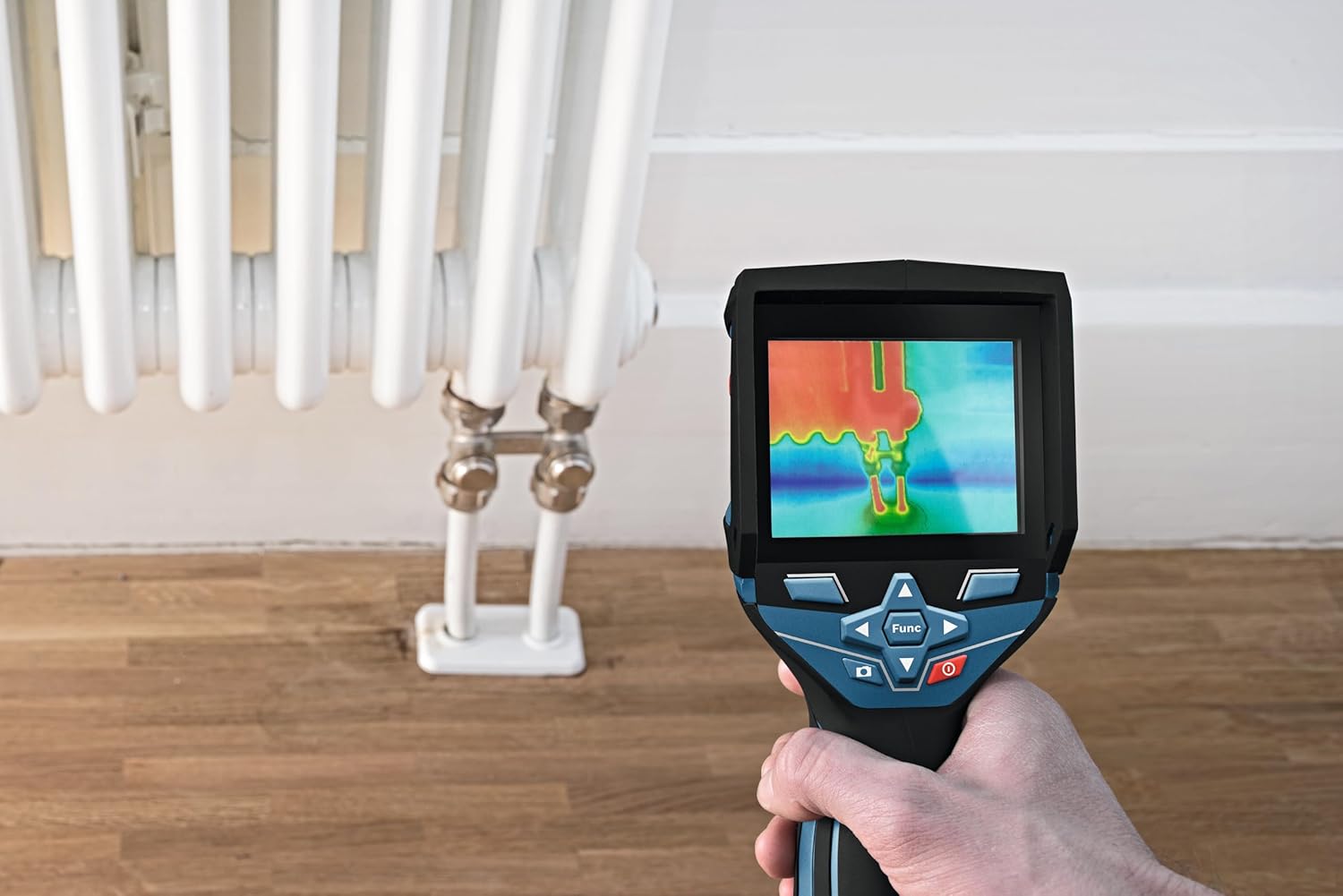
Figure 5.3: Inspecting an electrical panel. A technician is shown using the GTC400C to scan an open electrical panel, identifying potential hot spots or anomalies within the wiring and components.

Figure 5.4: Thermal inspection of a radiator. This image shows the GTC400C being used to analyze the heat distribution of a radiator, which can help identify inefficient areas or blockages.
6. Maintenance
6.1 Cleaning the Camera
To ensure the longevity and accuracy of your GTC400C, regular cleaning is recommended.
- Wipe the camera body with a clean, damp cloth. Do not use harsh chemicals or abrasive cleaners.
- For the lens and display, use a soft, lint-free cloth specifically designed for optical surfaces. Avoid touching the lens directly with your fingers.
- Ensure the camera is dry before storing or using it again.
6.2 Battery Care and Storage
- Store the battery in a cool, dry place away from direct sunlight and extreme temperatures.
- If storing for extended periods, charge the battery to approximately 50% capacity.
- Do not store the camera or battery in environments with high humidity or corrosive substances.
7. Troubleshooting
If you encounter issues with your Bosch GTC400C, refer to the following common problems and solutions:
| Problem | Possible Cause | Solution |
|---|---|---|
| Camera does not power on. | Battery is depleted or not properly installed. | Ensure battery is fully charged and correctly inserted. |
| Thermal image is blurry or unclear. | Lens is dirty or damaged. | Clean the lens with a soft, lint-free cloth. If damage persists, contact support. |
| Cannot connect to Bosch ThermalOn App. | Bluetooth/WiFi is off, app is outdated, or pairing issue. | Ensure connectivity is enabled on camera and device. Update app. Re-attempt pairing. |
| Camera freezes or becomes unresponsive. | Software glitch or temporary error. | Perform a soft reset by removing and reinserting the battery. |
If the problem persists after attempting these solutions, please contact Bosch customer support for further assistance.
8. Specifications
| Feature | Detail |
|---|---|
| Model Number | GTC400C |
| Product Dimensions | 3.74 x 2.48 x 9.17 inches |
| Item Weight | 2.2 pounds |
| Manufacturer | Bosch |
| Batteries Required | 1 Lithium Ion battery (included) |
| Thermal Resolution | 160x120 |
| Measurement Points | More than 19,000 |
| Image Storage | Up to 500 images |
| Connectivity | Bluetooth®, WiFi Hotspot |
| Durability Rating | IP53 |
9. Warranty and Support
9.1 Warranty Information
Bosch measuring and layout tools, including the GTC400C, are covered by a one-year limited warranty. An additional year of coverage can be obtained when you register your tool within eight weeks of purchase. Bosch 12V Max batteries and chargers are covered by a one-year limited warranty.
For full terms and conditions, please visit rb-pt.io/PowerToolWarranty.

Figure 9.1: Bosch Warranty Overview. This image summarizes the warranty terms: 1 year for the tool (extendable to 2 years with registration) and 1 year for the battery/charger.
9.2 Customer Support
For technical support, warranty claims, or any other inquiries, please contact Bosch customer service:
- Phone: 1-877-BOSCH99
- Online: Visit the official Bosch website for support resources and contact forms.