
1. Introduction
Thank you for choosing the HTW PC-041P31 Portable Air Conditioner. This manual provides essential information for the safe and efficient operation, installation, and maintenance of your appliance. Please read this manual thoroughly before using the product and retain it for future reference.
The HTW PC-041P31 is a cooling-only portable air conditioner designed for rooms up to 30 square meters, offering 3,500 frig/h (4.1 kW) of cooling capacity with a low noise level of 53 dB.
2. Safety Information
Please observe the following safety precautions to reduce the risk of electric shock, fire, or injury.
- Ensure the power supply matches the voltage specified on the rating label.
- Do not operate the unit with a damaged power cord or plug.
- Always unplug the unit before cleaning or servicing.
- Do not block air inlets or outlets. Maintain a minimum distance of 20 cm from walls or other objects.
- Do not insert fingers or objects into the air outlet grille.
- Keep the unit on a flat, stable surface to prevent tipping.
- This appliance is not intended for use by persons (including children) with reduced physical, sensory or mental capabilities, or lack of experience and knowledge, unless they have been given supervision or instruction concerning use of the appliance by a person responsible for their safety.
- Do not use the unit in wet environments such as bathrooms or laundry rooms.
- Do not use chemical solvents to clean the unit.
3. Product Overview
Familiarize yourself with the components of your HTW PC-041P31 Portable Air Conditioner.
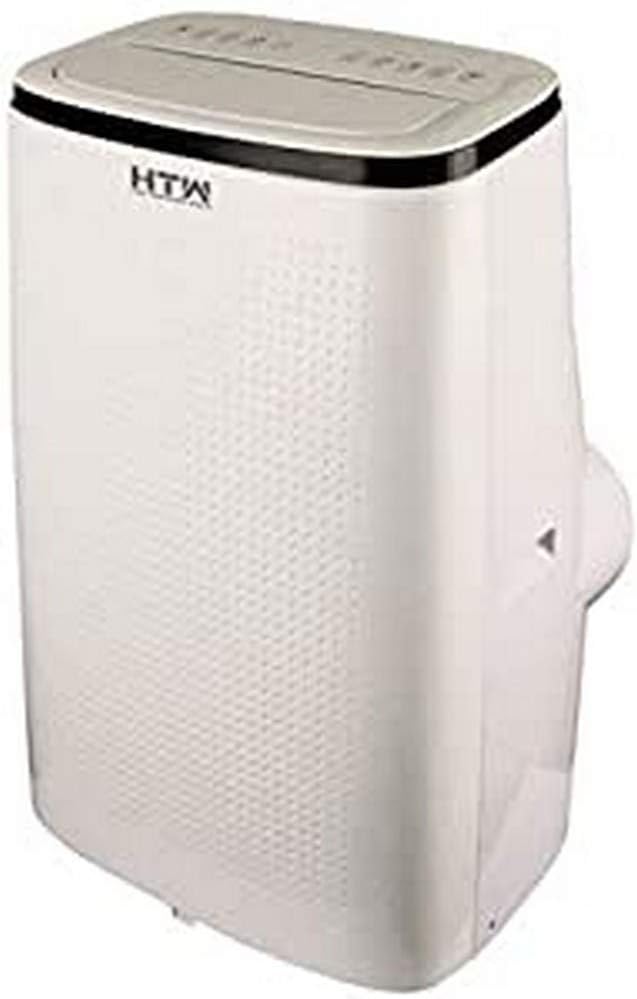
Figure 3.1: Front and side view of the HTW PC-041P31 Portable Air Conditioner. This image shows the main body of the unit, including the control panel on top and the air outlet louvers.

Figure 3.2: Side view of the HTW PC-041P31 Portable Air Conditioner. This image highlights the compact design and the handle for easy portability.

Figure 3.3: Rear view of the HTW PC-041P31 Portable Air Conditioner. This view displays the air intake grille, exhaust air outlet, and drainage port.
Components:
- Control Panel
- Air Outlet Louvers
- Air Filter (behind intake grille)
- Exhaust Air Outlet
- Drainage Port
- Power Cord
- Casters (wheels)
- Remote Control
- Window Kit (Exhaust hose, window slider kit, adapters)
4. Setup and Installation
4.1 Unpacking
- Carefully remove the air conditioner from its packaging.
- Remove all packing materials and ensure no components are missing.
- Keep the packaging for future storage or transportation.
4.2 Placement
- Place the unit on a firm, level surface in the desired room.
- Ensure there is at least 20 cm of space around the unit for proper airflow.
- Position the unit near a window or door for exhaust hose installation.
4.3 Window Kit Installation
The included window kit is essential for exhausting hot air outside, ensuring efficient cooling.
- Attach the exhaust hose to the exhaust air outlet on the back of the unit. Twist clockwise until secure.
- Connect the other end of the exhaust hose to the window slider kit adapter.
- Adjust the window slider kit to fit your window opening. Secure it in place.
- Insert the window slider kit adapter into the opening of the window slider kit.
- Ensure the window is sealed around the kit to prevent hot air from re-entering the room.
5. Operating Instructions
The HTW PC-041P31 features a user-friendly control panel and a remote control for convenient operation.
5.1 Control Panel
The control panel is located on the top of the unit. It typically includes buttons for Power, Mode, Fan Speed, Timer, and Temperature Adjustment.
5.2 Remote Control
The remote control allows you to operate the unit from a distance. Ensure batteries are correctly inserted.
5.3 Basic Operation
- Power On/Off: Press the POWER button to turn the unit on or off.
- Mode Selection: Press the MODE button to cycle through available modes. This model is cooling-only, so the primary mode will be Cooling. Other modes may include Fan-only and Dehumidify (Dry).
- Temperature Adjustment: In Cooling mode, use the UP and DOWN arrows to set your desired temperature.
- Fan Speed: Press the FAN SPEED button to select between Low, Medium, and High fan speeds.
- Timer Function: Use the TIMER button to set a delay for the unit to turn on or off. Refer to the remote control section for detailed timer settings.
This unit features an auto-restart system, which means it will automatically resume operation with the previous settings after a power outage.
6. Maintenance
Regular maintenance ensures optimal performance and extends the lifespan of your air conditioner.
6.1 Cleaning the Air Filter
The air filter should be cleaned every two weeks or more frequently depending on usage and air quality.
- Unplug the air conditioner from the power outlet.
- Locate the air filter, typically behind the intake grille on the rear of the unit.
- Carefully remove the filter.
- Wash the filter with lukewarm water and a mild detergent. Rinse thoroughly.
- Allow the filter to air dry completely before reinstalling it. Do not expose to direct sunlight.
6.2 Draining Accumulated Water
The unit collects condensation during operation. When the internal water tank is full, the unit will stop operating and display an indicator. You will need to drain the water.
- Unplug the air conditioner.
- Position a shallow pan or container under the drainage port at the bottom rear of the unit.
- Remove the drain plug. Water will begin to flow out.
- Once all water has drained, replace the drain plug securely.
For continuous drainage in Dehumidify (Dry) mode, you can connect a drain hose (not included) to the drainage port.
6.3 Cleaning the Unit Exterior
- Wipe the exterior with a soft, damp cloth.
- Do not use harsh chemicals, abrasives, or solvents, as these can damage the surface.
7. Troubleshooting
Before contacting customer support, please refer to the following troubleshooting guide for common issues.
| Problem | Possible Cause | Solution |
|---|---|---|
| Unit does not turn on. | No power, power cord loose, water tank full. | Check power connection, plug firmly, drain water tank. |
| Unit cools insufficiently. | Window kit not properly sealed, room too large, air filter dirty, air intake/outlet blocked. | Ensure window kit is sealed, clean air filter, clear obstructions, verify room size is within unit capacity. |
| Unit is noisy. | Unit not on a level surface, fan speed too high. | Place on a level surface, select a lower fan speed. |
| Water leaks from the unit. | Drain plug loose, unit tilted. | Ensure drain plug is secure, place unit on a level surface. |
8. Specifications
Technical specifications for the HTW PC-041P31 Portable Air Conditioner.
| Feature | Specification |
|---|---|
| Model Number | HTW-PC-041P31 |
| Cooling Capacity | 3,500 frig/h (4.1 kW) |
| Recommended Room Size | Up to 30 m² |
| Noise Level | 53 dB |
| Number of Fan Speeds | 3 |
| Energy Efficiency Class | A |
| Voltage | 220V |
| Dimensions (W x D x H) | 47 x 38.2 x 75.2 cm |
| Weight | 28.5 kg |
| Special Features | Programmable, Auto Restart, Water Tank Full Indicator |
9. Warranty and Support
HTW products are manufactured to high-quality standards. For warranty information and customer support, please refer to the warranty card included with your purchase or contact your local HTW dealer or service center. Keep your purchase receipt as proof of purchase.
For technical assistance or inquiries, please visit the official HTW website or contact their customer service department.


