
1. Introduction
Thank you for choosing the Mr IRONSTONE 39.4-inch Folding Computer Desk. This desk is designed for versatility and convenience, offering a sturdy and functional workspace that can be easily set up and stored. This manual provides essential information for the safe and efficient use of your new desk.

Figure 1.1: The Mr IRONSTONE 39.4-inch Folding Computer Desk, showcasing its compact and functional design.
2. Safety Information
Please read all safety instructions before assembly and use. Retain this manual for future reference.
- Ensure all components are present and undamaged before assembly.
- Assemble the desk on a soft, clean surface to prevent scratches.
- Do not overtighten screws during assembly to avoid damaging the material.
- Do not stand or sit on the desk.
- Distribute weight evenly across the desk surface.
- Keep small parts away from children to prevent choking hazards.
- Regularly check all connections to ensure they remain tight and secure.
3. Package Contents
Verify that all the following items are included in your package:
- Desk Top (1)
- Folding Leg Frame (1)
- Adjustable Feet (4) - may be pre-installed
- Accessory Hooks (11)
- Assembly Tool (1) - if required for adjustable feet
4. Setup Instructions
The Mr IRONSTONE Folding Computer Desk is designed for quick and easy setup. No complex assembly is required.
- Unpack Components: Carefully remove all parts from the packaging. Place the desk top and folding leg frame on a clean, soft surface to prevent damage.
- Unfold the Leg Frame: Gently unfold the metal leg frame until it locks into its open position. Ensure all locking mechanisms are securely engaged.
- Attach Desk Top: Place the desk top onto the unfolded leg frame. The desk top is designed to rest securely on the frame. Some models may have pre-drilled holes and screws for additional securing; if so, align the holes and fasten with the provided screws and tool.
- Adjust Feet (if necessary): The desk is equipped with adjustable feet. If the desk wobbles on an uneven floor, rotate the adjustable feet at the bottom of each leg until the desk is stable.
- Attach Hooks: The 11 accessory hooks can be placed along the side edges of the desk top as desired for hanging headphones, cables, or other light items.

Figure 4.1: Key features of the desk, including the adjustable foot for stability, the thickened metal frame for durability, and the robust desk board.
5. Operating Instructions
This desk is designed for use as a computer desk, writing desk, or workstation. Its folding design allows for easy storage when not in use.
- Folding the Desk: To fold the desk for storage, first remove all items from the desk surface. Then, disengage any securing mechanisms for the desk top (if applicable) and carefully lift the desk top. Unlock the leg frame and fold the legs inward. Store in a dry, safe place.
- Using Accessory Hooks: The included hooks are suitable for lightweight items such as headphones, small bags, or cables. Avoid hanging heavy objects that could cause the hooks to detach or the desk to become unstable.
- Weight Capacity: Do not exceed the recommended weight capacity of the desk. Refer to the specifications section for details.
6. Maintenance and Care
Proper care will extend the life and appearance of your Mr IRONSTONE desk.
- Cleaning: Wipe the desk surface and frame with a soft, damp cloth. Avoid using harsh chemicals, abrasive cleaners, or polishes that may damage the finish.
- Spills: Clean up spills immediately to prevent staining, especially on the laminate marble surface.
- Heat Protection: Use coasters or protective pads under hot items to prevent heat damage to the desk surface.
- Sunlight Exposure: Avoid prolonged direct sunlight exposure, which can cause fading or discoloration over time.
- Regular Checks: Periodically inspect all screws and connections to ensure they are tight. Retighten if necessary.
7. Troubleshooting
If you encounter any issues with your desk, refer to the following common problems and solutions:
| Problem | Possible Cause | Solution |
|---|---|---|
| Desk wobbles | Uneven floor; loose adjustable feet. | Adjust the leveling feet at the bottom of each leg until stable. Ensure the desk is on a flat surface. |
| Desk top not secure | Leg frame not fully unfolded/locked; screws not tightened (if applicable). | Ensure the leg frame is fully extended and locked. If your model uses screws to secure the top, check that they are tightened. |
| Hooks fall off easily | Overloaded hooks; improper placement. | Ensure only lightweight items are hung. Reposition hooks for better grip if possible. |
8. Specifications
Key specifications for the Mr IRONSTONE 39.4-inch Folding Computer Desk:
- Brand: Mr IRONSTONE
- Model: B0885WHRDS
- Desk Design: Folding Computer Desk
- Top Material: Engineered Wood (Laminate Marble finish)
- Base Material: Metal
- Item Weight: Approximately 14 Kilograms (30.8 lbs)
- Approximate Dimensions (L x W x H): 47.24 inches x 23.62 inches x 29.92 inches (as per diagram)
- Special Feature: Adjustable (feet)
- Mounting Type: Floor Mount
- Required Assembly: Minimal (unfolding and securing top)
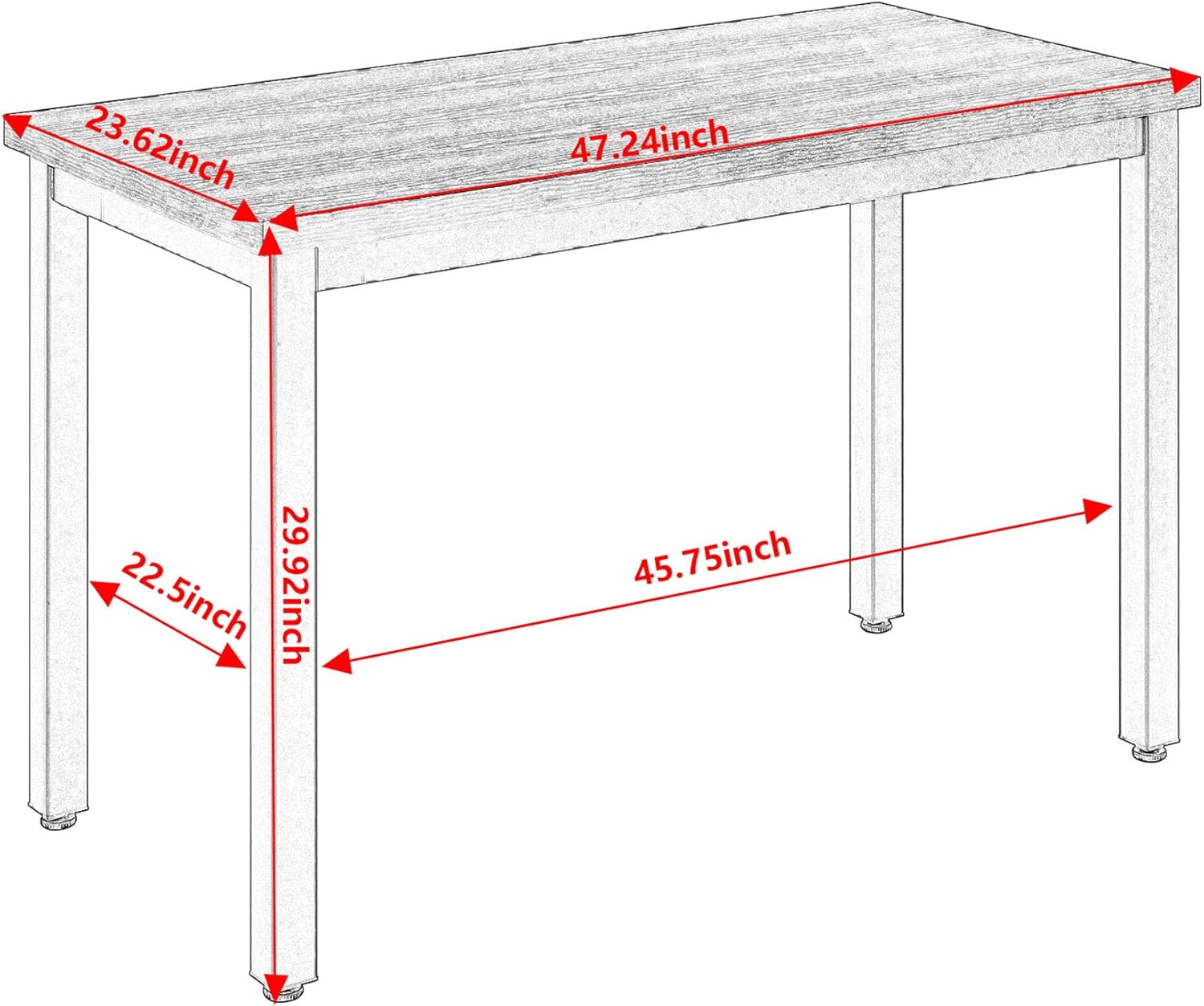
Figure 8.1: Dimensional diagram of the desk, showing approximate measurements for length, width, and height.
9. Warranty & Support
Mr IRONSTONE products are manufactured to high-quality standards. For specific warranty information, please refer to the documentation included with your purchase or visit the official Mr IRONSTONE website. For customer support, inquiries, or to report missing/damaged parts, please contact Mr IRONSTONE customer service through their official channels or the retailer where the product was purchased.
You can visit the Mr IRONSTONE Store on Amazon for more information.