Introduction
Thank you for choosing the HandFan HF318C Portable Misting Fan. This device is designed to provide personal cooling and humidification, ideal for various indoor and outdoor activities. Please read this manual thoroughly before use to ensure proper operation and maintenance.

Image: The HandFan HF318C fan shown in both its extended handheld form and its compact, folded configuration, highlighting its portability.
Product Overview
Key Features
- Portable and Foldable Design: Compact for easy carrying and storage.
- Misting Function: Provides a fine water mist for enhanced cooling.
- Rechargeable Battery: Built-in 2000mAh battery for cordless operation.
- Multiple Fan Speeds: Three adjustable fan speed settings.
- USB-C Charging: Convenient and fast charging via Type-C port.
- Versatile Use: Can be handheld, placed on a surface, or clipped.
Package Contents
- Mist fan (HF318C) x 1
- 50ml Water Bottle x 1
- Metal Clip x 1
- USB-C charging cable x 1
- User Manual x 1
- Hand Strap x 1
Setup
1. Charging the Fan
- Locate the USB-C charging port on the fan.
- Connect the provided USB-C cable to the fan and a compatible USB power source (e.g., USB socket, laptop, power adapter, power bank, car charger).
- The charging indicator light will illuminate. A full charge takes approximately 3.5 hours.
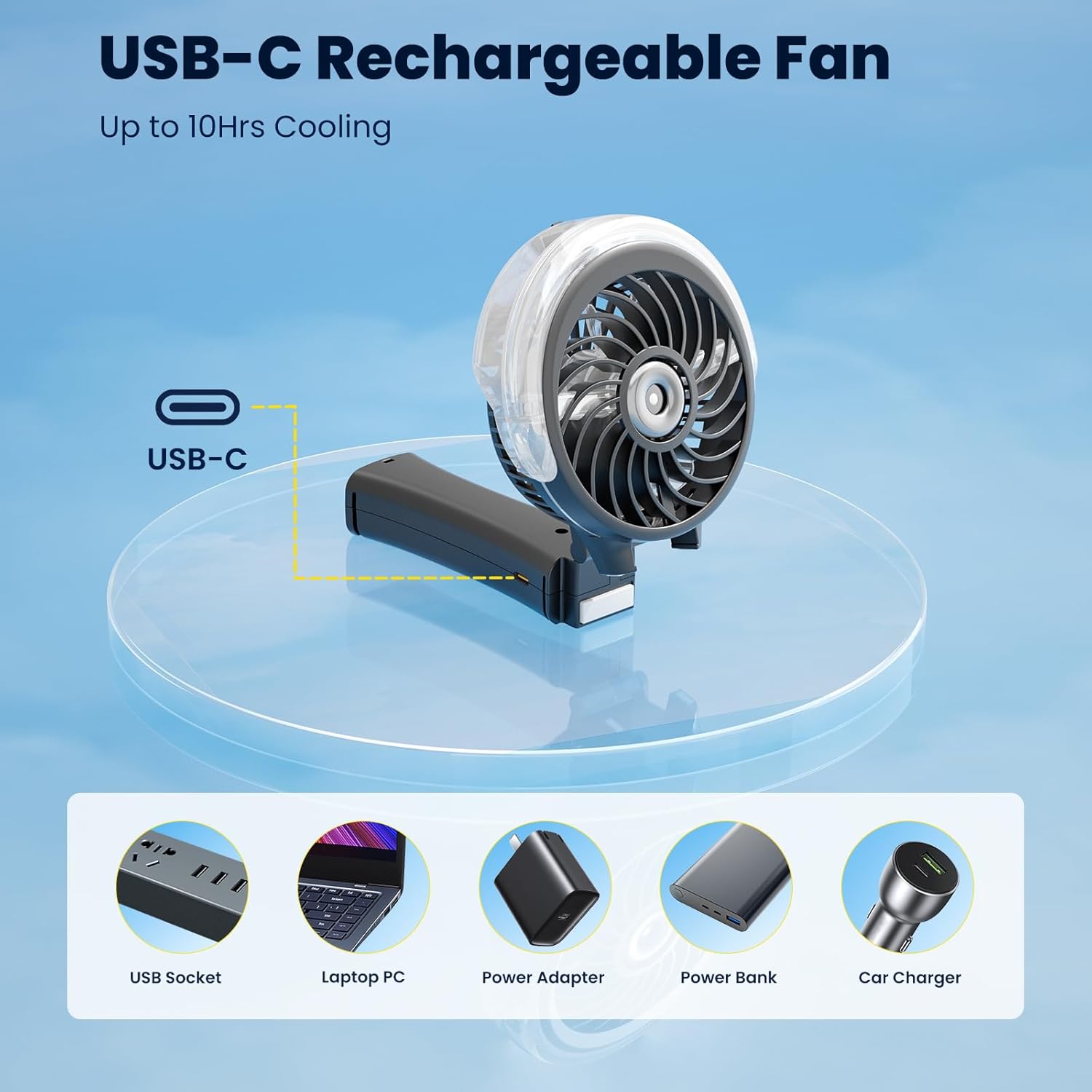
Image: The fan's USB-C charging port and compatible charging methods, including USB sockets, laptops, power adapters, power banks, and car chargers.
2. Filling the Water Tank for Misting
- Ensure the fan is powered off.
- Locate the water tank inlet, typically on the back or side of the fan head.
- Use the provided 50ml water bottle to carefully fill the 34ml water tank.
- Important: Only use tap water or mineral water. Do NOT use purified water or distilled water, as this can affect the misting function.

Image: A detailed view of the fan's water reservoir and misting nozzle, illustrating the water filling process.
3. Attaching Accessories
- Hand Strap: Attach the hand strap to the designated loop on the fan handle for secure carrying.
- Metal Clip: The metal clip can be attached to the base of the fan to allow it to stand on a surface or clip onto objects like desks, strollers, or golf carts.
Operating Instructions
1. Powering On/Off and Adjusting Fan Speed
- To turn the fan on, press the power button located on the handle.
- Each subsequent short press of the power button will cycle through the fan speeds:
- Press 1: Speed 1 (2500 RPM, 8.2 ft/s)
- Press 2: Speed 2 (3300 RPM, 11 ft/s)
- Press 3: Speed 3 (4200 RPM, 13.4 ft/s)
- To turn the fan off, continue pressing the power button until the fan stops, or press and hold the button for a few seconds.

Image: A hand demonstrating how to press the power button on the fan's handle to control its functions.
2. Using the Misting Function
- Ensure the water tank is filled as described in the Setup section.
- To activate the misting function, press and hold the power button for 3 seconds.
- To deactivate the misting function, press and hold the power button for 3 seconds again.
- The misting function can operate for 22-50 minutes on a full tank, depending on usage.

Image: The HandFan HF318C fan actively producing a fine mist, illustrating its enhanced cooling capability.
3. Folding and Positioning
- The fan features a 180° foldable handle, allowing it to be used as a handheld fan or folded for desktop use.
- When folded, the fan can stand independently on a flat surface.
- The metal clip can be used to secure the fan to various surfaces for hands-free operation.

Image: The fan's 180-degree foldable design, demonstrating its versatility for both handheld and desktop use, and ease of transport.
Maintenance
1. Cleaning the Fan
- Ensure the fan is turned off and unplugged before cleaning.
- Wipe the exterior of the fan with a soft, damp cloth. Do not use abrasive cleaners or solvents.
- For the fan blades, use a dry cloth or a soft brush to gently remove dust.
2. Water Tank Care
- Empty any remaining water from the tank after each use, especially if storing the fan for an extended period.
- Rinse the water tank periodically with clean water to prevent mineral buildup.
- Allow the tank to air dry completely before refilling or storing.
3. Battery Care
- To prolong battery life, avoid fully discharging the battery frequently.
- If storing the fan for a long time, charge it to about 50% every three months.
Troubleshooting
| Problem | Possible Cause | Solution |
|---|---|---|
| Fan does not turn on. | Battery is depleted. | Charge the fan using the provided USB-C cable. |
| Misting function does not work. | Water tank is empty or filled with incorrect water type (purified/distilled). | Refill the water tank with tap water or mineral water. Ensure the mist button is pressed and held for 3 seconds. |
| Fan is unusually noisy. | Obstruction in fan blades or internal issue. | Turn off the fan and check for any obstructions. If the issue persists, contact customer support. |
| Battery does not hold charge. | Battery degradation or faulty charging cable/adapter. | Try a different USB-C cable and power adapter. If the problem continues, contact customer support. |
Specifications
| Feature | Detail |
|---|---|
| Model | HF318C |
| Brand | HandFan |
| Color | Black |
| Power Source | Battery Powered (Rechargeable) |
| Battery Capacity | 2000mAh |
| Usage Time | 3-10 hours (depending on speed/mist usage) |
| Charge Time | 3.5 hours |
| Charge Port | USB Type-C |
| Water Tank Capacity | 34ml |
| Spray Volume | 2.0ml/min |
| Spray Duration | 22-50 minutes |
| Fan Speeds | 3 levels |
| Motor Speed (Max) | 4200 RPM |
| Wind Speed (Max) | 13.4 ft/s |
| Product Dimensions (Extended) | 4.13" (L) x 1.57" (W) x 8.07" (H) |
| Folded Dimensions | 4.1" (L) x 2.5" (W) x 4.7" (H) |
| Item Weight | 6.5 oz (188 Grams) |
| Noise Level | 30 Decibels |
| Number of Blades | 6 |
| Voltage | 5 Volts |
| Wattage | 5 watts |
| Indoor/Outdoor Usage | Outdoor |
Warranty and Support
Warranty Information
Specific warranty details for the HandFan HF318C Portable Misting Fan are typically provided with the product packaging or can be found on the official HandFan website. Please retain your proof of purchase for warranty claims.
Customer Support
For further assistance, product inquiries, or troubleshooting not covered in this manual, please visit the official HandFan store or contact their customer service:
- HandFan Official Store: Visit HandFan Store on Amazon
- Refer to the product packaging for additional contact information.

