
1. Introduction
Thank you for purchasing the SANRIO My Melody Handy Battery Powered Fan. This manual provides essential information for the safe and efficient use of your new fan. Please read these instructions thoroughly before use and retain them for future reference.
2. Safety Information
To ensure safe operation, please observe the following precautions:
- Do not immerse the fan in water or any other liquid.
- Keep fingers, hair, and loose clothing away from the fan blades during operation.
- Do not attempt to disassemble or modify the fan.
- Use only the specified type and number of batteries. Ensure correct polarity when inserting batteries.
- Remove batteries if the fan will not be used for an extended period.
- Keep out of reach of small children. This is not a toy.
- Avoid dropping the fan or subjecting it to strong impacts.
3. Package Contents
Please check that all items are present:
- My Melody Handy Battery Powered Fan
- Neck Strap
4. Product Overview
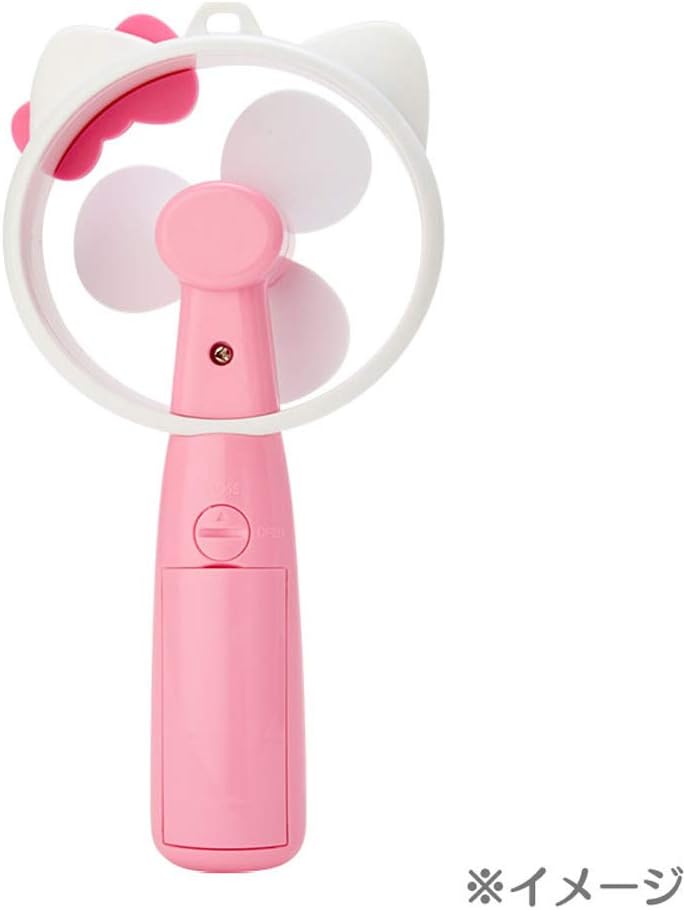
The My Melody Handy Fan is a portable, battery-powered personal fan featuring a charming My Melody design. It is designed for convenient cooling on the go.

Components:
- Fan Blades: Three soft, safe blades for airflow.
- Fan Head: Encloses the blades, featuring My Melody's ears and a bow.
- Handle: Ergonomic grip for handheld use.
- Power Button: Located on the handle for operation.
- Battery Compartment: Located on the back of the handle.
- Neck Strap Attachment Point: For securing the neck strap.

5. Setup
5.1 Battery Installation
The fan requires appropriate batteries (not included) for operation.
- Locate the battery compartment cover on the back of the fan handle.
- Gently slide or unclip the cover to open the compartment.
- Insert the batteries, ensuring correct polarity (+ and - terminals match the markings inside the compartment).
- Replace the battery compartment cover, ensuring it clicks securely into place.
5.2 Attaching the Neck Strap
The included neck strap allows for hands-free portability.
- Locate the small loop or attachment point at the top of the fan handle.
- Thread the thin loop end of the neck strap through this attachment point.
- Pass the larger end of the neck strap through the small loop you just created and pull gently to secure.
- Adjust the strap length for comfortable wearing around your neck.
6. Operating Instructions
6.1 Powering On/Off
The fan features a simple touch-sensitive or press-button control for operation.
- To turn the fan ON, press the power button located on the handle.
- To turn the fan OFF, press the power button again.
6.2 Speed Settings
This fan operates at a single power level, providing consistent airflow when turned on.
7. Maintenance
7.1 Cleaning
- Ensure the fan is turned off and batteries are removed before cleaning.
- Wipe the exterior of the fan with a soft, dry cloth.
- Do not use abrasive cleaners, solvents, or harsh chemicals.
- Do not allow water to enter the fan's internal components.
7.2 Storage
- Store the fan in a cool, dry place away from direct sunlight.
- If storing for an extended period, remove the batteries to prevent leakage.
8. Troubleshooting
If you encounter issues with your fan, please refer to the following table:
| Problem | Possible Cause | Solution |
|---|---|---|
| Fan does not turn on. | No batteries or batteries inserted incorrectly. | Check battery installation and polarity. Replace with fresh batteries. |
| Weak or no airflow. | Low battery power. | Replace batteries with fresh ones. |
| Unusual noise during operation. | Obstruction near fan blades. | Turn off the fan and carefully check for any obstructions. Remove if safe to do so. |
9. Specifications
| Feature | Detail |
|---|---|
| Brand | SANRIO |
| Model Name | My Melody Handy Fan |
| Item Model Number | 324761 |
| Color | Pink |
| Power Source | Battery Powered |
| Product Dimensions | 6"D x 4"W x 8"H |
| Item Weight | 4.9 ounces |
| Number of Blades | 3 |
| Number of Power Levels | 1 |
| Control Method | Touch / Button Press |
| Special Feature | Wearable Design, Character-inspired Design |
| Included Components | Neck Strap |
10. Warranty and Support
For warranty information or technical support, please refer to the product packaging or contact your retailer. Keep your purchase receipt as proof of purchase.


