
1. Introduction
Thank you for choosing the JR Products D29 Metal Bluetooth MP4 Player. This portable device is designed to provide a high-fidelity audio and video experience, featuring a durable magnesium alloy body, Bluetooth 4.2 connectivity, a built-in speaker, FM radio, and e-book functionality. This manual will guide you through the setup, operation, and maintenance of your new device.

Image: The JR Products D29 MP4 Player, showcasing its sleek metal design and compact form factor. The image displays both the front with its screen and controls, and the back panel with model information.
2. Setup and Initial Use
2.1 Package Contents
Before you begin, please ensure all items are present in the package:
- 1 x JR Products D29 MP4 Player
- 1 x Wired Earphone
- 1 x USB Cable
- 1 x User Manual (this document)
2.2 Charging the Device
The D29 player is equipped with a 400mA polymer battery. For optimal performance, fully charge the device before first use.
- Connect the small end of the provided USB cable to the charging port on the D29 player.
- Connect the standard USB end of the cable to a USB power adapter (not included) or a computer's USB port.
- The screen will indicate charging status. Charging is complete when the battery icon shows full.
A full charge provides approximately 65-80 hours of music playback with headphones (screen saver state) or 9 hours of video playback.
2.3 Powering On/Off
- To power on: Press and hold the Power button until the screen illuminates.
- To power off: Press and hold the Power button until the power-off prompt appears, then confirm.
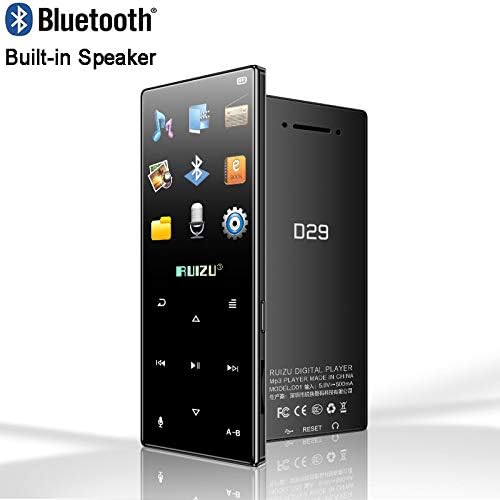
Image: The D29 MP4 Player displaying its main menu interface with various function icons, indicating readiness for operation.
3. Operating Instructions
The D29 player features a 1.8-inch screen with intuitive navigation. Use the physical buttons to navigate menus and control functions.
3.1 Music Playback
The player supports APE, AAC, FLAC, MP3, WMA, and OGG audio formats.
- From the main menu, select "Music".
- Browse your music library by artist, album, genre, or all songs.
- Select a song to begin playback.
Features:
- LRC Lyrics Synchronization: Supported for compatible files.
- A-B Repeat: Repeat a specific section of a song.
- Play Modes: Repeat play, single play, all loop.
- Variable Speed Playback: 16 times shifting.
3.2 Video Playback
The player supports AVI video format with a resolution of 320*240.
- From the main menu, select "Video".
- Browse and select your desired video file.
For best results, ensure video files are converted to the supported format and resolution.
3.3 Bluetooth Connectivity
The D29 features Bluetooth V4.2 for wireless audio streaming to compatible headphones or speakers.
- From the main menu, select "Bluetooth".
- Turn on Bluetooth and enable pairing mode on your external device.
- The player will scan for available devices. Select your device from the list to pair.
3.4 FM Radio
Listen to your favorite FM radio stations. The player supports radio recording.
- From the main menu, select "FM Radio".
- Use the navigation buttons to scan for stations or manually tune.
- To record, select the record option within the FM Radio interface.
3.5 E-Book Reader
Read text files in TXT format.
- From the main menu, select "E-Book".
- Browse and select your TXT file.
The player supports bookmarks for easy navigation within your e-books.
3.6 Recording Function
The D29 supports MIC recording, with recordings saved in MP3 format.
- From the main menu, select "Recording".
- Press the appropriate button to start and stop recording.

Image: The D29 MP4 Player showcasing its bright display with a colorful background and clearly visible menu icons, demonstrating its user interface.
4. Maintenance and Care
- Cleaning: Use a soft, dry cloth to clean the device. Do not use liquid cleaners or aerosols.
- Storage: Store the player in a cool, dry place away from direct sunlight and extreme temperatures.
- Water Exposure: This device is not waterproof. Avoid exposure to water or high humidity.
- Battery Care: To prolong battery life, avoid fully discharging the battery frequently. Charge it regularly, even if not in use for extended periods.
- Software Updates: Check the manufacturer's website for any available firmware updates to ensure optimal performance.
5. Troubleshooting
| Problem | Possible Cause | Solution |
|---|---|---|
| Device does not power on. | Low battery; device frozen. | Charge the device for at least 30 minutes. If still unresponsive, press the reset button (if available, often a small pinhole) or hold the power button for 10-15 seconds. |
| Cannot connect via Bluetooth. | Bluetooth not enabled; device out of range; pairing issue. | Ensure Bluetooth is enabled on both devices. Move devices closer. Delete previous pairings and try pairing again. |
| No sound from speaker/headphones. | Volume too low; faulty headphones; audio file issue. | Increase volume. Test with different headphones. Ensure audio file is not corrupted and is in a supported format. |
| Video playback issues. | Unsupported video format/resolution. | Ensure video files are in AVI format with 320*240 resolution. Convert files if necessary. |
| Device freezes or crashes. | Software glitch; corrupted files. | Restart the device. If persistent, consider backing up data and performing a factory reset (refer to advanced settings, if available). |
6. Specifications
| Model | D29 |
| Body Material | Magnesium Alloy |
| Display | 1.8 inch screen, 128*160 resolution |
| Dimensions | 94 x 40 x 9 mm |
| Item Weight | 2.82 ounces (approx. 80g) |
| Internal Memory | 16GB |
| Expandable Memory | Supports max 128GB TF card |
| Bluetooth Version | 4.2 |
| Built-in Speaker | Yes |
| Battery | 400mA Polymer Battery |
| Battery Life (Music) | 65-80 hours (with headphones, screen saver) |
| Battery Life (Video) | 9 hours |
| Audio Formats | APE, AAC, FLAC, MP3, WMA, OGG |
| Video Formats | AVI (320*240 resolution) |
| E-Book Format | TXT |
| Recording Format | MP3 (MIC recording) |
| Special Features | FM Radio, Alarm Clock, Stopwatch, LRC Lyrics Sync, A-B Repeat, Variable Speed Playback |
| Connectivity | Bluetooth, USB |
| Supported Languages | 28 languages including English, Russian, Italian, Hebrew, French, German, Spanish, Japanese, Korean, etc. |

Image: A promotional image of the D29 MP4 Player, highlighting its design and features, often used for product presentation.
7. Warranty and Support
For warranty information and technical support, please refer to the specific warranty card included with your product or visit the official JR Products website. Keep your purchase receipt as proof of purchase for any warranty claims.
For common issues, please refer to the Troubleshooting section of this manual. If the problem persists, contact customer support through the channels provided by your retailer or the manufacturer.