1. Introduction
Thank you for choosing the RUIZU D29 Bluetooth MP3 Player. This device is designed for portable audio and media playback, offering a range of features including music, video, FM radio, e-book reading, and voice recording. It features a durable zinc alloy body, a 1.8-inch TFT screen, and Bluetooth 4.2 connectivity for wireless audio.

Image: The RUIZU D29 MP3 Player showcasing its sleek design and compact form factor.
2. Package Contents
Please check the package for the following items:
- 1 x RUIZU D29 Music Player
- 1 x User Manual
- 1 x USB Cable
- 1 x Headphones
3. Setup
3.1 Charging the Device
The RUIZU D29 is equipped with a 300mA polymer battery. Before first use, fully charge the device using the provided USB cable connected to a computer's USB port or a compatible USB wall adapter (not included).
- Connect the small end of the USB cable to the player's charging port.
- Connect the standard USB end to a power source.
- The screen will indicate charging status.
3.2 Inserting a TF Card (Optional)
The device supports a TF (microSD) card up to 128GB for expanded storage. Locate the TF card slot on the side of the player and gently insert the card until it clicks into place.
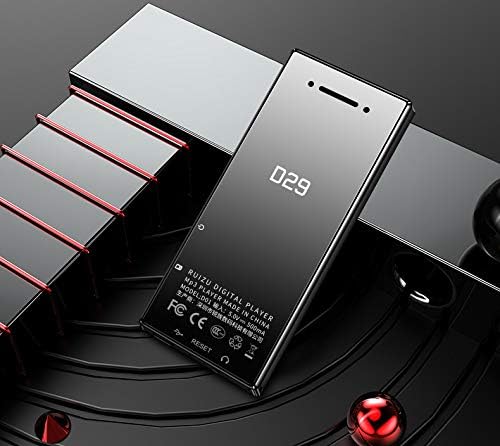
Image: Rear view of the RUIZU D29 MP3 Player, showing the model number and a potential reset pinhole.
3.3 Powering On/Off
To power on the device, press and hold the power button until the screen lights up. To power off, press and hold the power button again until the device shuts down.
4. Operating Instructions
4.1 Basic Navigation
Use the touch buttons below the screen to navigate through menus and control playback. The 1.8-inch TFT screen displays the user interface.
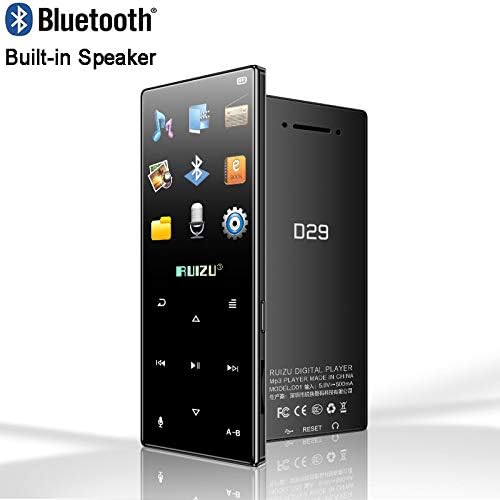
Image: Front view of the RUIZU D29 MP3 Player displaying its user interface with various application icons.
4.2 Music Playback
The player supports APE, AAC, FLAC, MP3, WMA, and OGG audio formats. You can enjoy music with background playback and LRC lyric synchronization.
- Navigate to the 'Music' icon on the main menu.
- Select a song or album from your stored files.
- Use the navigation buttons for play/pause, skip tracks, and adjust volume.
- Playback modes include repeat and single play.
- Variable speed playback (8x shift) is also supported.
4.3 Bluetooth Functionality
The D29 features Bluetooth 4.2 for wireless audio output.
- Compatibility: Connects only to Bluetooth headphones or Bluetooth speakers. It cannot connect to mobile phones or computers.
- FM Radio: FM radio cannot be heard via Bluetooth. Use wired headphones for radio reception.
- Data Transfer: Bluetooth does not support data transfer.
- Pairing: Go to the Bluetooth settings on the player, enable Bluetooth, and search for available devices (e.g., Bluetooth headsets). Select your device to pair.
4.4 FM Radio
The device includes an FM radio function, supporting frequencies from 87.5 MHz to 108 MHz. You can also record radio broadcasts.
- Plug in the wired headphones (they act as the antenna).
- Navigate to the 'FM Radio' icon.
- Scan for stations or manually tune.
4.5 Video Playback
The player supports AVI video format with 128 resolution. Video playback time is approximately 3-5 hours on a full charge.
- Navigate to the 'Video' icon.
- Select a video file to play.
4.6 E-Book Reading
Read text files in TXT format. The device supports bookmarking your reading progress.
- Navigate to the 'E-Book' icon.
- Open a TXT file.
4.7 Recording Function
The built-in microphone allows for voice recording in MP3 format.
- Navigate to the 'Record' icon.
- Start and stop recording as needed.
4.8 Other Functions
The RUIZU D29 also includes an alarm clock, stopwatch, and image navigation features.
5. Maintenance
Proper care will extend the life of your RUIZU D29 MP3 Player.
- Cleaning: Use a soft, dry cloth to clean the device. Avoid liquid cleaners or abrasive materials.
- Storage: Store the player in a cool, dry place away from direct sunlight and extreme temperatures.
- Battery Care: To maintain battery health, avoid fully discharging the battery frequently. Charge the device regularly, even if not in use for extended periods.
- Protection: Avoid dropping the device or exposing it to water.
6. Troubleshooting
If you encounter issues with your RUIZU D29, please refer to the following common solutions:
- Device not turning on: Ensure the battery is charged. Connect to a power source and try again.
- Screen frozen or unresponsive: Locate the 'RESET' pinhole (if present, often a small hole on the side or back) and gently press it with a thin object (like a paperclip) to restart the device.
- Cannot connect to Bluetooth device: Ensure your Bluetooth headphones/speaker are in pairing mode. Remember the D29 only connects to audio output devices, not phones or computers.
- No sound from FM Radio: Ensure wired headphones are plugged in, as they serve as the antenna.
- Files not playing: Check if the file format is supported (e.g., APE, AAC, FLAC, MP3, WMA, OGG for audio; AVI 128 for video; TXT for e-books). Ensure the file is not corrupted.
- TF card not recognized: Ensure the TF card is inserted correctly and is not damaged. Try reformatting the card (this will erase all data).
7. Specifications
| Body Material | Zinc Alloy |
| Screen | 1.8-inch TFT (126x160 resolution) |
| Dimensions | 96.4 x 42 x 9.6 mm |
| Internal Memory | 8GB / 16GB (model dependent) |
| Expandable Memory | TF Card up to 128GB |
| Bluetooth Version | 4.2 |
| Supported Audio Formats | APE, AAC, FLAC, MP3, WMA, OGG |
| Supported Video Formats | AVI (128 resolution) |
| Supported E-Book Formats | TXT |
| Recording Format | MP3 |
| FM Radio Frequency | 87.5 MHz - 108 MHz |
| Battery Type | 300mA Polymer Battery |
| Music Playback Time | Up to 20 hours (with headphones, screen off) |
| Video Playback Time | 3-5 hours |
| Connectivity | Bluetooth, USB |
| Languages | Multi-language support (English, Russian, French, etc.) |
8. Warranty and Support
For warranty information and customer support, please refer to the documentation included with your purchase or visit the official JR/RUIZU website. Keep your proof of purchase for warranty claims.