
VAVSEA D001/D001A
VAVSEA Small Electric Dehumidifier User Manual
Model: D001/D001A
Brand: VAVSEA
1. Introduction and Overview
Thank you for choosing the VAVSEA Small Electric Dehumidifier. This compact and portable unit is designed to effectively reduce humidity in small to medium-sized areas, creating a more comfortable and healthier environment. Its quiet operation makes it ideal for use in various rooms, including bathrooms, bedrooms, kitchens, basements, wardrobes, closets, offices, and RVs.
This manual provides detailed instructions for setting up, operating, and maintaining your dehumidifier to ensure optimal performance and longevity.

Figure 1.1: Front view of the VAVSEA Small Electric Dehumidifier, showing its compact design and water tank.
2. Package Contents and Setup
Before operating your dehumidifier, please ensure all components are present and inspect the unit for any damage.
2.1. What's Included
- VAVSEA Small Electric Dehumidifier Unit
- Power Adapter
- User Manual (this document)

Figure 2.1: The dehumidifier unit, its retail box, user manual, and power adapter.
2.2. Placement
For optimal performance, place the dehumidifier on a flat, stable surface in the desired area. Ensure there is adequate space around the air inlets and outlets for proper air circulation. Avoid placing the unit directly against walls or furniture.

Figure 2.2: Examples of suitable placement in a living room and a wardrobe, highlighting its versatility for small spaces.
2.3. Power Connection
Connect the power adapter to the DC input port on the back of the dehumidifier. Plug the other end of the adapter into a suitable electrical outlet (100-240V AC, 50/60Hz).
3. Operating Instructions
3.1. Powering On/Off
To turn the dehumidifier ON, press the power button located on the top of the unit. The "ON" indicator light will illuminate green. To turn the unit OFF, press the power button again.
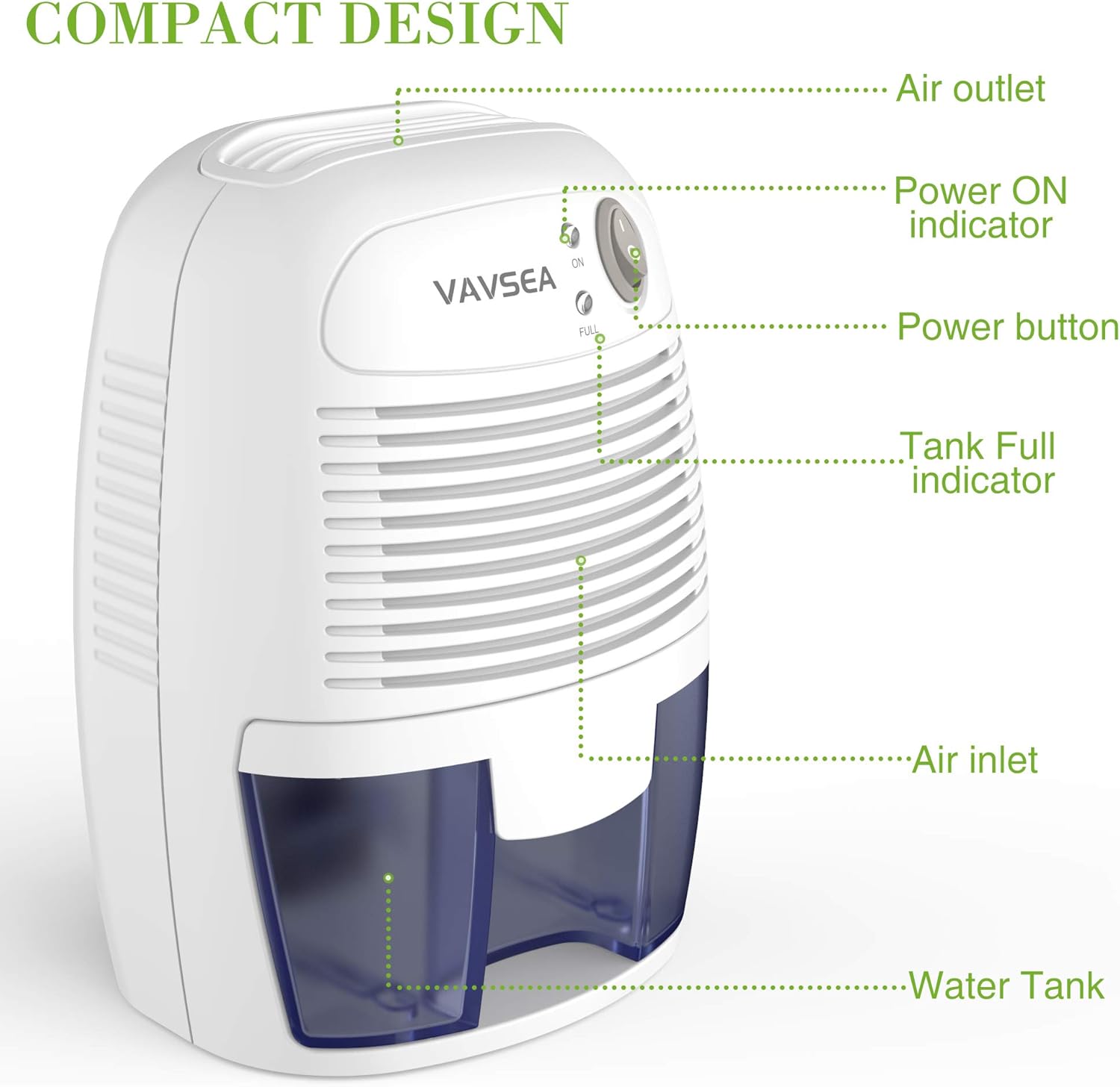
Figure 3.1: Labeled components of the dehumidifier, including the power button and indicator lights.
3.2. Indicator Lights
- ON Indicator (Green): Illuminates when the unit is powered on and operating.
- FULL Indicator (Red): Illuminates when the water tank is full and needs to be emptied. The unit will automatically shut off when the tank is full to prevent overflow.
3.3. Water Tank Removal and Emptying
When the "FULL" indicator light turns red, the water tank needs to be emptied. Follow these steps:
- Turn off the dehumidifier and unplug it from the power outlet.
- Carefully pull out the water tank from the front of the unit.
- Locate the black rubber plug on the bottom of the tank. Pull up the plug to open the drain hole.
- Drain the collected water into a sink or drain.
- Replace the black rubber plug firmly to prevent leaks.
- Slide the empty water tank back into the dehumidifier until it clicks securely into place.
- Plug in the unit and turn it back on to resume operation.

Figure 3.2: Step-by-step guide for emptying the water tank.
3.4. Benefits of Dehumidification
Using the VAVSEA dehumidifier helps to:
- Dry clothes more efficiently.
- Remove excess moisture from the air.
- Reduce the growth of mold and mildew.
- Absorb musty odors, improving overall air quality.

Figure 3.3: Visual representation of the benefits provided by the dehumidifier.

Figure 3.4: The dehumidifier's ultra-quiet operation, suitable for bedrooms without disturbing sleep.
4. Maintenance
Regular maintenance ensures the efficiency and longevity of your VAVSEA dehumidifier.
4.1. Cleaning the Water Tank
Empty the water tank regularly as described in Section 3.3. Periodically, rinse the tank with clean water and a mild detergent to prevent mold or mildew buildup. Ensure the tank is completely dry before reinserting it into the unit.
4.2. Cleaning the Unit Exterior
Wipe the exterior of the dehumidifier with a soft, damp cloth. Do not use abrasive cleaners or solvents, as these may damage the surface. Ensure the unit is unplugged before cleaning.
4.3. Air Inlets and Outlets
Keep the air inlets (front grille) and air outlets (top) free from dust and obstructions. You can use a soft brush or a vacuum cleaner with a brush attachment to gently clean these areas.
5. Troubleshooting
If you encounter issues with your dehumidifier, refer to the following common problems and solutions:
| Problem | Possible Cause | Solution |
|---|---|---|
| Unit does not turn on. | Not plugged in; Power button not pressed; Power outage. | Ensure the power adapter is securely plugged into both the unit and the wall outlet. Press the power button. Check your home's power supply. |
| Unit is on but not collecting water. | Humidity level is low; Room temperature is too low; Air inlets/outlets blocked. | The unit may not collect water if the humidity is already low. Ensure room temperature is above 41°F (5°C). Clear any obstructions from air inlets and outlets. |
| "FULL" indicator light is on, but tank is not full. | Water tank not properly seated. | Remove the water tank and reinsert it firmly until it clicks into place. |
| Unusual noise during operation. | Unit not on a flat surface; Internal component issue. | Place the unit on a flat, stable surface. If noise persists, contact customer support. |
6. Specifications
| Feature | Detail |
|---|---|
| Brand | VAVSEA |
| Model | D001/D001A (Inferred) |
| Floor Area Coverage | Up to 215 Square Feet (1200 Cubic Feet) |
| Color | White and Blue |
| Water Tank Capacity | 1.1 Pounds (approx. 500ml / 17oz) |
| Dehumidification Capacity | 0.5 Liters per Day |
| Product Dimensions (D x W x H) | 5.11"D x 6"W x 8.5"H |
| Item Weight | 1.06 pounds (17 Ounces) |
| Wattage | 23 watts |
| Operation Mode | Standard |
| Upper Temperature Rating | 50 Degrees Celsius |
| Special Features | Detachable, Continuous Draining, Portable, Water Level Indicator, Quiet Operation, Removable Tank, Automatic Shutoff |
| UPC | 791405051062 |
| Date First Available | May 1, 2020 |

Figure 6.1: Dimensions and key features of the VAVSEA Small Electric Dehumidifier.
7. Warranty and Support
For warranty information, technical support, or any inquiries regarding your VAVSEA Small Electric Dehumidifier, please contact VAVSEA customer support through their official channels. Refer to the contact information provided in the product packaging or on the official VAVSEA website.
Please retain your purchase receipt as proof of purchase for warranty claims.