
1. Introduction and Safety Information
The Infurider YF-870N is a 6000-count auto-ranging digital clamp meter designed for accurate electrical measurements. It can measure AC/DC voltage, AC/DC current up to 1000A, resistance, capacitance, continuity, frequency, temperature, and inrush current. This manual provides essential information for safe and effective operation.
1.1 Safety Precautions
- Always read and understand this manual before using the device.
- Ensure the device is in good working condition and free from damage before each use.
- Do not attempt to measure voltages or currents exceeding the specified maximum limits.
- Exercise extreme caution when working with live circuits. High voltages can be dangerous.
- Wear appropriate personal protective equipment (PPE), such as safety glasses and insulated gloves.
- When measuring AC current, ensure only a single live or neutral wire is clamped. Clamping bundled wires will result in a zero reading.
- Replace the battery when the low battery indicator appears to ensure accurate readings.
2. Package Contents
Verify that all items are present in the package:
- 1 x Infurider YF-870N Digital Clamp Meter
- 1 x Test Lead Set
- 1 x K-Type Thermocouple
- 1 x 9V Battery (6F22)
- 1 x User Manual
3. Product Features
- 6000 Count Display: Provides high-resolution measurements.
- Auto-Ranging: Automatically selects the correct measurement range.
- True RMS: Ensures accurate readings for non-sinusoidal waveforms.
- Large Backlit LCD: High-definition display with backlight for clear visibility in various lighting conditions, including night work.
- Data Hold Function: Freezes the current reading on the display.
- MAX/MIN Value Measurement: Records the maximum and minimum values during a measurement session.
- Relative Measurement (REL): Allows for zeroing the display to measure changes relative to a reference value.
- Continuity Buzzer: Audible indication for circuit continuity.
- Diode Test: Checks the functionality of diodes.
- Temperature Measurement: Supports K-type thermocouples for temperature readings.
- Inrush Current Test: Measures the initial surge current when equipment is powered on.
- Jaw Opening: Maximum jaw opening of 1.77 inches (4.5 cm) for clamping various wire sizes.
4. Setup
4.1 Battery Installation
- Locate the battery compartment cover on the back of the clamp meter.
- Use a screwdriver to open the battery compartment.
- Insert the provided 9V (6F22) battery, ensuring correct polarity.
- Close the battery compartment cover and secure it with the screw.
4.2 Initial Power On
Turn the function dial from 'OFF' to any measurement function to power on the device. The LCD will illuminate.
5. Operating Instructions
5.1 Function Dial
The central function dial is used to select the desired measurement mode. Rotate the dial to the appropriate setting for your measurement.

Image: The function dial allows selection of various measurement modes. The display shows the REL button, Backlight, and Data Hold functions.
5.2 Measuring AC/DC Current
To measure current, select the 'A' (Amperage) setting on the function dial.
- Open the clamp jaws by pressing the trigger.
- Place the clamp around a single conductor (wire).
- Ensure the clamp jaws are fully closed.
- Read the current value on the LCD.
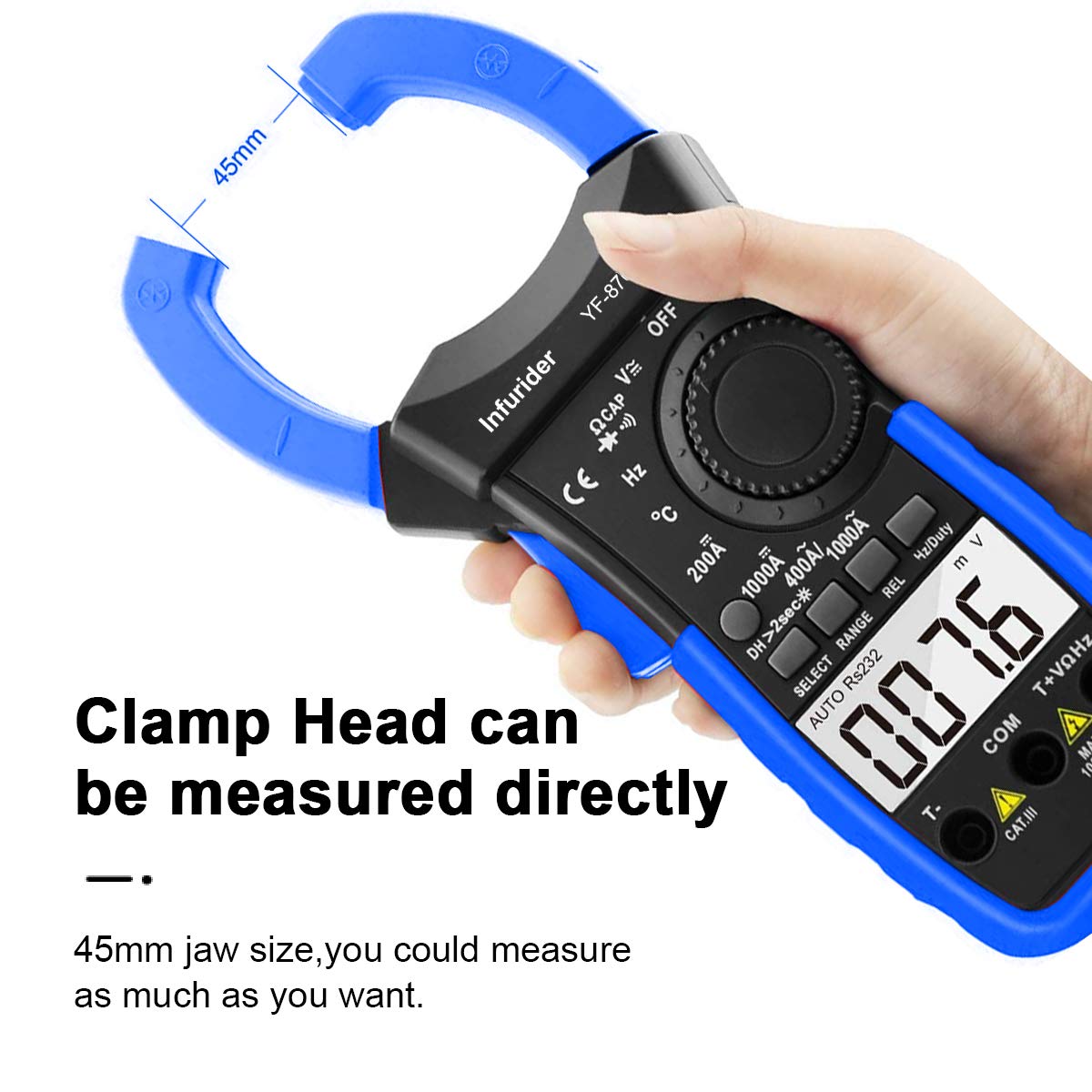
Image: The clamp head can directly measure current on a single conductor. The 45mm jaw size allows for various wire dimensions.

Image: Important: Do not clamp multiple wires (e.g., live and neutral together) as this will result in an inaccurate or zero reading. Only clamp a single conductor.
5.3 Measuring Voltage (AC/DC)
To measure voltage, select the 'V' (Voltage) setting on the function dial.
- Insert the test leads into the appropriate input jacks (COM and VΩHz).
- Connect the test probes across the circuit or component you wish to measure.
- Read the voltage value on the LCD.

Image: The meter can accurately measure the voltage of an automobile battery using the test leads.
5.4 Other Measurements (Resistance, Capacitance, Temperature, Continuity, Frequency)
Rotate the function dial to the corresponding symbol for Resistance (Ω), Capacitance (CAP), Temperature (°C/°F), Continuity (Buzzer symbol), or Frequency (Hz). Follow the on-screen prompts or standard multimeter practices for connecting test leads or the K-type thermocouple.

Image: The YF-870N is capable of various measurements, including temperature using the K-type thermocouple and current in different electrical setups.
5.5 Special Functions
- Data Hold: Press the 'HOLD' button (often combined with backlight) to freeze the current reading. Press again to release.
- Backlight: Long press the backlight button (often combined with data hold) to turn the LCD backlight on or off. Useful for low-light conditions.
- MAX/MIN: Press the 'MAX/MIN' button to cycle through maximum, minimum, and current readings.
- REL (Relative Measurement): Press the 'REL' button to set the current display value as a reference, effectively zeroing the display for subsequent measurements.
6. Maintenance
6.1 Cleaning
Wipe the device with a dry, soft cloth. Do not use abrasive cleaners or solvents.
6.2 Battery Replacement
When the low battery indicator appears on the display, replace the 9V battery as described in the Setup section (4.1 Battery Installation).
6.3 Storage
If the meter is not used for an extended period, remove the battery to prevent leakage and damage. Store the device in a cool, dry place away from direct sunlight.
7. Troubleshooting
- No Display/Power On: Check battery installation and ensure the battery has sufficient charge.
- Inaccurate Readings: Ensure correct function selection, proper test lead connection, and that only a single wire is clamped for current measurements. Check for low battery.
- 'OL' or Overload Indication: The measured value exceeds the selected range. Switch to a higher range if available, or ensure the input is within the device's maximum specifications.
- Continuity Buzzer Not Working: Ensure the device is in continuity mode and the circuit is complete.
8. Specifications
| Measurement Function | Range | Accuracy |
|---|---|---|
| DC Voltage | 600mV/6V/60V/600V/1000V | ±(0.8%+5) |
| AC Voltage | 600mV/6V/60V/600V/750V | ±(1.5%+5) |
| DC Current | 200A/1000A | ±(3.0%+10) |
| AC Current | 200A/1000A | ±(3.0%+10) |
| Resistance | 600Ω/6kΩ/60kΩ/600kΩ/6MΩ/60MΩ | ±(1.8%+8) |
| Capacitance | 9.999nF/99.99nF/999.9nF/9.999uF/99.99uF/999.9uF/9.999mF/99.99mF | ±(2.5%+25) for nF, ±(2.5%+10) for uF, ±(5.0%+25) for mF |
| Temperature | -20°C to 1000°C | ±(2.5%+2) |
| Frequency | 9.999Hz to 9.999MHz | ±(0.5%+15) |
| Duty Cycle | 0.1% to 99.9% | ±(2.0%+2) |
General Specifications
- Display: 6000 Counts
- Power Source: 9V Battery (6F22)
- Item Weight: 580 grams
- Max Jaw Opening: 1.77 inches (4.5 cm)
- Manufacturer: Infurider
- Model Number: YF-870N
9. Warranty and Support
Infurider provides a one-year quality warranty for the YF-870N Digital Clamp Meter. If you encounter any quality-related issues with your product within this period, Infurider will provide a replacement.
For any questions, concerns, or technical support regarding your AC/DC clamp meter, please contact Infurider customer service. We aim to respond to all inquiries within 24 hours.
Please refer to the contact information provided on the Infurider official website or your purchase documentation for the most up-to-date support channels.