Introduction
Welcome to the GolfTed GT-R Electric Golf Trolley user manual. This document provides essential information for the safe and efficient operation, assembly, and maintenance of your new electric golf trolley. Please read these instructions carefully before using the product to ensure optimal performance and longevity.
Safety Instructions
- Always operate the trolley on stable and even ground.
- Keep hands and feet clear of moving parts, especially the wheels and motors.
- Do not overload the trolley beyond its maximum capacity of 30 kg.
- Ensure the battery is fully charged before each use to avoid unexpected power loss.
- Store the trolley and battery in a dry, cool place away from direct sunlight and extreme temperatures.
- Do not expose the battery or motors to excessive moisture or water during cleaning.
- Use only the charger provided by GolfTed for the lithium-ion battery.
Package Contents
Your GolfTed GT-R Electric Golf Trolley package includes the following items:
- GolfTed GT-R Electric Golf Trolley (main frame, wheels, motors)
- Lithium-ion Battery (24V)
- Battery Charger
- Remote Control
- Stainless Steel Scorecard Holder
- Stainless Steel Umbrella Holder
- Bottle Holder
- Phone/Rangefinder Holder
- Carry Bag for Transport
- Divot Repair Tool
- Ball Marker
- Neoprene Bag (for phone, etc.)
- Towel for Cleaning
- Bottle with LED Temperature Display
Setup and Assembly
1. Unpacking
Carefully remove all components from the packaging. Inspect all parts for any signs of damage. If any parts are missing or damaged, contact GolfTed customer support immediately.
2. Assembling the Trolley
The GT-R trolley is designed for quick and easy assembly, consisting of 5 main parts. Follow these steps:
- Attach the main frame components. Ensure all locking mechanisms click into place securely.
- Mount the rear wheels onto the axle. The wheels can be used in freewheel mode or engaged for powered operation.
- Attach the front wheel assembly.
- Connect the battery to the designated power port. Ensure a firm connection.

Figure 1: Assembled GolfTed GT-R Electric Golf Trolley.

Figure 2: Side view of the assembled trolley, showcasing its sleek design.

Figure 3: Rear view of the trolley, highlighting the rear wheels and motor housing.
3. Attaching Accessories
Your trolley comes with various accessories to enhance your golfing experience. Attach them to the designated points on the trolley frame:
- Scorecard Holder: Secure the stainless steel scorecard holder to the handle.
- Umbrella Holder: Attach the stainless steel umbrella holder to the side of the handle assembly.
- Bottle Holder: Clip the bottle holder onto the frame at a convenient location.
- Phone/Rangefinder Holder: Mount the phone/rangefinder holder to the handle for easy access.
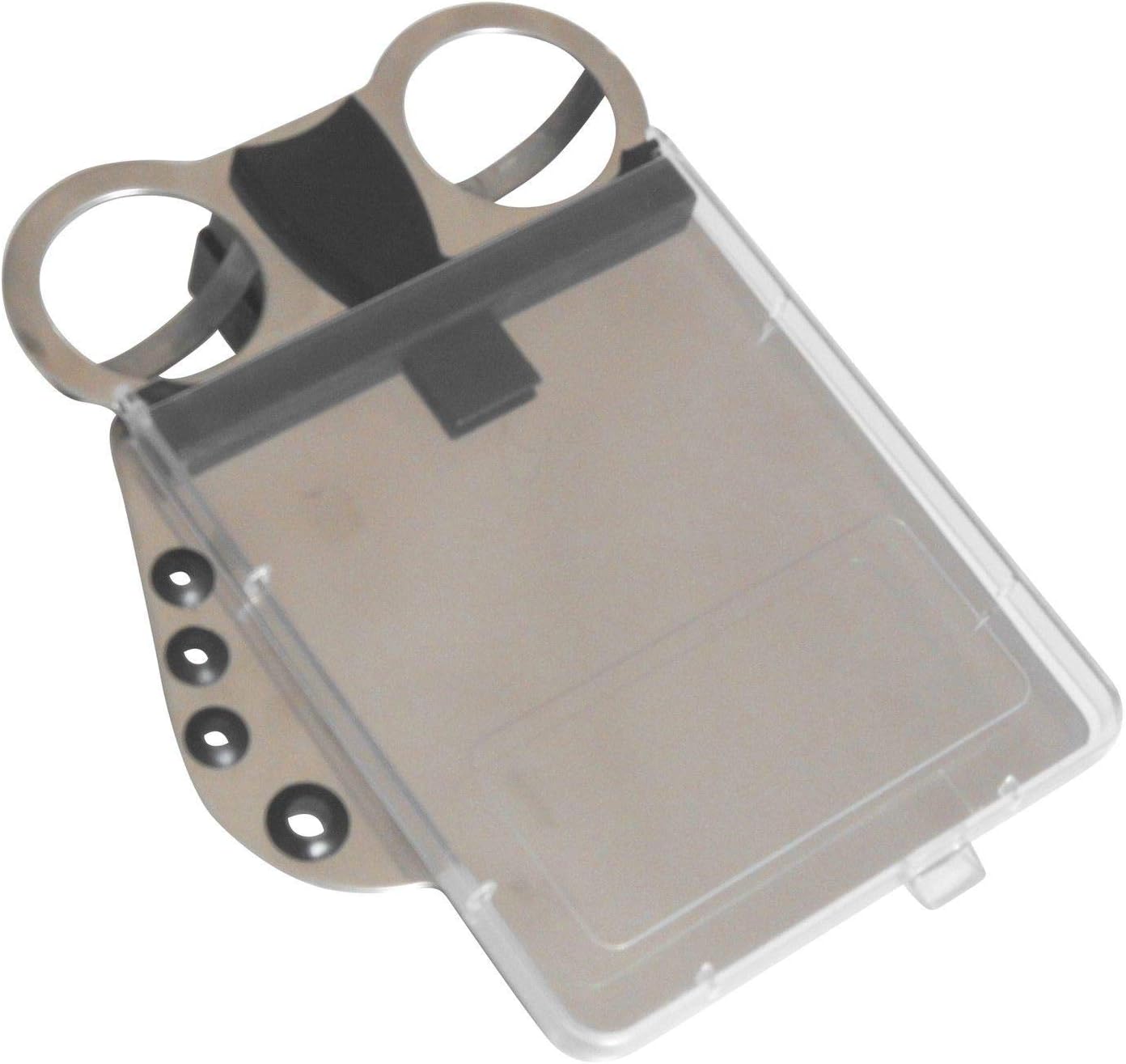
Figure 4: Stainless Steel Scorecard Holder.

Figure 5: Stainless Steel Umbrella Holder.

Figure 6: Phone/Rangefinder Holder.

Figure 7: Bottle with LED Temperature Display.

Figure 8: Carry Bag for Transport.
Operation
1. Charging the Battery
The GolfTed GT-R uses a 24V Lithium-ion battery. Before first use and after each round, ensure the battery is fully charged. Connect the charger to the battery and then to a standard power outlet. The charger indicator will show charging status. A full charge typically allows for 27 to 36 holes of golf under normal conditions.
2. Powering On/Off
Locate the power button on the trolley's handle. Press and hold to turn the trolley on or off. The display will illuminate when powered on.
3. Manual Control
The trolley features a continuously adjustable speed control knob on the handle. Rotate the knob to increase or decrease speed. A dedicated stop/start function button allows for immediate halting and resumption of movement.
4. Remote Control Operation
The remote control provides convenient operation from a distance:
- Forward/Backward: Use the directional buttons to move the trolley forward or backward.
- Left/Right: Steer the trolley using the left and right directional buttons.
- Distance Advance: Press the 10-20-30 meter button to send the trolley forward a preset distance.
5. Special Features
- Downhill Speed Control: This feature automatically regulates the trolley's speed when descending slopes, preventing it from accelerating uncontrollably.
- Automatic Electric Brake: The trolley is equipped with an automatic electric brake that engages when the trolley stops, preventing it from rolling away. Note that this is not a parking brake.
Maintenance
1. Cleaning
Regularly clean your trolley with a damp cloth to remove dirt and debris. Avoid using abrasive cleaners or solvents. Do not spray water directly onto the motors or battery compartment.
2. Battery Care
- Always fully charge the battery after each use, even if only partially discharged.
- If storing the trolley for an extended period, charge the battery to approximately 50-70% and store it in a cool, dry place. Recharge every 1-2 months to maintain battery health.
- Do not expose the battery to extreme temperatures.
3. Storage
The trolley can be quickly disassembled into 5 parts for compact storage. Its minimal size when disassembled is 65 x 35 x 25 cm. Store the trolley in a dry, protected area.

Figure 9: GolfTed GT-R Trolley in its compact, folded state.
Troubleshooting
- Trolley not moving: Check battery connection and charge level. Ensure the power button is on. Verify remote control battery if using remote.
- Remote control not responding: Replace remote control batteries. Ensure line of sight to the trolley.
- Reduced battery life: Ensure the battery is fully charged before use. Check for proper charging. Battery performance can decrease over time; consider battery replacement if significantly degraded.
- Unusual noises: Inspect wheels and axles for obstructions or damage. Ensure all connections are secure.
If you encounter issues not listed here, please contact GolfTed customer support.
Technical Specifications
| Model Number | GT-R |
| Brand | GolfTed |
| Material | Stainless Steel |
| Dimensions (L x W x H) | 65 x 35 x 25 cm (disassembled) |
| Weight | 12.5 kg |
| Motor Power | 2 x 200 W |
| Battery Type | 1 Lithium-ion (24V) |
| Battery Life | 27-36 holes (normal use) |
| Max Load Capacity | 30 kg |
| Wheel Size | 12 Inches |
Warranty and Support
The GolfTed GT-R Electric Golf Trolley comes with a 2-year warranty on spare parts, effective from the date of purchase. This warranty covers manufacturing defects and material faults under normal use. It does not cover damage caused by misuse, accidents, unauthorized modifications, or normal wear and tear.
For warranty claims, technical support, or any questions regarding your product, please contact GolfTed customer service through your original point of purchase or visit the official GolfTed website for contact information.


