
1. Introduction and Overview
The GE Pro Series Indoor Crystal HD Amplified Antenna is designed to provide access to local television broadcasts in Full 1080p HD and is ready for 4K Ultra HD signals. This antenna offers enhanced reception and optimized local channels, serving as a complement to streaming services or as a primary source for free over-the-air television. Its integrated amplifier, featuring PureAmp Technology, boosts signal strength and reduces noise for clear reception. The slim design and adjustable stand allow for versatile placement within your home theater setup.
This manual provides detailed instructions for setting up, operating, maintaining, and troubleshooting your GE Pro Series Indoor Crystal HD Amplified Antenna.
2. Key Features
- Extended Range: Receives signals from broadcast sources up to 50 miles away.
- High-Definition Reception: Supports uncompressed 1080p signals and is 4K ready for future broadcasts.
- PureAmp Technology: Integrated amplifier boosts signal strength and filters out noise for clearer reception.
- Adjustable Stand: Allows for stable vertical or horizontal placement to optimize signal reception.
- VHF and UHF Compatibility: Designed for comprehensive reception of both Very High Frequency and Ultra High Frequency channels.
- Power Source: Operates via a standard corded electric connection.

Image: The antenna is compatible with 4K Ultra HD and Full HD 1080p, and works within a 50-mile range of the broadcast source.

Image: The antenna features extendable dipoles for enhanced VHF reception and PureAmp Technology to boost signal and filter noise. Dimensions are shown as 9.50 inches tall and 5.45 inches wide.
3. Setup Instructions
3.1. What's Included
- GE Pro Series Indoor Crystal HD Amplified Antenna
- Power Adapter
- Coaxial Cable
3.2. Connection Steps
- Position the Antenna: Place the antenna in a location that offers the best possible signal reception. This is typically near a window and facing the direction of local broadcast towers. The adjustable stand allows for vertical or horizontal orientation.
- Connect Coaxial Cable: Attach one end of the coaxial cable to the 'Antenna In' or 'RF In' port on your television.
- Connect to Antenna: Attach the other end of the coaxial cable to the designated port on the GE Pro Series Indoor Crystal HD Amplified Antenna.
- Connect Power Adapter: Plug the power adapter into the antenna's power input, then plug the adapter into a standard electrical outlet. The amplifier requires power to function.
- Perform Channel Scan: Turn on your television and navigate to the TV's menu. Select 'Channel Scan' or 'Auto Program' to search for available channels. Refer to your TV's manual for specific instructions on how to perform a channel scan.

Image: The GE Pro Series Indoor Crystal HD Amplified Antenna in its upright position, ready for connection.
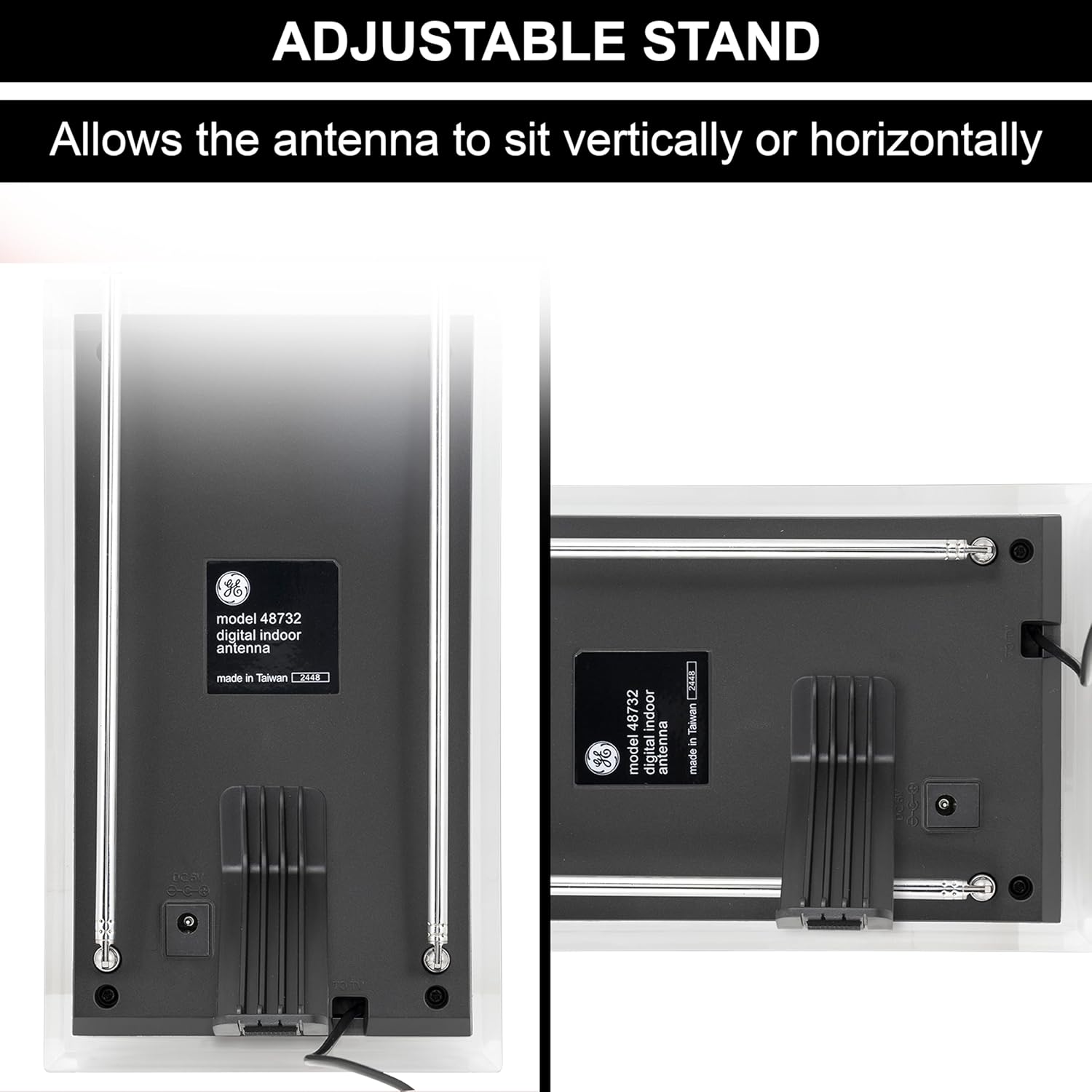
Image: The back of the antenna showing the adjustable stand, allowing for both vertical and horizontal positioning to suit different setups.
4. Operating Instructions
Once the antenna is set up and a channel scan is complete, you can begin watching free over-the-air television. Use your television's remote control to browse and select channels. The quality of reception may vary based on location, environmental factors, and the position of the antenna.
4.1. Optimizing Reception
- Experiment with Placement: Try different locations for your antenna. Higher positions, such as on a shelf or near a window, often yield better results.
- Adjust Dipoles: Extend and adjust the two metal dipoles on the antenna. These are crucial for receiving VHF signals. Experiment with their length and angle.
- Re-scan Channels: Whenever you move the antenna or adjust its position, perform a new channel scan on your TV to ensure all available channels are detected and optimized.
- Directional Aiming: If possible, aim the antenna towards the broadcast towers in your area. Websites like FCC DTV Reception Maps can help identify tower locations.

Image: Tips for maximizing viewing experience, including checking available stations, considering an amplifier if towers are far, testing antenna reception in different locations, and performing regular channel scans.
5. Troubleshooting
- No Signal or Poor Picture Quality:
- Ensure the antenna is powered on and connected correctly to the TV.
- Try repositioning the antenna, especially closer to a window or higher up.
- Perform a new channel scan after any adjustments.
- Check for potential interference from other electronic devices or large metal objects.
- Missing Channels:
- Ensure your TV is set to the correct input source (e.g., 'Antenna' or 'Air').
- Perform a full channel scan. Some TVs require this periodically to find new or relocated channels.
- Adjust the extendable dipoles for better VHF reception.
- Intermittent Signal Loss:
- Environmental factors like severe weather can affect signal strength.
- Ensure the antenna is not obstructed by large buildings, trees, or other obstacles.

Image: Visual examples of factors that can block antenna reception, including distance from broadcast towers, surrounding buildings, mountains or valleys, and power-consuming appliances.
6. Maintenance
The GE Pro Series Indoor Crystal HD Amplified Antenna requires minimal maintenance. To ensure optimal performance and longevity:
- Cleaning: Gently wipe the antenna with a soft, dry cloth to remove dust. Avoid using harsh chemicals or abrasive cleaners.
- Cable Inspection: Periodically check the coaxial cable and power adapter for any signs of damage or wear. Replace if necessary.
- Environmental Protection: While designed for indoor use, avoid placing the antenna in areas with extreme temperatures, high humidity, or direct sunlight for prolonged periods.
7. Specifications
| Feature | Specification |
|---|---|
| Model Number | 48732 |
| Brand | GE |
| Dimensions (L x W x H) | 10.75 x 5.5 x 2.8 inches |
| Item Weight | 15.9 ounces |
| Maximum Range | 50 Miles |
| Signal Support | VHF, UHF, 1080p HD, 4K Ultra HD |
| Technology | PureAmp Technology |
| Power Source | Corded Electric |
| Color | Black |
8. Warranty and Support
For warranty information and customer support, please refer to the documentation included with your product packaging or visit the official GE website. Keep your proof of purchase for warranty claims.
In situations of severe weather, such as storms, cable and satellite services can be disrupted. An over-the-air antenna like the GE Pro Series Indoor Crystal HD Amplified Antenna can serve as a reliable backup to access important local broadcasts and stay informed.

Image: A city skyline under a lightning storm, emphasizing the antenna's role in providing access to local broadcasts during service disruptions.