
The Blue Cactus Company B087K1PWVB
The Blue Cactus Universal Battery Pack for Reclining Furniture
User Manual
Brand: The Blue Cactus Company | Model: B087K1PWVB
Product Overview
The Blue Cactus Universal Battery Pack provides wireless power for your reclining furniture, eliminating the need for constant wall connections. It features an LCD display for battery life monitoring and is designed for standard 2-pin furniture connectors. This rechargeable battery ensures uninterrupted comfort, even during power outages, and offers enhanced flexibility in furniture placement.

Image: The Blue Cactus Universal Battery Pack with its charger, showcasing the main components of the product.
What's Included
- 2500 mAh Battery Pack
- Power Supply Charger
- Power Cord 47"

Image: Visual representation of the 2500mAh Battery Kit, highlighting recommended uses and included items.
Video: "What is in the box?" - This video provides a visual unboxing of the product, showing all included components.
Technical Specifications
| Product Dimensions | 6 x 1.5 x 3 inches |
| Item Weight | 2.59 pounds |
| Batteries | 1 Lithium Ion batteries required. (included) |
| Battery Cell Composition | Lithium Ion |
| Battery Capacity | 2500 Milliamp Hours |
Compatibility
This battery pack is designed for universal compatibility with standard 2-pin furniture connectors. Please ensure your furniture's input matches this type before use.

Image: Diagram illustrating compatibility with 2-pin connectors and showing incompatible plug types (USB, 5-pin, RJ45, Figure-8, Barrel Plug).
Important Compatibility Notes:
- Not compatible with USB ports.
- Not compatible with 5-pin connectors.
- Not compatible with RJ45 connectors.
- Not compatible with barrel plugs.
Initial Setup
Connecting the Battery Pack to Your Furniture
Follow these steps to connect your Blue Cactus battery pack to your reclining furniture:
- Locate the existing power cord of your reclining furniture.
- Disconnect the furniture's power cord from the wall outlet.
- Find the 2-pin connection point on your furniture's power cord, typically near the motor or where it connects to the wall adapter.
- Connect the output cable (long cord) from the Blue Cactus battery pack to this 2-pin connection point on your furniture's power cord.
- Ensure the connection is secure.
Video: "Simple Instructions for Charging and Installation" - This video demonstrates the straightforward process of connecting and charging the battery pack.
Furniture Placement Freedom
With the battery pack, you can place your reclining furniture anywhere in the room without being limited by wall outlets, enhancing your living space's flexibility and safety by eliminating tripping hazards.

Image: Illustrates the benefits of the battery pack, such as no tripping hazards, longer relaxation, flexible placement, and blackout readiness.
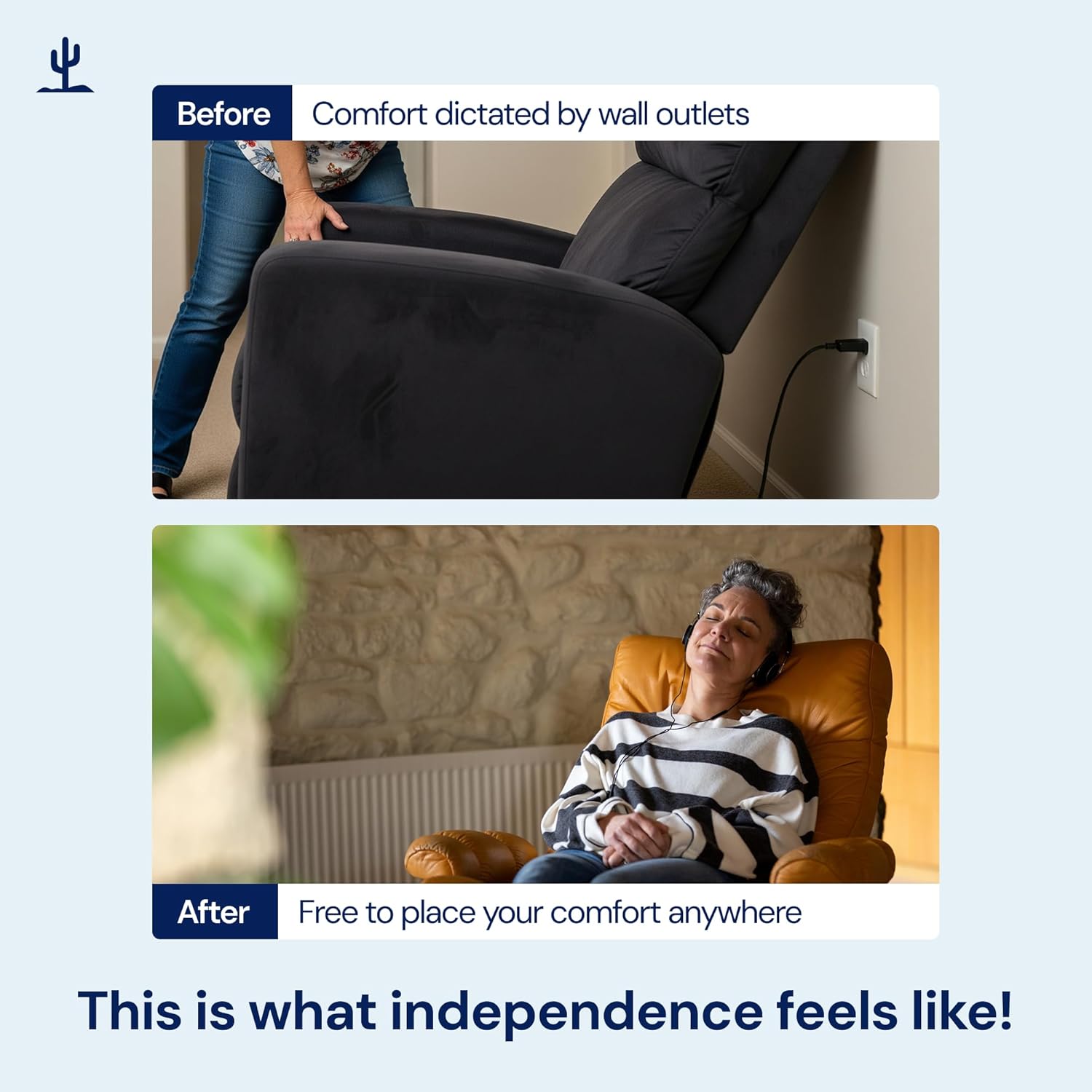
Image: A visual comparison showing furniture placement dictated by wall outlets (Before) versus freedom of placement with the battery pack (After).
Operating Your Furniture with the Battery Pack
Once connected, your furniture will operate as usual, powered by the battery. The LCD display on the battery pack shows the remaining charge, allowing you to monitor its power level. This ensures reliable power backup, providing peace of mind during power outages.
Video: "Battery Pack for Reclining Furniture" - Demonstrates the battery pack in action, powering reclining furniture smoothly.
Charging the Battery Pack
An initial 24-hour charge is recommended for optimal performance. Subsequent charges will vary based on usage. The LCD display will indicate when the battery is fully charged.
- Connect the charger to the battery pack's 'IN' port.
- Plug the charger into a standard wall outlet.
- Allow the battery to charge until the LCD display shows 100%.
- Once fully charged, unplug the charger from the wall outlet and then disconnect it from the battery pack.
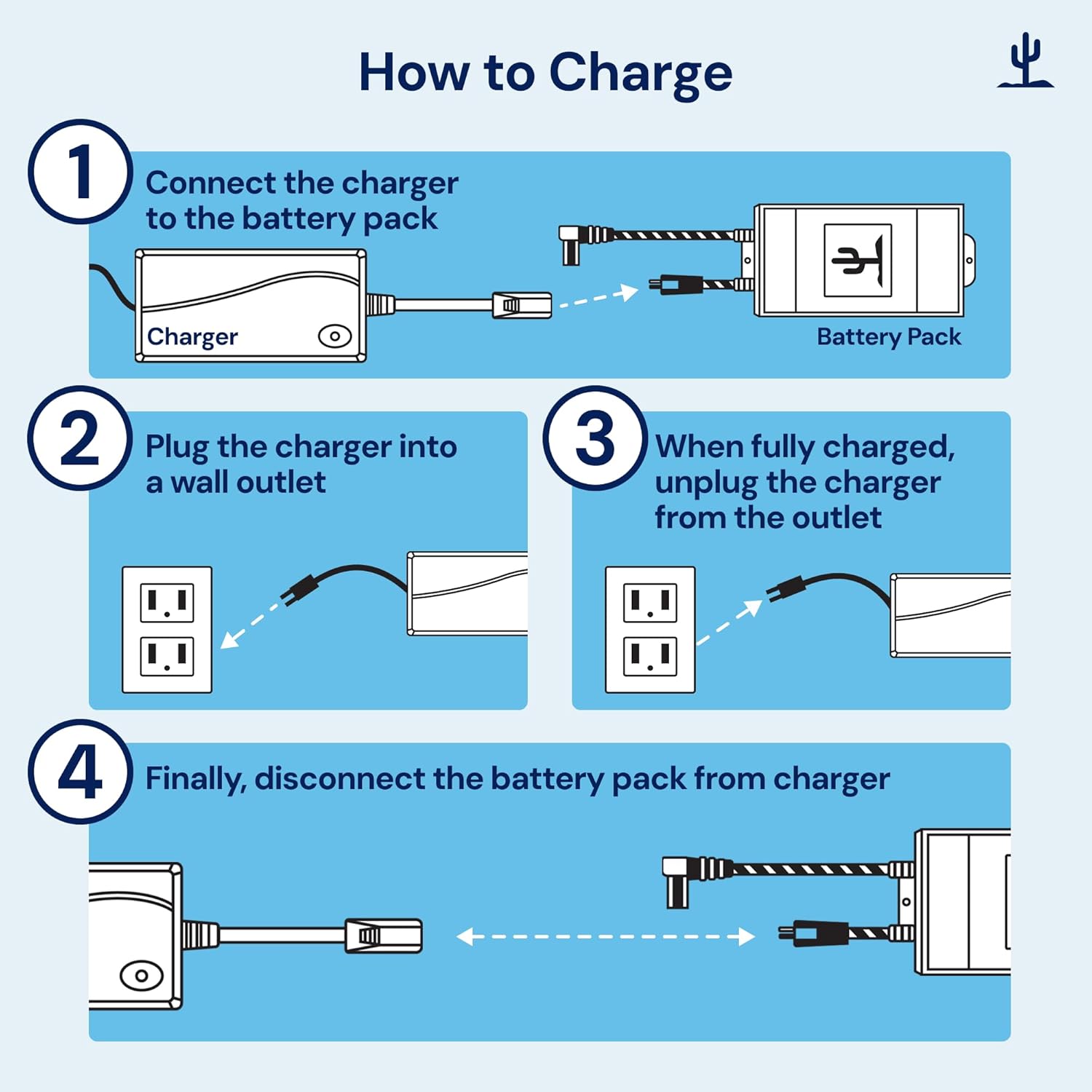
Image: Step-by-step visual guide on how to properly charge the battery pack.
Care and Maintenance
- Keep the battery pack in a dry environment, away from moisture and direct sunlight.
- Avoid exposing the battery to extreme temperatures (hot or cold).
- Regularly check all cable connections to ensure they are secure and free from damage.
- If storing the battery for an extended period, ensure it is fully charged before storage to prolong its lifespan.
- Clean the exterior of the battery pack with a soft, dry cloth. Do not use liquid cleaners.
Troubleshooting Common Issues
| Issue | Possible Cause / Solution |
|---|---|
| Furniture not responding. | Check battery charge level on the LCD display. Ensure all connections between the battery pack and furniture are secure. |
| Battery draining quickly. | Excessive use of power-intensive features (e.g., USB charging, continuous motor use). Ensure the battery is fully charged before use. |
| Battery not charging. | Verify the charger is properly connected to both the battery and a working wall outlet. Check for any visible damage to the charger or cables. |
Warranty and Customer Support
At The Blue Cactus Company, we prioritize your satisfaction. Our dedicated US-based customer service team is here to assist you with any questions or concerns.
Warranty Information:
Please refer to the product packaging or contact customer support for specific warranty details and terms.