
1. Introduction
Thank you for purchasing the RUIZU M5 Sport Bluetooth MP3 Player. This device is designed for portable audio and multimedia enjoyment, featuring a full touch screen, Bluetooth 5.0 connectivity, FM radio, voice recording, e-book reading, clock, and pedometer functions. This manual provides detailed instructions on how to set up, operate, and maintain your device.
2. Package Contents
Please check the package for the following items:
- 1 x RUIZU M5 MP3 Player
- 1 x USB Cable
- 1 x Wired Earphone
- 1 x User Manual (this document)
3. Product Overview
The RUIZU M5 features a compact design with a full touch screen and physical buttons for essential controls. It includes a clip for easy portability during sports activities.
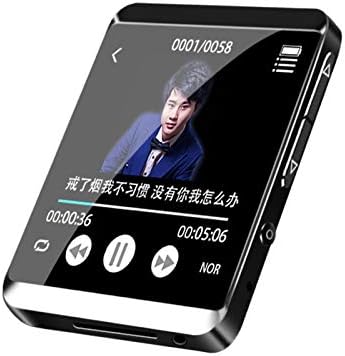
Figure 3.1: Front view of the RUIZU M5 MP3 Player showing the touch screen interface during music playback.

Figure 3.2: The player's screen displaying synchronized lyrics during music playback, enhancing the user experience.
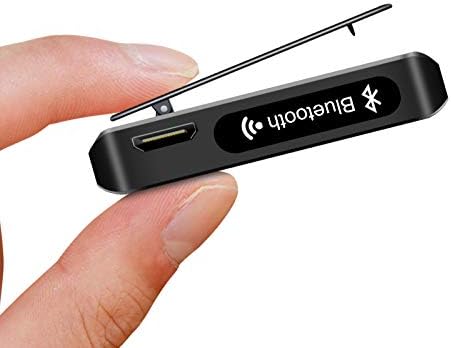
Figure 3.3: Side view of the RUIZU M5, highlighting the integrated clip for secure attachment and the Bluetooth antenna for wireless connectivity.

Figure 3.4: The player's screen indicating the slot for a MicroSD (TF) card, allowing for memory expansion.

Figure 3.5: The RUIZU M5 MP3 Player being used with an armband, demonstrating its suitability for sports and active lifestyles.

Figure 3.6: The RUIZU M5 MP3 Player clipped to clothing, showcasing its compact size and convenient portability.
4. Setup
4.1 Initial Charging
Before first use, fully charge the device. Connect the provided USB cable to the player's charging port and the other end to a USB power adapter (not included) or a computer's USB port. The charging time is approximately 1 to 1.5 hours.
4.2 Power On/Off
- To power on: Press and hold the power button until the screen lights up.
- To power off: Press and hold the power button until the power-off prompt appears, then confirm.
4.3 Inserting a MicroSD (TF) Card
The device supports MicroSD (TF) cards for expanded storage. Locate the TF card slot on the side of the player. Gently insert the card with the gold contacts facing down until it clicks into place. To remove, push the card in slightly until it springs out.
5. Operating Instructions
Navigate the device using the touch screen. Tap icons to select functions and swipe to scroll through lists.
5.1 Music Playback
- Supported formats: MP3, WMA, APE, FLAC, AWV, AAC, OGG.
- From the main menu, select 'Music'.
- Browse by artist, album, genre, or all songs.
- Tap a song to begin playback.
- Use on-screen controls for play/pause, skip, volume adjustment, and repeat modes.
- Lyrics synchronization is supported for compatible files.
5.2 Bluetooth Connectivity
The RUIZU M5 features Bluetooth 5.0, allowing connection to Bluetooth headphones and speakers.
- From the main menu, select 'Bluetooth'.
- Turn on Bluetooth. The player will search for nearby devices.
- Select your desired Bluetooth device from the list to pair.
- Once paired, audio will be routed through the connected Bluetooth device.
5.3 FM Radio
- Supported frequency: 87.5MHZ~108MHZ.
- Connect wired earphones as they act as the antenna.
- From the main menu, select 'FM Radio'.
- Use the auto-scan function to find and save available stations.
- Manually tune or select from saved stations.
5.4 Recording
- From the main menu, select 'Recording'.
- Tap the record button to start and stop recording.
- Recordings are saved in a dedicated folder and can be played back from the device.
5.5 E-Book Reader
- Supported format: TXT.
- From the main menu, select 'E-Book'.
- Browse and open TXT files stored on the device or TF card.
- Use touch gestures to turn pages.
5.6 Pedometer
- From the main menu, select 'Pedometer'.
- Activate the pedometer function to track your steps.
- Ensure the device is securely clipped or placed on your person for accurate tracking.
5.7 Video Playback
- Supported formats: AMV/AVI.
- From the main menu, select 'Video'.
- Browse and select video files for playback.
5.8 Pictures
- From the main menu, select 'Pictures'.
- View image files stored on the device.
5.9 Alarm Clock
- From the main menu, select 'Alarm Clock'.
- Set new alarms, including time and repeat options.
6. Charging
To charge the RUIZU M5, connect the included USB cable to the player's USB port and to a standard USB power source (e.g., computer USB port, wall adapter). The battery indicator on the screen will show charging status. A full charge takes approximately 1 to 1.5 hours. The average battery life is around 10 hours of continuous use, depending on usage patterns and functions activated.
7. Maintenance
- Keep the device dry. Moisture can damage internal circuits.
- Avoid extreme temperatures. High temperatures can shorten the life of electronic devices.
- Do not drop, knock, or shake the device. Rough handling can break internal circuit boards.
- Clean the screen and body with a soft, dry cloth. Avoid using harsh chemicals or cleaning solvents.
- Store the device in a clean, dust-free environment when not in use.
8. Troubleshooting
8.1 Device will not power on
- Ensure the battery is charged. Connect to a power source and try again.
- If the device is unresponsive, try performing a soft reset by pressing and holding the power button for an extended period (e.g., 10-15 seconds).
8.2 Cannot connect to Bluetooth device
- Ensure Bluetooth is enabled on both the MP3 player and the target device.
- Make sure both devices are within the Bluetooth transmission distance (approx. 10 meters).
- Unpair and re-pair the devices.
- Ensure the target Bluetooth device is in pairing mode.
8.3 No sound from earphones
- Check if the earphones are properly plugged into the 3.5mm audio jack.
- Ensure the volume is not set to zero or muted.
- Test with another pair of earphones to rule out faulty earphones.
8.4 Files not recognized or playing
- Verify that the file format is supported (e.g., MP3, WMA, APE, FLAC, AWV, AAC, OGG for music; AMV/AVI for video; TXT for e-books).
- Ensure the files are not corrupted.
- Check if the MicroSD card is properly inserted and not corrupted.
9. Specifications
| Feature | Description |
|---|---|
| Model | RUIZU M5 (D20) |
| Screen Size | Approx. 1.54 inch (LCD) |
| Memory Capacity | 8GB |
| Expansion Card | Support MicroSD (TF) card |
| Bluetooth Version | 5.0 |
| Bluetooth Transmission Distance | Around 10 Meters |
| Music Formats | MP3, WMA, APE, FLAC, AWV, AAC, OGG |
| Video Formats | AMV/AVI |
| E-Book Format | TXT |
| FM Radio Frequency | 87.5MHZ~108MHZ |
| Charging Time | Around 1-1.5 Hours |
| Battery Average Life | 10 Hours |
| Voltage | 3.7 Volts |
| Item Weight | 200 Grams |
| Supported Languages | English, French, Russian, Italian, Czech, Spanish, Nederlands, Dansk, Deutsch, Italiano, Magyar, Polski, Suomi, Svenska, Indonesian, Norsk, Greek, Portugal, Slovenian, Turkish (Support 28 languages) |
10. Warranty and Support
For warranty information and technical support, please refer to the documentation provided at the time of purchase or contact your retailer. Keep your purchase receipt as proof of purchase for any warranty claims.