
1. Introduction
Thank you for purchasing the MIUZEI USB-C Power Supply for Raspberry Pi 4. This power adapter is designed to provide stable and reliable power to your Raspberry Pi 4 Model B (1GB, 2GB, or 4GB versions) and other compatible USB-C devices. It features a 5.1V 3A output and an integrated on/off switch for convenient operation. Please read this manual carefully before use to ensure proper installation and safe operation.
2. Safety Information
- Ensure the power supply is connected to a properly grounded electrical outlet.
- Do not expose the power supply to water, moisture, or extreme temperatures.
- Avoid dropping or subjecting the power supply to severe impacts.
- Do not attempt to disassemble or modify the power supply. This will void the warranty and may cause damage or injury.
- Keep out of reach of children.
- Disconnect the power supply from the outlet when not in use for extended periods.
3. Package Contents
Please check the package for the following items:
- 1 x MIUZEI USB-C Power Supply (5.1V 3A)
- 1 x Integrated USB-C Cable with On/Off Switch
4. Product Features
- Input: AC 100-240V, 50/60Hz, 0.5A Max
- Output: DC 5.1V, 3.0A (15.3W)
- Connector: USB-C (Type C)
- Cable Length: Approximately 150 cm (59 inches)
- Integrated On/Off Switch for convenient power control.
- Multiple protection features for safe operation.
- Compact design to avoid blocking adjacent outlets.

Figure 1: Overview of the MIUZEI USB-C Power Supply, showing the Type-C connector and the AC adapter unit. The cable features reinforced protection at both ends to prevent bending damage.

Figure 2: The power adapter includes 7 protection features: over-temperature, electrostatic, electromagnetic, over-voltage, short-circuit, over-current, and low-voltage protection, ensuring safe and stable power delivery.
5. Setup
- Connect the USB-C connector of the power supply cable into the USB-C power input port on your Raspberry Pi 4 or other compatible device.
- Plug the AC adapter into a standard wall electrical outlet (AC 100-240V).
- Press the on/off switch located on the cable to the 'ON' position to power on your device.

Figure 3: The power supply connected to a Raspberry Pi 4 setup. Its compact design ensures it does not obstruct adjacent power outlets, making it suitable for various power strip configurations.
6. Operating Instructions
The MIUZEI USB-C Power Supply features an inline on/off switch for convenient control of your connected device.
- To turn on the connected device, press the switch button until it clicks into the 'ON' position.
- To turn off the connected device, press the switch button again until it clicks into the 'OFF' position.
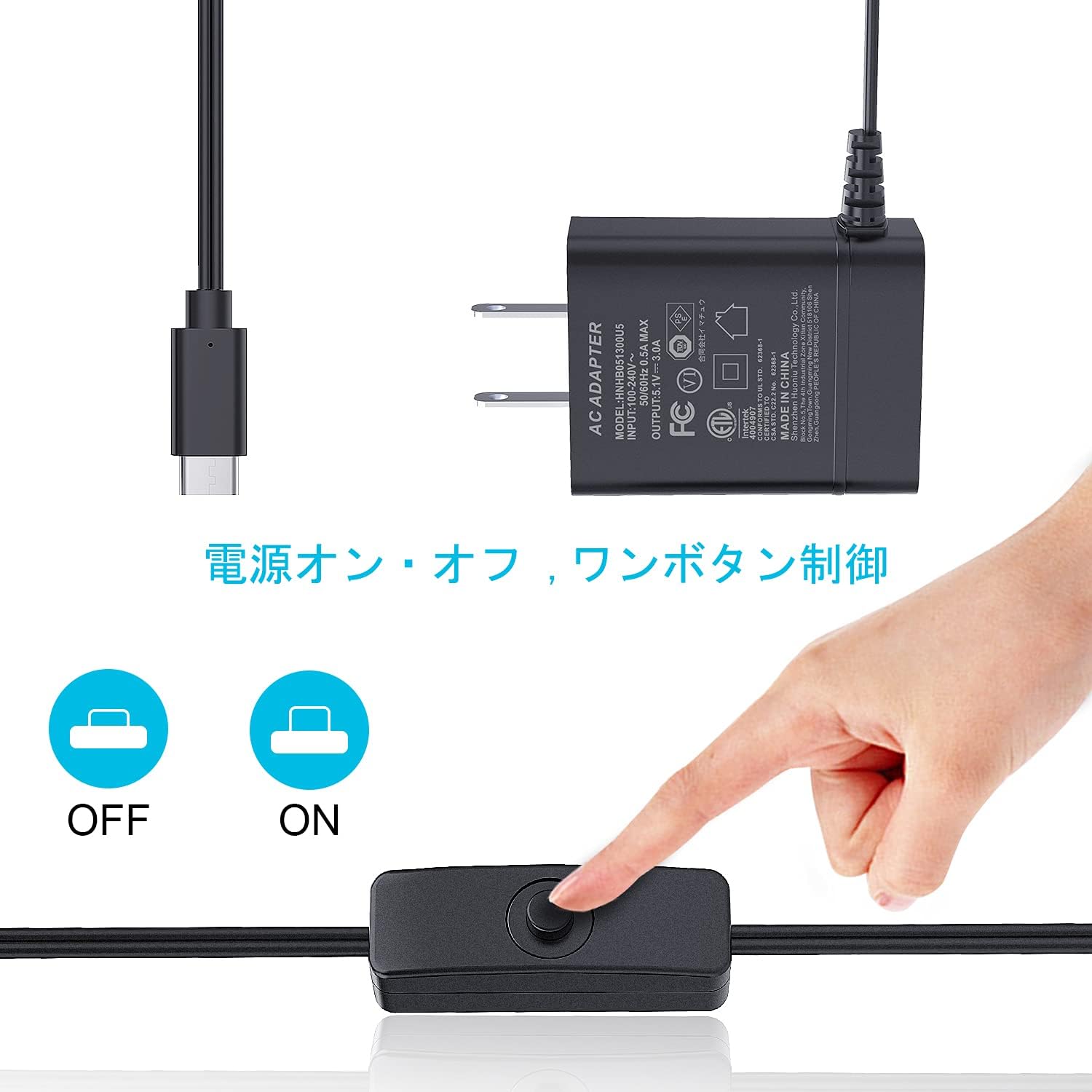
Figure 4: Demonstrates the one-button control for the power supply's on/off switch, allowing easy power management for your device.
7. Compatibility
This power supply is broadly compatible with various Type-C devices requiring 5.1V 3A power. Key compatible devices include:
- Raspberry Pi 4 Model B (1GB, 2GB, 4GB versions)
- Nintendo Switch
- Google Pixel 2
- LG G6
- Samsung TAB S3
- Samsung S8
- Other devices with USB-C power input requiring 5.1V 3A.

Figure 5: Illustrates the wide compatibility of the USB-C power supply with devices such as Raspberry Pi 4B, Nintendo Switch, Google Pixel 2, LG G6, Samsung TAB S3, and Samsung S8.
8. Maintenance
- Keep the power supply clean and free from dust. Use a soft, dry cloth for cleaning.
- Do not use liquid cleaners or aerosols.
- Store the power supply in a cool, dry place when not in use.
- Regularly inspect the cable and adapter for any signs of damage. If damage is found, discontinue use immediately.
9. Troubleshooting
No Power to Device:
- Ensure the power supply is securely plugged into a working electrical outlet.
- Verify that the USB-C connector is fully inserted into your device's power port.
- Check if the on/off switch is in the 'ON' position.
- Test the electrical outlet with another device to confirm it is functional.
- Inspect the cable and adapter for any visible damage. If damaged, do not use.
Device Instability or Under-voltage Warnings (Raspberry Pi):
- Ensure the power supply is rated for 5.1V 3A, as specified for Raspberry Pi 4.
- Avoid using excessively long or low-quality USB-C extension cables, which can cause voltage drop.
- Reduce the number of high-power USB peripherals connected to the Raspberry Pi if possible.
10. Specifications
| Specification | Value |
|---|---|
| Model Number | HNHB051300U5 |
| Input | AC 100-240V, 50/60Hz, 0.5A Max |
| Output | DC 5.1V, 3.0A |
| Wattage | 15.3 Watts (calculated from 5.1V * 3A) |
| Connector Type | USB-C (Type C) |
| Cable Length | 150 cm (approx. 59 inches) |
| Item Weight | 0.1 Kilograms (100 grams) |
| UPC | 191762694146 |
| ASIN | B087CF6127 |
11. Warranty and Support
This product comes with a standard manufacturer's warranty. For specific warranty terms and conditions, please refer to the documentation provided with your purchase or contact the retailer. For technical support or inquiries, please reach out to the MIUZEI customer service team via the contact information provided on their official website or through your purchase platform.