
1. Product Overview
The ELECWISH Gaming Chair Model US-OC087-GY is designed to provide ergonomic support and comfort for extended periods of sitting, whether for gaming or office work. It features a sturdy metal frame, high-density sponge padding, and durable PU leather upholstery. Key features include an adjustable backrest, seat height adjustment, a retractable footrest, and supportive headrest and lumbar cushions.
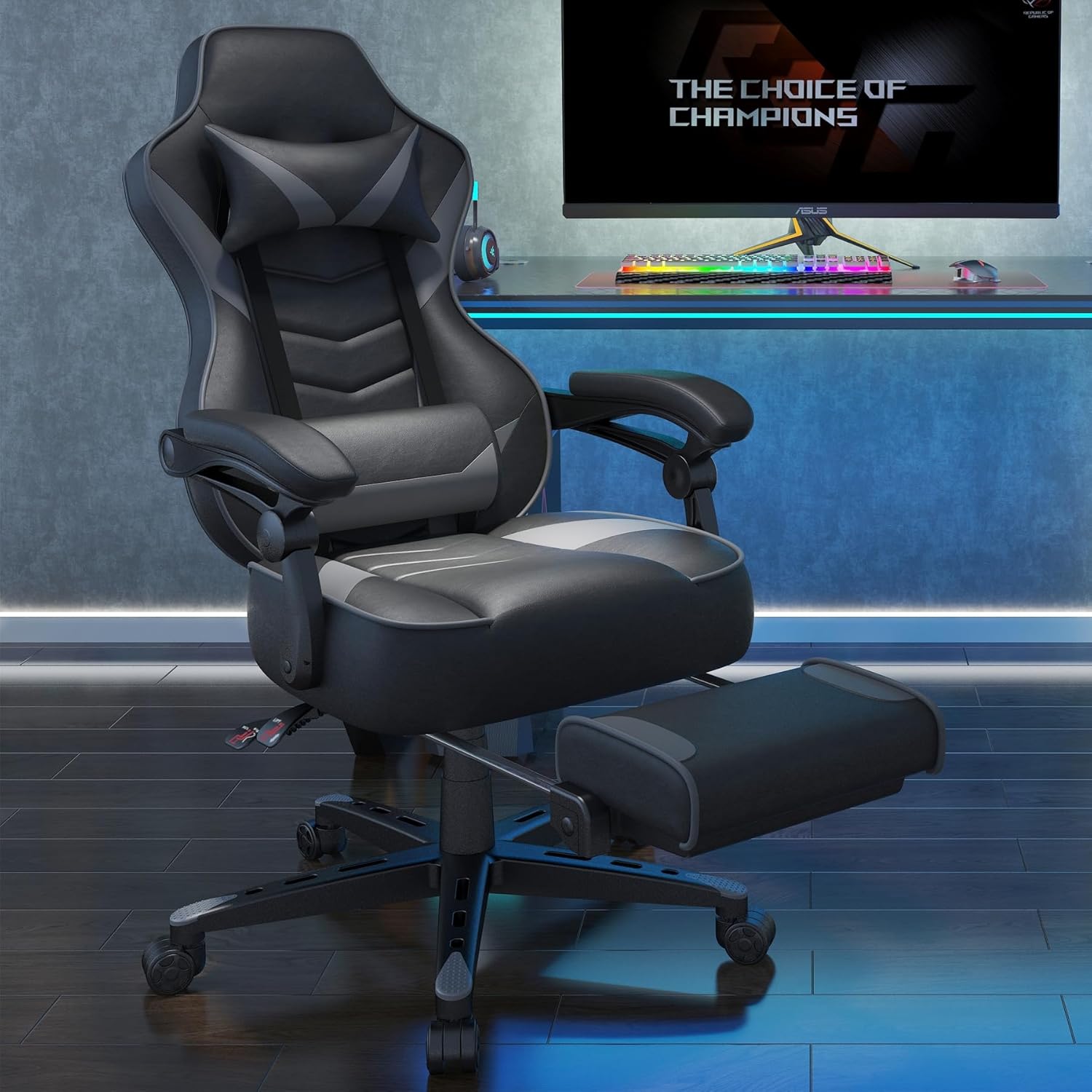
Image: The ELECWISH Gaming Chair with its footrest extended, showcasing its design and features within a typical gaming environment.
2. Setup and Assembly
This ELECWISH Gaming Chair is designed for straightforward assembly. All necessary hardware, tools, and clear instructions are included to facilitate quick setup.
2.1 Included Components

Image: This image displays all the individual components included in the ELECWISH Gaming Chair package, ready for assembly. Please ensure all parts are present before beginning.
2.2 Assembly Video Guide
Video: This official ELECWISH video demonstrates the assembly process and highlights key features of the ELECWISH Gaming Chair, including adjustments for height, recline, and footrest. This can be a helpful visual aid during setup.
3. Operating Instructions
The ELECWISH Gaming Chair offers multiple adjustment options to customize your seating experience for maximum comfort and ergonomic support.
3.1 Backrest Adjustment
The backrest can be adjusted and locked at any position between 90 and 150 degrees. Use the recline lever located on the side of the chair to adjust the angle. Push the lever up to unlock, adjust to your desired angle, and push the lever down to lock.

Image: This diagram illustrates the range of backrest adjustment, from an upright 90-degree working position to a reclined 150-degree resting position.
3.2 Seat Height Adjustment
The seat height can be adjusted from 19.5 inches to 23.2 inches. Locate the lift lever under the seat on the right side. To raise the seat, lift the lever while taking your weight off the seat. To lower the seat, lift the lever while remaining seated.

Image: A close-up view of the gas lift and control levers beneath the seat, indicating the lift mechanism for height adjustment.
3.3 Retractable Footrest
For added relaxation, the chair includes a retractable footrest. Pull the footrest out from under the seat when desired, and push it back in for storage.
3.4 Lumbar Support and Headrest Cushions
The chair comes with a removable headrest cushion and an adjustable lumbar support cushion. These can be positioned to provide optimal support for your neck and lower back, enhancing comfort during long sessions.

Image: This graphic illustrates how the chair provides ergonomic support to the neck, back, and waist areas, emphasizing the benefits of the included cushions.
3.5 Swivel Function
The chair features a 360-degree swivel function, allowing for easy rotation and movement without needing to reposition the entire chair.
4. Maintenance
To ensure the longevity and appearance of your ELECWISH Gaming Chair, follow these simple maintenance guidelines:
- Cleaning: Wipe clean with a damp cloth. Avoid harsh chemicals or abrasive cleaners that may damage the PU leather.
- Inspection: Periodically check all screws and bolts to ensure they are tight. Re-tighten if necessary to maintain stability and safety.
- Placement: Place the chair on a flat and stable surface to prevent tipping. Avoid prolonged exposure to direct sunlight or extreme temperatures.
5. Troubleshooting
If you encounter any issues with your ELECWISH Gaming Chair, please refer to the following common solutions:
- Chair feels wobbly: Ensure all assembly screws are securely tightened. Check the base and casters for any damage or loose connections.
- Height adjustment not working: Verify that the lift lever is fully engaged. If the issue persists, the gas lift cylinder may need replacement.
- Casters not rolling smoothly: Check for any debris (hair, dust) caught in the casters and clean them. Ensure the casters are properly inserted into the base.
- Backrest not reclining: Ensure the recline lever is functioning correctly and not obstructed.
For persistent issues not covered here, please contact customer support.
6. Specifications
| Feature | Detail |
|---|---|
| Brand | ELECWISH |
| Model Name | Charles |
| Model Number | US-OC087-GY |
| Color | Black+grey |
| Material | Stainless Steel (Frame), Sponge (Fill), PU Leather (Furniture Finish) |
| Product Dimensions (D x W x H) | 21.7"D x 26.8"W x 39"H |
| Item Weight | 45 Pounds |
| Maximum Weight Recommendation | 330 Pounds |
| Seat Height | 20.9 Inches (Adjustable from 19.5"-23.2") |
| Seat Depth | 21 inches |
| Backrest Width | 32 Inches |
| Reclining Position Count | 10 (90-150 degrees) |
| Included Components | Gaming Chair, Headrest Cushion, Lumbar Cushion, Footrest |
| Required Assembly | Yes |
| Indoor Outdoor Usage | Indoor |
| Furniture Base Movement | Swivel |
7. Warranty Information
The ELECWISH Gaming Chair Model US-OC087-GY comes with a 2-year EU Spare Part Availability Duration. For specific warranty claims or details, please refer to your purchase documentation or contact ELECWISH customer support.
8. Customer Support
For any questions, assistance, or support regarding your ELECWISH Gaming Chair, please contact the seller, ELECWISH INC. You can visit their store on Amazon for more information: