
Technical Precision MSE-AC20-S-AZ-3C2S-1
Instruction Manual
Replacement for MAGNISIGHT MSE-AC20-S by Technical Precision
Model: MSE-AC20-S-AZ-3C2S-1
Introduction
This manual provides essential information for the safe and effective use of your Technical Precision replacement bulb for MAGNISIGHT MSE-AC20-S. This product is designed as a direct replacement to ensure continued functionality of your device. Please read this manual thoroughly before installation and retain it for future reference.
Each package contains two (2) replacement bulbs.
Safety Information
Always observe the following safety precautions to prevent injury or damage to the product:
- Power Disconnection: Always ensure the power supply to the fixture is completely disconnected before attempting to install, remove, or handle the bulb. This can be done by turning off the light switch and, if possible, the circuit breaker.
- Cool Down: Allow the old bulb to cool completely before removal to avoid burns.
- Proper Handling: Handle the new bulb by its base to avoid touching the glass, as oils from your skin can reduce bulb life.
- Correct Type: Ensure the replacement bulb matches the specifications of the original bulb and the fixture. Using an incorrect bulb type may cause damage or fire.
- Disposal: Dispose of old bulbs according to local regulations, especially if they are Compact Fluorescent Light (CFL) bulbs, which may contain small amounts of mercury.
- Indoor Use Only: This bulb is intended for indoor use in appropriate fixtures.
Setup and Installation
Follow these steps to safely install your new replacement bulb:
- Turn Off Power: Locate the light fixture's power switch and turn it to the "OFF" position. For added safety, turn off the corresponding circuit breaker at your electrical panel.
- Remove Old Bulb: Carefully remove the old bulb from the fixture. If it's a plug-in type, gently pull it straight out from its socket. Allow it to cool if it was recently in use.
- Inspect Fixture: Briefly inspect the fixture's socket for any damage or debris. Ensure it is clean and dry.
- Insert New Bulb: Align the pins of the new Technical Precision replacement bulb with the slots in the fixture's socket. Gently push the bulb straight into the socket until it is firmly seated. Do not force the bulb.
- Restore Power: Once the new bulb is securely in place, restore power by turning on the circuit breaker and then the light switch.
- Test: Verify that the new bulb illuminates correctly.
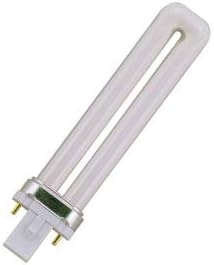
Figure 1: Technical Precision replacement bulb, illustrating its compact fluorescent design with a two-pin base for easy installation into compatible fixtures.
Operating Instructions
The Technical Precision replacement bulb operates in conjunction with your existing fixture. Once installed, simply use the fixture's standard control mechanism (e.g., a wall switch or integrated button) to turn the light on or off.
- Turning On: Activate the power switch connected to the fixture.
- Turning Off: Deactivate the power switch connected to the fixture.
Maintenance
These replacement bulbs require minimal maintenance. Follow these guidelines to ensure optimal performance and longevity:
- Cleaning: If the bulb becomes dusty, ensure the power is off and the bulb is cool. Gently wipe the glass with a soft, dry, lint-free cloth. Do not use liquid cleaners directly on the bulb.
- Regular Inspection: Periodically check the bulb and fixture for any signs of wear or damage. If any issues are observed, disconnect power and address them before continued use.
- Replacement: Replace the bulb when it reaches the end of its operational life or if it shows signs of flickering or dimming.
Troubleshooting
If you encounter issues with your replacement bulb, consider the following common solutions:
| Problem | Possible Cause | Solution |
|---|---|---|
| Bulb does not light up. |
|
|
| Bulb flickers. |
|
|
If troubleshooting steps do not resolve the issue, please contact Technical Precision customer support.
Specifications
| Attribute | Detail |
|---|---|
| Brand | Technical Precision |
| Model Number | MSE-AC20-S-AZ-3C2S-1 |
| Replacement For | MAGNISIGHT MSE-AC20-S |
| Unit Count | 2.0 Count (2 bulbs per pack) |
| Wattage | 2 watts (also listed as 5 Watts) |
| Material | Copper |
| Connectivity Technology | Normal bulb |
| Light Source Type | Compact Fluorescent Light (CFL) |
Warranty and Support
Specific warranty details for this product are not provided in the available information. For any warranty claims, technical support, or product inquiries, please contact the manufacturer directly:
Manufacturer: Technical Precision
Please refer to the seller's or manufacturer's official website for the most current contact information and warranty policies.