
Surpassed DMW-BCF10
Surpassed DMW-BCF10 Battery Pack User Manual
Model: DMW-BCF10 | Brand: Surpassed
1. Introduction
This manual provides essential information for the safe and effective use of your Surpassed DMW-BCF10 Li-ion Battery Pack. This high-quality replacement battery is designed to provide reliable power for compatible Panasonic Lumix digital cameras. Please read this manual thoroughly before using the battery.
2. Safety Information and Warnings
Your safety is paramount. Please observe the following warnings to prevent damage to the battery, camera, or personal injury:
- DO NOT CONNECT IMPROPERLY: Ensure correct polarity when inserting the battery.
- DO NOT DISPOSE OF IN FIRE OR EXPOSE TO EXCESS HEAT: High temperatures can cause the battery to explode or leak.
- DO NOT CRUSH, PUNCTURE, INCINERATE OR SHORT CIRCUIT EXTERNAL CONTACTS: Such actions can lead to fire, explosion, or severe injury.
- Use only specified chargers designed for this battery type.
- Keep the battery out of reach of children.
- If the battery leaks, avoid contact with skin and eyes. Rinse immediately with plenty of water and seek medical advice.

Figure 2.1: Front view of the DMW-BCF10 battery pack, displaying essential information and safety warnings.
3. Product Overview
The Surpassed DMW-BCF10 is a high-capacity, rechargeable Li-ion battery designed for optimal performance. It features high energy density and a long recycle life, ensuring extended use for your digital camera.
Key Features:
- New High Quality Lithium-ion Replacement Battery
- High Energy Density, High Recycle Life, Long Life Battery
- Extra Power for Your Digital Video Camera / Camcorder
- Absolutely NO Memory Effect, allowing you to charge and use the battery at any time without degradation.
- 100% Decoded and 100% Compatible With the Original Cameras and Chargers
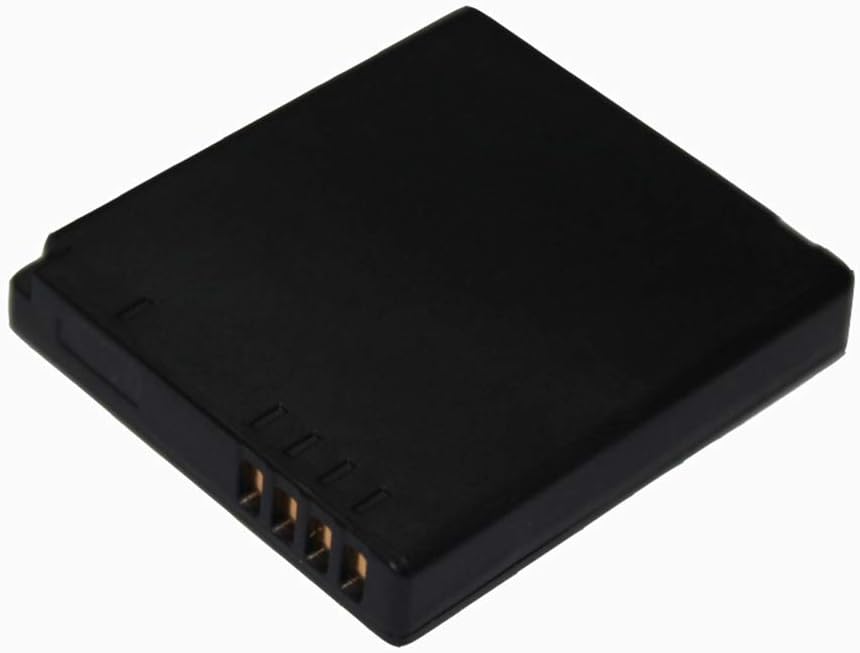
Figure 3.1: Rear view of the DMW-BCF10 battery pack, highlighting the electrical contact pins.
4. Setup
Before first use, ensure the battery is fully charged. Refer to the "Operating" section for charging instructions.
Inserting the Battery:
- Turn off your digital camera and disconnect any power sources.
- Locate the battery compartment on your camera, typically on the bottom or side.
- Open the battery compartment cover.
- Align the battery with the compartment, ensuring the contact pins on the battery match the terminals in the camera.
- Gently push the battery into the compartment until it clicks into place. Do not force the battery.
- Close the battery compartment cover securely.
5. Operating
Charging the Battery:
To charge your Surpassed DMW-BCF10 battery, use a compatible charger (e.g., the original charger for your Panasonic camera or a compatible third-party charger).
- Remove the battery from the camera.
- Insert the battery into the charger, ensuring proper alignment of the contacts.
- Connect the charger to a power source.
- Observe the charger's indicator light. It will typically show a specific color or pattern to indicate charging in progress and completion.
- Once fully charged, disconnect the charger from the power source and remove the battery.
Note: This Li-ion battery has no memory effect, meaning you can recharge it at any time without needing to fully discharge it first.
6. Maintenance
Proper maintenance can extend the life and performance of your battery pack:
- Storage: Store the battery in a cool, dry place away from direct sunlight and extreme temperatures. For long-term storage, charge the battery to about 50% capacity.
- Cleaning: Keep the battery contacts clean. Use a dry, soft cloth to wipe away any dust or debris.
- Avoid Deep Discharge: While Li-ion batteries have no memory effect, avoiding complete discharge can help maintain overall battery health over many cycles.
- Disposal: Do not dispose of batteries in household waste. Follow local regulations for proper recycling of Li-ion batteries.
7. Troubleshooting
If you encounter issues with your battery, consider the following:
| Problem | Possible Cause | Solution |
|---|---|---|
| Battery not charging | Incorrectly inserted battery, faulty charger, dirty contacts. | Ensure battery is inserted correctly. Try a different compatible charger. Clean battery and charger contacts. |
| Camera not powering on with battery | Battery not charged, battery not inserted correctly, battery fault. | Charge the battery fully. Re-insert the battery, ensuring it clicks into place. Test with another known-good battery if available. |
| Short battery life | Battery not fully charged, extreme operating temperatures, battery aging. | Ensure full charge. Operate camera within recommended temperature ranges. Battery capacity naturally decreases over time. |
8. Specifications
| Specification | Detail |
|---|---|
| Battery Type | Li-ion |
| Voltage | 3.7V |
| Capacity | 1200mAh |
| Condition | New |
| Manufacturer | Surpassed |
| Recommended Uses | Camcorder, Camera, Digital Camera |
9. Compatibility
This battery pack is compatible with the following battery codes and camera models:
Compatible Battery Codes:
- Panasonic DMW-BCF10
- Panasonic DMW-BCF10E
- Panasonic DMW-BCF10PP
- Panasonic CGA-S/106B
- Panasonic DMW-BCK7
- Panasonic DMW-BCK7E
- Panasonic DMW-BCK7PP
- Panasonic NCA-YN101G
Compatible Camera Models (Examples):
- Panasonic Lumix DMC-F2
- Panasonic Lumix DMC-F3
- (Please refer to your camera's manual for specific battery compatibility.)
10. Warranty and Support
For any questions, concerns, or support regarding your Surpassed DMW-BCF10 Battery Pack, please feel free to contact the manufacturer or seller. We are committed to providing quality power products and excellent customer service.
Refer to your purchase documentation for specific warranty terms and contact information.