
TOSHIBA TF-55A810U21
Toshiba TF-55A810U21 55-inch 4K UHD Fire TV Edition User Manual
Model: TF-55A810U21 | Brand: TOSHIBA
Introduction
This manual provides essential instructions for setting up, operating, and maintaining your Toshiba TF-55A810U21 55-inch 4K UHD Fire TV Edition. This television integrates the Fire TV experience, offering access to streaming content and live over-the-air TV. It features 4K Ultra HD picture quality and a Voice Remote with Alexa for convenient control.
Safety Information
Important: Please read all safety instructions before operating your television. Keep this manual for future reference.
- Web-based services and content require high-speed Internet service. Some services may require a subscription.
- Ensure proper ventilation around the television. Do not block ventilation openings.
- Do not expose the television to rain or moisture.
- Handle the television with care during unpacking and installation.
What's in the Box
Verify that all components are present:
- Toshiba TF-55A810U21 55-inch 4K UHD Fire TV Edition
- Voice Remote with Alexa (includes 2 AAA batteries)
- TV Stand (2 pieces)
- Power Cord
- Quick Setup Guide (not included in this manual)

Image: The Toshiba TF-55A810U21 television, its remote control, and the two stand feet.
Setup
1. Unpacking and Placement
Carefully remove the TV from its packaging. It is recommended to have two people for this process due to the TV's size and weight (approximately 33.1 pounds). Place the TV on a soft, flat surface, screen-side down, to attach the stand or prepare for wall mounting.
2. Attaching the Stand
Align the stand feet with the screw holes on the bottom of the TV. Secure them using the provided screws. Ensure the stand is firmly attached before placing the TV upright.

Image: Front view of the Toshiba TF-55A810U21 television with its stand attached.
3. Wall Mounting (Optional)
If wall mounting, ensure you use a VESA-compatible mount (M6 screws recommended) that can support the TV's weight. Follow the instructions provided with your wall mount. It is advisable to seek professional installation for wall mounting.
4. Connecting Peripherals
Connect your external devices to the appropriate ports on the back and side of the TV.
- HDMI (1-3): For connecting devices like Blu-ray players, game consoles, or cable boxes. HDMI 1 supports ARC (Audio Return Channel).
- USB: For connecting USB storage devices.
- ANT/CABLE IN: For connecting an HD antenna (sold separately) for live over-the-air TV.
- LAN: For a wired internet connection.
- DIGITAL AUDIO OUT (Optical): For connecting to a soundbar or audio receiver.
- AUDIO OUT (3.5mm): For connecting headphones or external speakers.
- AV IN (Video, L-Audio-R): For connecting older devices with composite video and stereo audio outputs.

Image: Side panel connections including USB, HDMI (ARC), HDMI 2, HDMI 3, Digital Audio Out (Optical), and Audio Out.
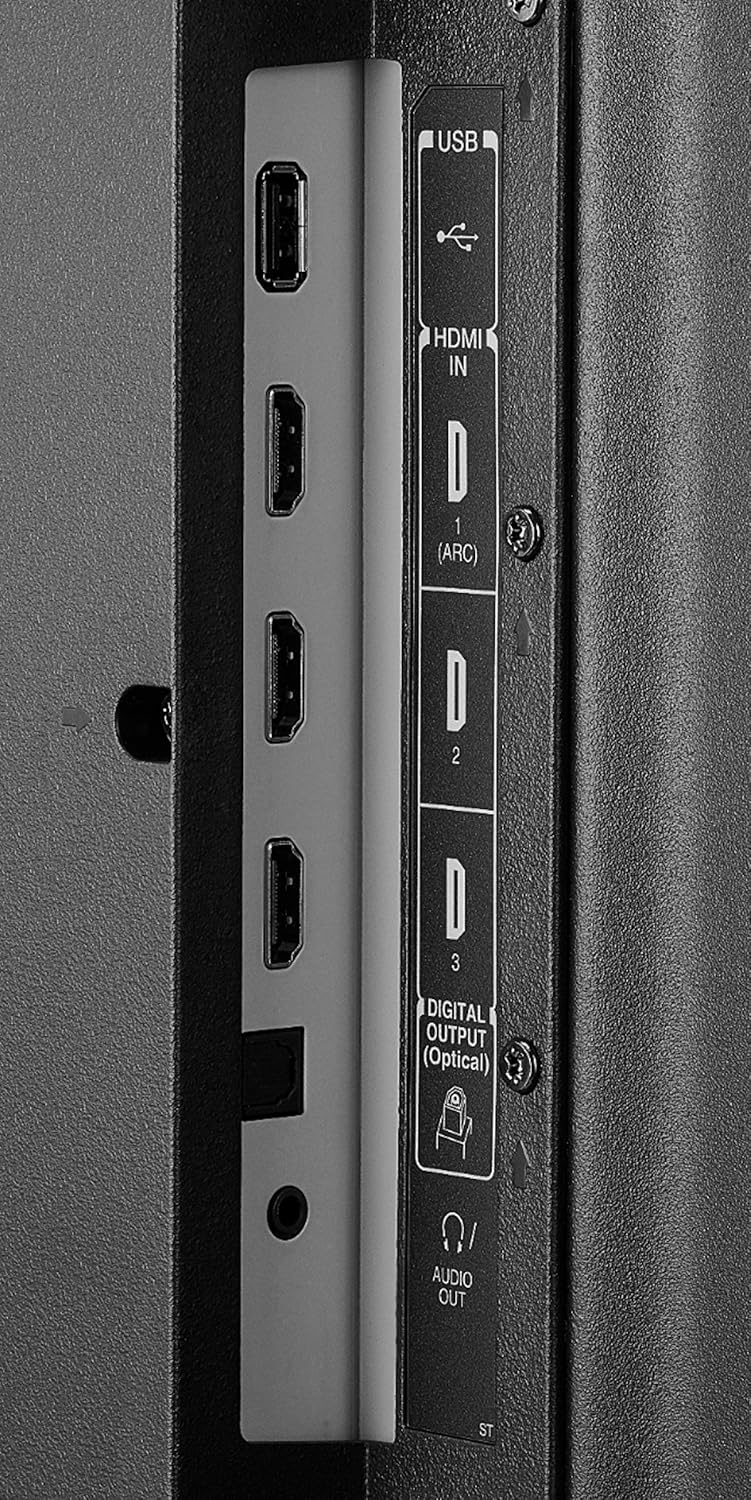
Image: Rear panel connections including AV In (Video, L-Audio-R), LAN, and ANT/CABLE IN.

Image: Full rear view of the Toshiba TF-55A810U21 television, showing the location of all input and output ports.
5. Power On and Initial Setup
Plug the power cord into the TV and then into a wall outlet. Press the power button on the remote control. Follow the on-screen instructions to complete the initial setup, which includes:
- Language selection.
- Connecting to Wi-Fi or using a wired Ethernet connection.
- Signing in to your Amazon account for Fire TV features.
- Scanning for live TV channels (if an antenna is connected).
- Pairing the Voice Remote with Alexa.
Operating Your TV
1. Voice Remote with Alexa
The included Voice Remote allows you to control your TV using voice commands. Press and hold the microphone button to speak your commands. You can launch apps, search for titles, play music, switch inputs, and control smart home devices.

Image: The Voice Remote with Alexa, featuring dedicated buttons for Prime Video, Netflix, and HBO.
2. Navigating the Fire TV Interface
The Fire TV home screen provides access to live TV, streaming apps, and your connected devices. Use the navigation buttons on your remote to browse content and settings.

Image: The Fire TV home screen showing various streaming services like Netflix, Hulu, Prime Video, YouTube, and Disney+.
3. Accessing Apps and Streaming Services
From the home screen, select the desired app icon to launch streaming services such as Netflix, Prime Video, Hulu, Disney+, and more. You can also download additional apps from the Amazon Appstore.
4. Live TV
If you have connected an HD antenna, select the "Live" tab on the Fire TV home screen to access over-the-air channels. The TV also integrates with Pluto TV for additional free streaming channels.
5. Input Selection
To switch between connected devices (e.g., game console, Blu-ray player), press the "Input" button on your remote or navigate to the "Inputs" section on the Fire TV interface.
6. Picture and Sound Settings
Access the settings menu to adjust picture modes (e.g., Standard, Movie, Dynamic), brightness, contrast, color, and sound settings (e.g., bass, treble, sound mode). The TV offers breathtaking 4K Ultra HD picture quality with over 8 million pixels.
Maintenance
1. Cleaning the TV
Before cleaning, unplug the TV from the power outlet. Use a soft, dry cloth to wipe the screen and cabinet. For stubborn marks, lightly dampen the cloth with water or a mild, non-abrasive screen cleaner. Do not use harsh chemicals or abrasive materials.
2. Software Updates
Your Fire TV Edition television receives automatic over-the-air software updates. Ensure your TV is connected to the internet to receive the latest features and improvements, including new Alexa skills.
Troubleshooting
| Problem | Possible Solution |
|---|---|
| No power | Ensure the power cord is securely plugged into both the TV and a working wall outlet. Try a different outlet. |
| No picture, but sound is present | Check the input source. Ensure the connected device is powered on and functioning correctly. |
| No sound, but picture is present | Check the volume level and mute status. Verify audio cables are connected correctly. If using external audio, ensure the correct audio output is selected in TV settings. |
| Remote control not working | Replace the AAA batteries in the remote. Ensure there are no obstructions between the remote and the TV. Re-pair the remote if necessary (refer to initial setup instructions). |
| Cannot connect to Wi-Fi | Check your Wi-Fi router and internet connection. Ensure you are entering the correct Wi-Fi password. Try restarting your router and the TV. |
| Fire TV interface is slow or unresponsive | Restart the TV by unplugging it for 30 seconds and plugging it back in. Ensure the TV has the latest software updates. |
Specifications
| Brand | TOSHIBA |
| Model Number | TF-55A810U21 |
| Screen Size | 55 Inches (140 cm visible diagonal) |
| Display Technology | LED |
| Resolution | 4K Ultra HD (3840 x 2160) |
| Refresh Rate | 60 Hz |
| Aspect Ratio | 16:9 |
| Connectivity Technology | Wi-Fi, Ethernet |
| Supported Internet Services | Amazon Instant, Hulu Plus, Netflix, Pandora (and others via Fire TV) |
| Product Dimensions (W x H x D) | 49.09 x 30.16 x 12.01 inches (with stand) |
| Item Weight | 33.07 pounds |
| On-mode Power Consumption | 60 watts |
| Batteries Required | 2 AAA batteries (included for remote) |
Warranty and Support
For warranty information and technical support, please refer to the documentation included with your product or visit the official TOSHIBA support website. Keep your purchase receipt for warranty claims.
Online Resources:
- For the latest information and support, visit the TOSHIBA Store on Amazon.