
1. Introduction
Thank you for purchasing the SOWO Q16 Bluetooth 5.0 Portable Speaker. This manual provides essential information for setting up, operating, and maintaining your device. Please read it thoroughly before use to ensure optimal performance and longevity of your speaker.
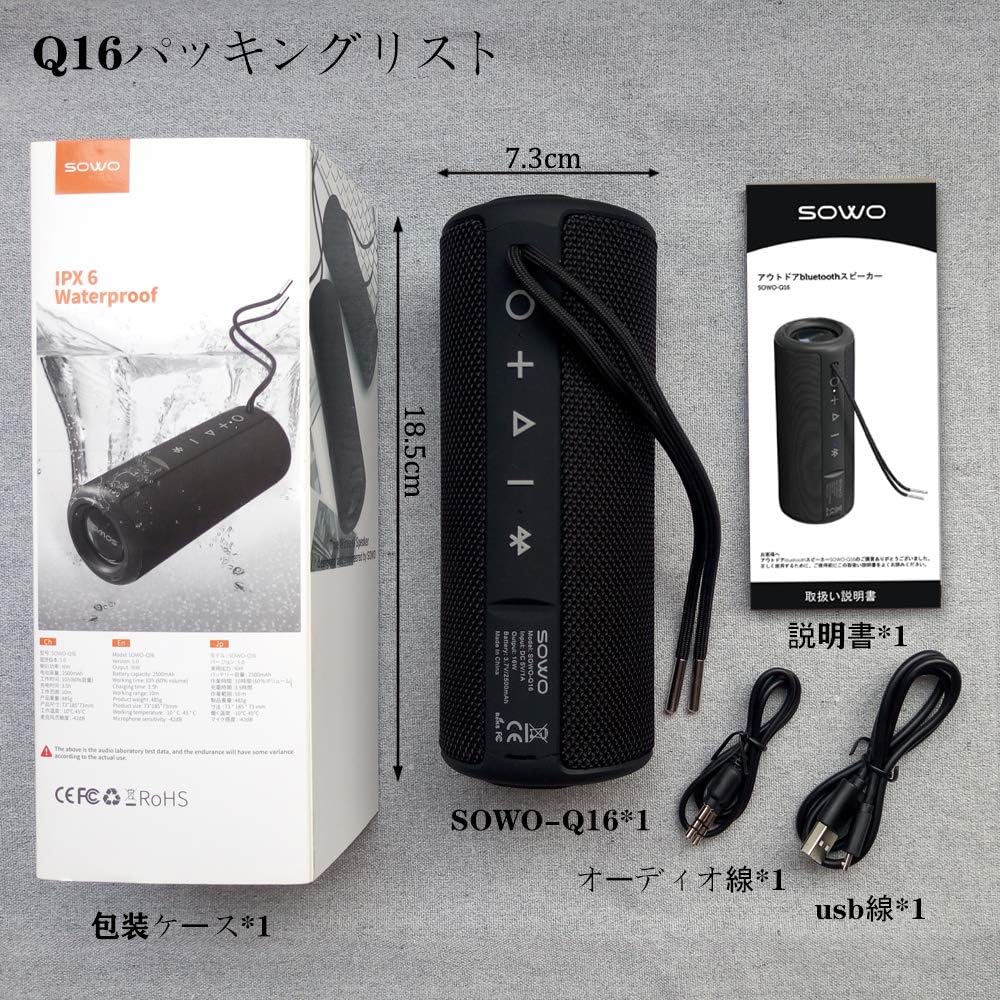
2. Package Contents
Verify that all items listed below are included in your package:
- SOWO Q16 Portable Bluetooth Speaker
- Micro USB Charging Cable
- AUX Audio Cable
- User Manual (this document)
3. Product Overview
The SOWO Q16 is a versatile portable speaker designed for various audio needs. It features Bluetooth 5.0 connectivity, FM radio, MP3 playback via microSD card, and AUX input. The speaker is also IPX6 waterproof, making it suitable for outdoor use.
Key Features:
- Bluetooth 5.0 for stable wireless connection
- Enhanced bass and clear sound output
- IPX6 Waterproof, dustproof, and shock-resistant design
- FM Radio (87.5MHz - 108MHz)
- MicroSD (TF Card) slot for MP3 playback
- AUX input for wired connections
- Built-in microphone for hands-free calls
- True Wireless Stereo (TWS) function for pairing two speakers
- Up to 16 hours of continuous playback


4. Setup
4.1 Charging the Speaker
Before first use, fully charge the speaker. Connect the Micro USB charging cable to the speaker's charging port and the other end to a USB power adapter (not included) or a computer's USB port. The charging indicator light will illuminate during charging and turn off when fully charged.
4.2 Power On/Off
- Power On: Press and hold the Power button for approximately 3 seconds. You will hear an audible prompt.
- Power Off: Press and hold the Power button for approximately 3 seconds. You will hear an audible prompt.
4.3 Bluetooth Pairing
- Ensure the speaker is powered on and in Bluetooth pairing mode (indicated by a flashing LED).
- On your device (smartphone, tablet, laptop), enable Bluetooth and search for available devices.
- Select "SOWO Q16" from the list of devices.
- Once paired, the speaker will emit an audible confirmation, and the LED indicator will stop flashing.
5. Operating Instructions
5.1 Button Functions
The speaker features several control buttons. Refer to the product diagram for exact locations.
- Power Button: Press and hold to power on/off. Short press to switch modes (Bluetooth, FM, MicroSD, AUX).
- Play/Pause Button: Short press to play or pause music. In call mode, short press to answer/end a call. Press and hold to reject a call.
- Volume Up (+): Short press to increase volume. Press and hold for next track (in music modes) or next station (in FM mode).
- Volume Down (-): Short press to decrease volume. Press and hold for previous track (in music modes) or previous station (in FM mode).
5.2 Bluetooth Mode
After successful pairing, your speaker will automatically connect to the last paired device when powered on. Play music from your connected device, and control playback using the speaker's buttons or your device.
5.3 FM Radio Mode
- Short press the Power button to switch to FM Radio mode.
- Press the Play/Pause button to automatically scan and save available FM stations.
- Use the Volume Up (+) and Volume Down (-) buttons (long press) to navigate between saved stations.

5.4 MicroSD (TF Card) Mode
Insert a MicroSD (TF) card with MP3 audio files into the designated slot. The speaker will automatically switch to MicroSD mode and begin playing music. Use the Play/Pause and Volume buttons to control playback.
5.5 AUX Mode
Connect one end of the AUX audio cable to the speaker's AUX input port and the other end to the audio output of your device (e.g., laptop, MP3 player). The speaker will automatically switch to AUX mode. Control playback from your connected device.
5.6 Call Function
When connected via Bluetooth to a smartphone, the speaker can be used for hands-free calls:
- Answer Call: Short press the Play/Pause button.
- End Call: Short press the Play/Pause button.
- Reject Call: Press and hold the Play/Pause button.
5.7 True Wireless Stereo (TWS) Pairing
To achieve a stereo sound experience, you can pair two SOWO Q16 speakers together:
- Ensure both speakers are powered off and not connected to any Bluetooth device.
- Power on both speakers. They will enter Bluetooth pairing mode.
- On one of the speakers, double-press the Power button. The speakers will attempt to pair with each other.
- Once successfully paired, you will hear an audible confirmation. The LED indicator on one speaker will flash (master), and the other will be solid (slave).
- Now, connect your device to the master speaker via Bluetooth as described in section 4.3. Both speakers will play audio in stereo.


6. Maintenance
- Cleaning: Use a soft, dry cloth to clean the speaker's surface. Do not use abrasive cleaners or solvents.
- Water Exposure: While the speaker is IPX6 waterproof, avoid prolonged submersion. Ensure charging port covers are securely closed before exposing to water.
- Storage: Store the speaker in a cool, dry place away from direct sunlight and extreme temperatures.
- Battery Care: To prolong battery life, charge the speaker regularly, even if not in frequent use. Avoid fully discharging the battery for extended periods.
7. Troubleshooting
| Problem | Possible Cause | Solution |
|---|---|---|
| Speaker does not power on. | Low battery. | Charge the speaker using the provided USB cable. |
| Cannot pair via Bluetooth. | Speaker is not in pairing mode or already connected to another device. Device's Bluetooth is off. | Ensure speaker is in pairing mode. Disconnect from other devices. Enable Bluetooth on your device. |
| No sound. | Volume too low. Incorrect mode selected. Device not playing audio. | Increase speaker and device volume. Ensure correct mode (Bluetooth, AUX, MicroSD) is selected. Check audio playback on your device. |
| FM radio reception is poor. | Weak signal. | Move the speaker to a location with better signal reception. |
| MicroSD card not recognized. | Card inserted incorrectly. Unsupported file format. Corrupted card. | Reinsert the card. Ensure files are in MP3 format. Try a different MicroSD card. |
8. Specifications
| Feature | Detail |
|---|---|
| Brand | SOWO |
| Model Number | Q16 |
| Connectivity Technology | Bluetooth 5.0, AUX, MicroSD (TF Card), USB (for charging) |
| Mounting Type | Tabletop Mount |
| Material | Plastic |
| Speaker Type | Outdoor, Portable |
| Recommended Uses | Computer, TV, Mobile Devices |
| Color | Black |
| Waterproof Rating | IPX6 |
| Control Method | Buttons |
| Driver Diameter | 40 mm |
| Battery Life (Average) | Up to 16 Hours |
| Compatible Devices | iPhone, iPad, MP3 Players, Laptops, Android devices |
| Power Source | Battery Powered (USB Charging) |
| Battery Type | 1 Lithium Ion Battery (Included) |
| Product Weight | 540 grams |
9. Warranty and Support
SOWO products are designed and manufactured to the highest quality standards. For warranty information or technical support, please refer to the contact details provided with your purchase documentation or visit the official SOWO website. Please retain your proof of purchase for warranty claims.


