
Kastar CHL-0B-FV70
Kastar NP-FV70 LCD AC Battery Charger Instruction Manual
Model: CHL-0B-FV70
Introduction
This manual provides detailed instructions for the safe and efficient operation of your Kastar NP-FV70 LCD AC Battery Charger. Please read this manual thoroughly before using the product and retain it for future reference. This charger is designed to charge compatible Sony NP-FV series camera batteries.
Safety Information
- Do not disassemble: The charger contains no user-serviceable parts. Disassembly may result in electric shock or fire. Refer servicing to qualified service personnel.
- Avoid moisture: To prevent fire or electric shock, do not expose the charger to rain or moisture. Use in dry locations only.
- Proper ventilation: Ensure adequate ventilation around the charger during operation. Do not cover the charger.
- Voltage compatibility: Use only with AC 100-240V, 50-60Hz power sources.
- Children and pets: Keep the charger out of reach of children and pets.
- Battery compatibility: Only charge batteries specified as compatible with this charger. Charging incompatible batteries may cause damage or injury.
Package Contents
- 1 x Kastar NP-FV70 LCD AC Battery Charger
- 1 x Car Charger Adapter (DC)
- 1 x European Plug Adapter (AC)
Product Overview
The Kastar NP-FV70 LCD AC Battery Charger is a compact and versatile charging solution for your camera batteries. It features an LCD display to show charging status and battery capacity.
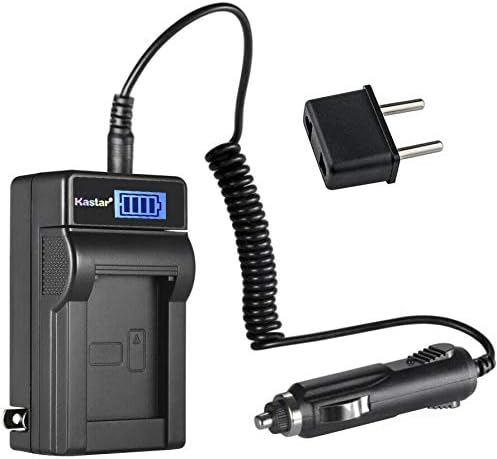
Image 1: The Kastar NP-FV70 LCD AC Battery Charger, shown with its included car charger adapter and a European plug adapter. The main unit features a foldable AC plug and an LCD screen.

Image 2: A close-up view of the Kastar charger with a compatible battery inserted. The LCD screen clearly displays the battery's current charge level, indicated by a battery icon with multiple bars.

Image 3: The rear label of the Kastar LCD AC Charger, detailing its input (AC 100-240V, 50/60Hz, Max 150mA) and output (DC 4.2V/8.4V, 800mA) specifications. It also includes safety warnings against disassembly and moisture, and indicates "Made in China" with FC, CE, and RoHS certifications.
Setup
- Power Connection:
- For AC Power: Fold out the integrated AC plug and insert the charger directly into a standard wall outlet (AC 100-240V, 50-60Hz). If needed, attach the European plug adapter.
- For DC (Car) Power: Connect the car charger adapter cable to the DC input port on the side of the charger. Insert the car charger adapter into your vehicle's 12V accessory socket.
- Battery Insertion: Align the battery with the charging contacts on the charger and gently slide it into place until it clicks securely.
Operating Instructions
- Charging Process:
Once the battery is correctly inserted and the charger is connected to a power source, the LCD display will illuminate and show the current charging status. The battery icon will typically animate or show increasing bars to indicate charging progress.
- Checking Battery Status (without AC power):
Even when the charger is not connected to an AC power source, you can insert a battery to verify its current charge status. The LCD display will show the battery percentage or charge level for a few seconds, allowing you to quickly assess the battery's condition.
- Charging Completion:
The LCD display will indicate when the battery is fully charged, usually by showing a full battery icon or a "FULL" message. Once charging is complete, remove the battery from the charger and disconnect the charger from the power source.
Compatibility
Compatible Battery Models:
- Sony NP-FV30
- Sony NP-FV50
- Sony NP-FV70
- Sony NP-FV90
- Sony NP-FV100
Compatible Charger Models (for reference):
- Sony BC-TRV
- Sony BC-VH1
- Sony AC-VQH10
Compatible Camera and Camcorder Models:
This charger is compatible with numerous Sony DCR, DEV, FDR, HDR, HXR, NEX, and PXW series cameras and camcorders that use the listed NP-FV series batteries. It is also compatible with Andoer HDV-201LM and Andoer HDR-AE8 4K WiFi Full HD 1080p 60fps digital cameras.
For a comprehensive list of compatible camera models, please refer to the product description or the manufacturer's website. Examples include:
- Sony DCR-PJ5, DCR-SR15, DCR-SR20, DCR-SR21, DCR-SR58, DCR-SR68, DCR-SR73, DCR-SR78, DCR-SR83, DCR-SR88, DCR-SX15, DCR-SX20, DCR-SX21, DCR-SX22, DCR-SX33, DCR-SX34, DCR-SX43, DCR-SX44, DCR-SX45, DCR-SX53, DCR-SX63, DCR-SX65, DCR-SX73, DCR-SX83, DCR-SX85
- Sony DEV-3, DEV-30, DEV-5, DEV-50, DEV-50V
- Sony FDR-AX100, FDR-AX100E, FDR-AX700, FDR-AX33, FDR-AX43, FDR-AX53, FDR-AXP55
- Sony HDR-CX110, HDR-CX115, HDR-CX116, HDR-CX130, HDR-CX150, HDR-CX155, HDR-CX160, HDR-CX180, HDR-CX190, HDR-CX200, HDR-CX210, HDR-CX220, HDR-CX230, HDR-CX250, HDR-CX260V, HDR-CX280, HDR-CX290, HDR-CX300, HDR-CX305, HDR-CX320, HDR-CX330, HDR-CX330E, HDR-CX350, HDR-CX360, HDR-CX370, HDR-CX380, HDR-CX390, HDR-CX400, HDR-CX410, HDR-CX430, HDR-CX455, HDR-CX510, HDR-CX540, HDR-CX550, HDR-CX560, HDR-CX580, HDR-CX610E, HDR-CX675, HDR-CX690, HDR-CX700, HDR-CX730, HDR-CX740, HDR-CX760, HDR-CX900, HDR-CX900E
- Sony HDR-PJ10, HDR-PJ200, HDR-PJ220, HDR-PJ230, HDR-PJ260, HDR-PJ26, HDR-PJ30, HDR-PJ320, HDR-PJ330, HDR-PJ340, HDR-PJ340E, HDR-PJ350, HDR-PJ380, HDR-PJ390, HDR-PJ420, HDR-PJ50, HDR-PJ510, HDR-PJ540, HDR-PJ580, HDR-PJ650, HDR-PJ670, HDR-PJ710, HDR-PJ740, HDR-PJ760, HDR-PJ780, HDR-PJ790, HDR-PJ810, HDR-PJ820, HDR-PJ820E
- Sony HDR-TD10, HDR-TD20, HDR-TD30
- Sony HDR-XR150, HDR-XR155, HDR-XR160, HDR-XR260, HDR-XR350, HDR-XR350VE, HDR-XR550
- Sony NEX-VG10, NEX-VG20, NEX-VG30, NEX-VG900
- Sony HXR-MC50, HXR-NX30, HXR-NX70, HXR-NX80
- Sony PXW-Z90V, PXW-X70
- Andoer HDV-201LM
- Andoer HDR-AE8 4K WiFi Full HD 1080p 60fps digital camera
Maintenance
- Cleaning: Disconnect the charger from the power source before cleaning. Use a soft, dry cloth to wipe the exterior. Do not use liquid cleaners or solvents.
- Storage: Store the charger in a cool, dry place away from direct sunlight and extreme temperatures when not in use.
- Contact Points: Ensure the charging contacts on the charger and battery are clean and free of debris for optimal connection.
Troubleshooting
| Problem | Possible Cause | Solution |
|---|---|---|
| Charger not powering on / LCD not displaying | No power connection; Faulty outlet; Damaged charger. | Ensure charger is securely plugged into a working power outlet. Try a different outlet. If issues persist, the charger may be faulty. |
| Battery not charging | Battery not properly inserted; Incompatible battery; Dirty contacts; Faulty battery. | Re-insert the battery, ensuring it's seated correctly. Verify battery compatibility. Clean charger and battery contacts. Try charging a different, known-good battery. |
| Slow charging | Using a low-power USB source (if applicable, though this is an AC charger); Battery degradation. | Ensure the charger is connected to a stable AC power source. Battery performance may degrade over time. |
Specifications
| Model Number | CHL-0B-FV70 |
| Input | AC 100-240V, 50-60Hz, Max 150mA |
| Output | DC 4.2V / 8.4V, 800mA |
| Product Dimensions | Approximately 3 x 1.5 x 4 inches |
| Item Weight | Approximately 3 ounces |
| UPC | 638457565539 |
Warranty and Support
Kastar products are designed for reliability and performance. For warranty information or technical support, please refer to the official Kastar website or contact their customer service directly. Please retain your proof of purchase for warranty claims.
For further assistance, visit the Kastar Store on Amazon.
Related Documents - CHL-0B-FV70
 |
Sony AC-VQ1051 AC Adaptor/Charger Operating Instructions Detailed operating instructions for the Sony AC-VQ1051 AC Adaptor/Charger, covering identification of parts, usage, charging modes, specifications, and troubleshooting. |
 |
Desview R6 UHB 5.5" 2800nits Ultra High Brightness Monitor Specifications Detailed specifications for the Desview R6 UHB, a 5.5-inch ultra-high brightness monitor with 2800nits, touch screen functionality, and Rec.709 color correction. Features include advanced functions like False Color, RGB Histogram, HDR Monitoring, and various signal ports. |
 |
7-inch Daylight Viewable Field Monitor F970 Kit User Manual Comprehensive user manual for the 7-inch Daylight Viewable Field Monitor with F970 Install and Power Kit, featuring touch screen operation, HDR monitoring, 3D LUT support, SDI/HDMI connectivity, and advanced video assist functions. |
 |
Vasco Controller Hydraulic Radiator met Blower Mix - Handleiding Installatie- en gebruikershandleiding voor de Vasco Controller Hydraulic Radiator met Blower Mix. Ontdek functies, bediening, veiligheid en technische specificaties voor efficiënte verwarming. |
 |
Blackmagic Cinema Camera 6K Technical Specifications Detailed technical specifications for the Blackmagic Cinema Camera 6K, covering sensor size, lens mount, frame rates, resolutions, audio, media, codecs, storage, power, physical dimensions, environmental conditions, and included accessories. |
 |
LILLIPUT V7 7-inch 4K HDMI Voice Control Camera Monitor Explore the LILLIPUT V7, a professional 7-inch 4K HDMI camera monitor featuring intuitive voice control, touchless shortcuts, and advanced camera assist functions for filmmakers and photographers. |
Ask a question about this manual
Ask about setup, troubleshooting, compatibility, parts, safety, or missing instructions. Manuals+ will review the question and use this page’s manual context to help answer it.