Important Safety Instructions
Please read all instructions carefully before using this appliance. Failure to follow these instructions may result in electric shock, fire, or serious personal injury.
- Do not touch hot surfaces. Use handles or knobs.
- To protect against electrical hazards, do not immerse cord, plugs, or the appliance in water or other liquid.
- Close supervision is necessary when any appliance is used by or near children.
- Unplug from outlet when not in use and before cleaning. Allow to cool before putting on or taking off parts, and before cleaning the appliance.
- Do not operate any appliance with a damaged cord or plug, or after the appliance malfunctions or has been damaged in any manner. Contact customer service for examination, repair, or adjustment.
- The use of accessory attachments not recommended by the appliance manufacturer may cause injuries.
- Do not use outdoors.
- Do not let cord hang over edge of table or counter, or touch hot surfaces.
- Do not place on or near a hot gas or electric burner, or in a heated oven.
- Extreme caution must be used when moving an appliance containing hot oil or other hot liquids.
- Always attach plug to appliance first, then plug cord into the wall outlet. To disconnect, turn any control to 'off', then remove plug from wall outlet.
- Do not use appliance for other than intended use.
Product Overview
The Westinghouse WKRM293 is an 8-inch electric appliance designed for making tortillas, rotis, chapattis, pitas, and other flatbreads. It features non-stick cooking plates for easy release and cleaning, a thermostat for temperature control, and a durable stainless steel housing.

Image 1: The Westinghouse WKRM293 8-Inch Tortilla and Roti Maker, showcasing its compact design and stainless steel finish.
Key Features:
- 8-Inch Non-Stick Cooking Plates: Designed for easy release of flatbreads and simple cleaning.
- Adjustable Thermostat: Allows control over the cooking plate temperature.
- Power and Ready Light Indicators: A red light indicates power, and a green light indicates when the machine has reached the set temperature.
- Cool-Touch Handle: Facilitates safe operation when pressing dough.
- Stainless Steel Housing: Provides durability and resistance to external damage.
- 110 Volt Operation: Suitable for use in the USA.
Setup
- Unpack: Carefully remove the appliance from its packaging. Retain packaging for future storage or transport.
- Inspect: Check the appliance for any signs of damage. Do not use if damaged.
- Clean: Before first use, wipe the non-stick cooking plates with a damp cloth. Do not use abrasive cleaners. Ensure the appliance is completely dry before plugging in.
- Placement: Place the Tortilla and Roti Maker on a stable, heat-resistant, and dry surface, away from flammable materials. Ensure adequate ventilation around the appliance.
- Power Connection: Plug the power cord into a standard 110-volt electrical outlet. The red power indicator light will illuminate.
Operating Instructions
Follow these steps to prepare your flatbreads:
- Preheat: Close the Tortilla and Roti Maker and turn the thermostat dial to your desired heat setting. The green 'Ready' indicator light will illuminate once the appliance reaches the set temperature. This may take a few minutes.
- Prepare Dough: While the appliance preheats, prepare your dough balls (approximately 1-2 inches in diameter, depending on desired flatbread thickness).
- Place Dough: Once the green light is on, open the appliance using the cool-touch handle. Carefully place one dough ball in the center of the bottom cooking plate.
- Press Dough: Gently close the top plate using the handle to flatten the dough. Apply even pressure for a few seconds to achieve the desired thickness. Avoid excessive force.
- Cook: Allow the flatbread to cook. The cooking time will vary based on the dough type, thickness, and desired crispness. Monitor the flatbread to prevent overcooking.
- Flip (Optional): For some recipes, you may wish to open the appliance and flip the flatbread to ensure even cooking on both sides.
- Remove: Once cooked, carefully remove the flatbread using a non-metallic utensil (e.g., a wooden or silicone spatula) to avoid damaging the non-stick coating.
- Repeat: Close the appliance to maintain heat and repeat the process for additional flatbreads.
- Turn Off: When finished, turn the thermostat dial to the 'Min' or 'Off' position and unplug the appliance from the wall outlet.
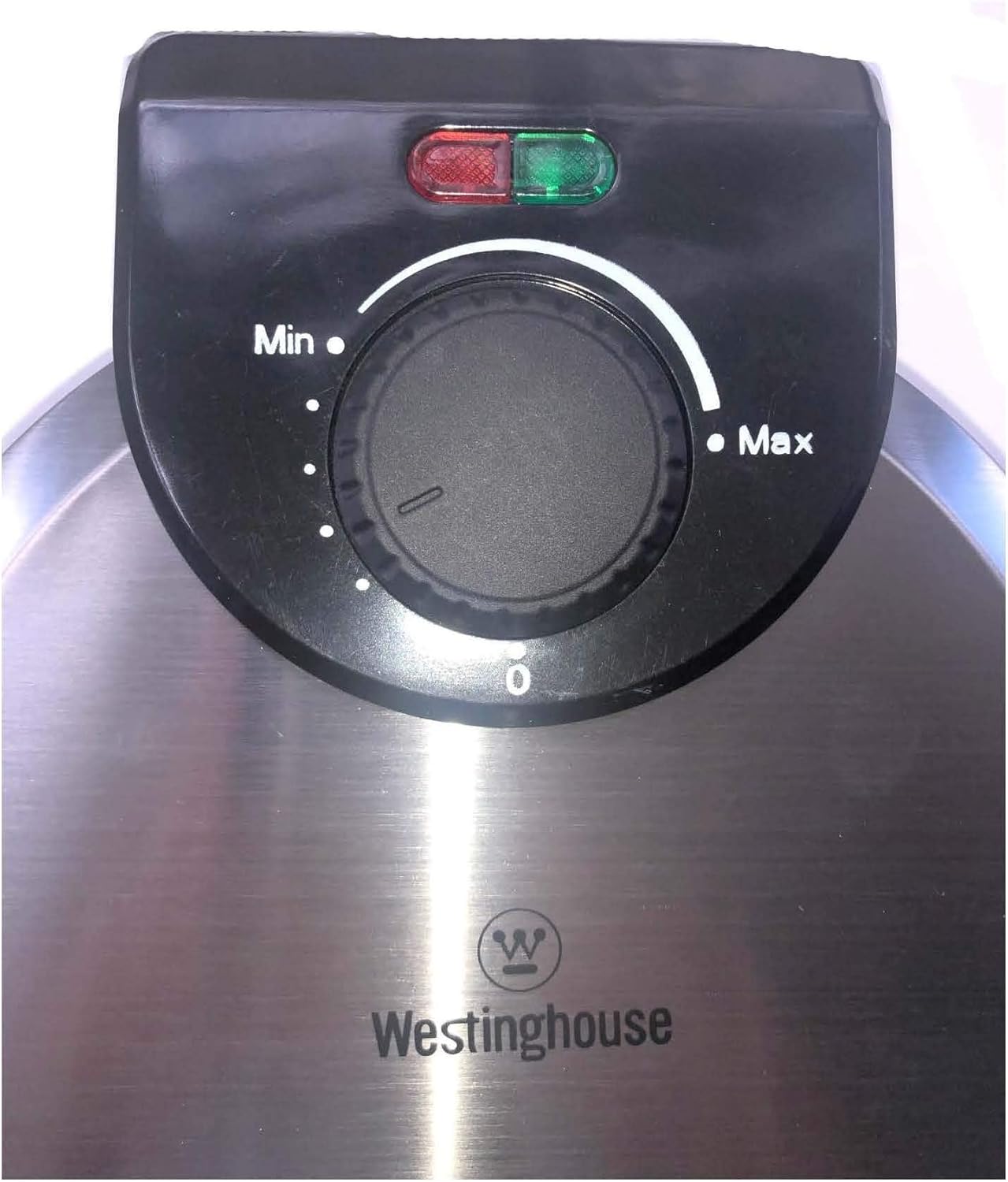
Image 2: Close-up of the control dial, showing 'Min' and 'Max' temperature settings, and the red (Power) and green (Ready) indicator lights.
Cleaning and Maintenance
Proper cleaning and maintenance ensure the longevity and optimal performance of your Tortilla and Roti Maker.
- Always Unplug: Before cleaning, ensure the appliance is unplugged from the power outlet and has completely cooled down.
- Wipe Cooking Plates: The non-stick cooking plates should be cleaned with a slightly damp cloth. For stubborn residue, use a soft sponge with a small amount of mild dish soap, then wipe clean with a damp cloth. Do not use abrasive pads, metal utensils, or harsh chemicals, as these can damage the non-stick coating.
- Clean Exterior: Wipe the exterior stainless steel housing with a soft, damp cloth. Dry thoroughly.
- Do Not Immerse: Never immerse the appliance, power cord, or plug in water or any other liquid.
- Storage: Once clean and dry, store the appliance in a cool, dry place. The compact design allows for easy storage.
Troubleshooting
If you encounter issues with your Tortilla and Roti Maker, refer to the following common problems and solutions:
- Appliance does not heat up:
- Ensure the power cord is securely plugged into a working 110-volt outlet.
- Check if the thermostat dial is set to a heat setting above 'Min'.
- Verify that the red power indicator light is on.
- Flatbreads are not cooking evenly or sticking:
- Ensure the appliance is fully preheated (green 'Ready' light is on) before placing dough.
- Adjust the thermostat to a higher setting if flatbreads are undercooked.
- Ensure the non-stick plates are clean and free of residue.
- Avoid using metal utensils that can scratch the non-stick coating.
- Dough slides out when pressing:
- Ensure the dough ball is centered on the lower plate.
- Apply gentle, even pressure when closing the top plate. Excessive force can cause the dough to shift.
- The consistency of the dough can affect this; ensure your dough is not too wet or too dry.
- Handle becomes loose or damaged:
- Avoid dropping the appliance or applying excessive force to the handle.
- If the handle is damaged, discontinue use and contact customer support for assistance.
Specifications
| Model Number | WKRM293 |
| Brand | Westinghouse |
| Color | Silver |
| Material | Stainless Steel |
| Wattage | 110 watts |
| Voltage | 110 Volts |
| Item Weight | 3.99 pounds |
| Package Dimensions | 12.25 x 9 x 7.75 inches |
| Special Feature | Manual temperature control |
| UPC | 193862000971 |
Warranty and Support
This Westinghouse WKRM293 Tortilla and Roti Maker comes with a limited warranty. For specific details regarding warranty coverage, duration, and terms, please refer to the warranty card included with your product or contact Westinghouse customer service.
For technical support, troubleshooting assistance, or warranty claims, please contact Westinghouse customer service through their official website or the contact information provided in your product packaging. When contacting support, please have your model number (WKRM293) and proof of purchase available.


