Introduction
This user manual provides comprehensive instructions for the installation, operation, and maintenance of your PNI Clementine 8524BT Car MP3 Player and PNI HiFi500 Coaxial Car Speakers. Please read this manual thoroughly before using the product to ensure proper functionality and safety.
Package Contents
Upon opening the package, verify that all components listed below are present and in good condition:
- PNI Clementine 8524BT Car MP3 Player
- Mounting Frame (Sina mount)
- Remote Control
- Connection Cables (Wiring harness)
- User Manual (this document)
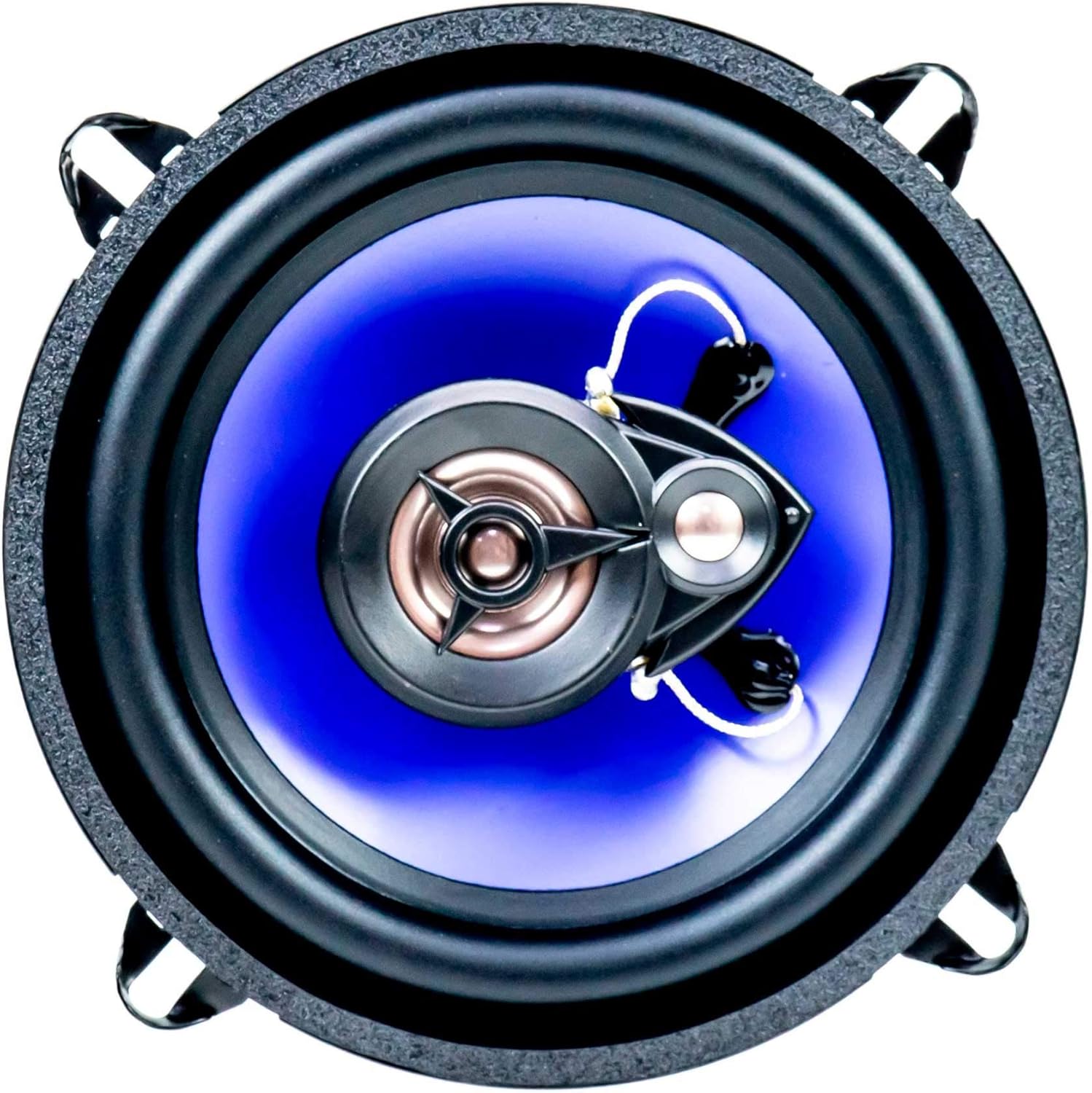
- 2 x PNI HiFi500 Coaxial Car Speakers
- 2 x Speaker Protection Grilles


Safety Information and Cautions
Observe the following precautions to ensure safe and optimal operation of your device:
- Do not use the product in very hot or very cold environments. Ensure the operating temperature is within -20°C to +60°C.
- Do not insert metal objects (such as screws or coins) into the unit to prevent short circuits and damage.
- The unit is designed to play MP3/WMA audio file types. Do not attempt to view photo or video files with this product. The screen will display the current file type being played.
- Ensure proper power supply voltage (12 V / 24 V) as specified for the device. Incorrect voltage can cause damage.
- Installation should ideally be performed by a qualified professional to avoid electrical damage or improper function.

Product Features
PNI Clementine 8524BT Car MP3 Player:
- AM / FM Radio with FM (87.5 - 108 MHz) and AM (522 - 1620 KHz) bands.
- AUX In audio input (3.5mm mini jack) for external devices.
- USB 2.0 port for media playback.
- MicroSD card slot for media playback.
- Bluetooth connectivity for audio streaming and hands-free calling.
- Screen characters and button lighting in blue.
- Automatic / Manual radio search mode.
- RDS special functions.
- 18 FM preset radio memories and 12 AM preset radio memories.
- LCD display.
- Supports MP3 file playback.
- Power supply voltage: 12 V / 24 V.
- Maximum audio power: 4 x 45W.
PNI HiFi500 Coaxial Car Speakers:
- 5-inch (12.7 cm) diameter coaxial speakers.
- 100W maximum power.
- 3-way design for comprehensive sound reproduction.
- Piezo Tweeter (15mm) for high frequencies.
- Mylar Dome Tweeter (30mm) for midrange frequencies.
Setup and Installation
It is highly recommended that installation be performed by a qualified automotive audio technician. Incorrect wiring or mounting can damage the unit, vehicle electronics, or cause injury.
PNI Clementine 8524BT Car MP3 Player Installation:
- Mounting: Insert the provided mounting frame (Sina mount) into the vehicle's 1 DIN opening. Secure it firmly.
- Wiring: Connect the wiring harness to the corresponding ports on the back of the car MP3 player and to your vehicle's electrical system. Ensure correct polarity for power (12V/24V), ground, accessory, and speaker outputs. Refer to the wiring diagram provided with the connection cables.
- Antenna: Connect the vehicle's radio antenna to the antenna input on the player.
- RCA Outputs: If using external amplifiers, connect RCA cables to the player's RCA outputs.
- Slide In: Carefully slide the car MP3 player into the mounted frame until it clicks into place.

PNI HiFi500 Coaxial Car Speakers Installation:
- Placement: Identify suitable mounting locations in your vehicle (e.g., door panels, rear deck) that accommodate 5-inch speakers.
- Wiring: Connect the speaker wires from the car MP3 player (or external amplifier) to the terminals on the speakers. Ensure correct positive and negative connections.
- Mounting: Secure the speakers using appropriate screws and mounting hardware. Ensure they are firmly seated to prevent vibrations.
- Grilles: Attach the provided protection grilles over the speakers for physical protection and aesthetic finish.

Operating Instructions
Familiarize yourself with the front panel controls and remote control for optimal use.

Front Panel Controls:
- Power Button (␁): Press to turn the unit ON/OFF.
- Volume Knob (VOL): Rotate to adjust the audio volume. Press to access audio settings (Bass, Treble, Balance, Fader).
- Mode Button (MODE): Press to cycle through available sources: FM/AM Radio, USB, MicroSD, AUX, Bluetooth.
- Band Button (BAND): In radio mode, press to switch between FM1, FM2, FM3, AM1, AM2 bands.
- Tune/Track Buttons (⏴⏴ / ⏵⏵): In radio mode, short press to seek stations. Long press for manual tuning. In USB/MicroSD mode, short press for previous/next track.
- Play/Pause Button (⏵⏵): In media playback mode, press to play or pause.
- Mute Button (MUTE): Press to mute/unmute audio output.
- USB Port: Insert USB flash drives for MP3/WMA playback.
- MicroSD Card Slot: Insert MicroSD cards for MP3/WMA playback.
- AUX Input (3.5mm jack): Connect external audio devices using a 3.5mm audio cable.
Radio Operation:
- Automatic Search: Long press the BAND button or seek buttons to automatically scan and store stations.
- Manual Tuning: Long press the tune buttons, then short press to fine-tune.
- Preset Stations: Short press number buttons (1-6) to recall stored stations. Long press to store current station to a preset.
USB/MicroSD Playback:
- Insert a USB drive or MicroSD card into the respective slot. The unit will automatically switch to USB/SD mode and begin playback.
- Use the track buttons to navigate between songs.
Bluetooth Operation:
- Pairing: Select Bluetooth mode using the MODE button. On your mobile device, search for "PNI 8524BT" (or similar) in Bluetooth settings and pair.
- Audio Streaming: Once paired, audio from your device will play through the car speakers.
- Hands-Free Calling: When a call comes in, the unit will display the caller ID. Press the answer button on the unit or remote to accept.
Specifications
PNI Clementine 8524BT Car MP3 Player:
| Feature | Specification |
|---|---|
| Power Supply Voltage | 12 V / 24 V |
| Maximum Audio Power | 4 x 45 W |
| FM Radio Frequency | 87.5 - 108 MHz |
| AM Radio Frequency | 522 - 1620 KHz |
| USB Port | Yes, 2.0 |
| Card Slot | Yes, microSD |
| Signal/Noise Ratio | > 60 dB |
| Dimensions (W x H x D) | 188 x 122 x 50 mm (7.4 x 4.8 x 2.0 inches) |
| Current Consumption (max) | 10A |
| AUX In | 3.5mm mini jack |
| Mounting Type | 1 DIN |
| Screen/Button Lighting | Blue |
| Special Features | RDS, Bluetooth |
| FM Preset Memories | 18 stations |
| AM Preset Memories | 12 stations |
| Audio File Support | MP3 |
| Channel Separation | > 25 dB |
| Frequency Response | 20 ~ 20000 Hz |
| Operating Temperature | -20 ~ +60 degrees C |
PNI HiFi500 Coaxial Car Speakers:
| Feature | Specification |
|---|---|
| Diameter | 5 inches (12.7 cm) |
| Power | 100W (Max) |
| Frequency Response | 80 - 20000 Hz |
| Number of Ways | 3 |
| Impedance | 4 ohms |
| Sensitivity | 88 dB |
| Dimensions | 127 X 60 X 127 mm |
| Tweeter | 15 mm Piezo |
| Midrange Speaker | 30mm Mylar Dome |
Troubleshooting
If you encounter issues with your PNI Clementine 8524BT or PNI HiFi500 speakers, refer to the common problems and solutions below:
| Problem | Possible Cause | Solution |
|---|---|---|
| No power to the unit. | Blown fuse, incorrect wiring, no power from vehicle. | Check the fuse on the unit's wiring harness. Verify power and ground connections. Ensure vehicle ignition is on. |
| No sound from speakers. | Incorrect speaker wiring, volume too low, unit in mute mode, incorrect source selected. | Check speaker connections (polarity). Increase volume. Press MUTE button. Select correct audio source (Radio, USB, AUX, BT). |
| Radio reception is poor. | Antenna not connected, damaged antenna, weak signal area. | Ensure antenna is securely connected. Check antenna for damage. Try tuning to stronger stations. |
| USB/MicroSD not playing. | Unsupported file format, corrupted files, drive/card not inserted correctly, drive/card capacity too large. | Ensure files are MP3/WMA format. Reinsert USB/MicroSD. Try a different drive/card. Check maximum supported capacity in full manual. |
| Bluetooth not connecting. | Unit not in pairing mode, Bluetooth off on mobile device, device already paired to another unit. | Ensure unit is in Bluetooth mode. Turn Bluetooth ON on your mobile device. Forget previous pairings on your device and re-scan. |
Maintenance
To ensure the longevity and optimal performance of your PNI car audio system, follow these maintenance guidelines:
- Cleaning: Use a soft, dry cloth to clean the unit's front panel and display. For stubborn dirt, slightly dampen the cloth with water. Do not use abrasive cleaners or solvents.
- Speaker Care: Keep the speaker cones free from dust and debris. Avoid pressing on the speaker cones or tweeters.
- Temperature: Avoid exposing the unit to extreme temperatures, both hot and cold, for extended periods.
- Connections: Periodically check all wiring connections to ensure they are secure and free from corrosion.
Warranty and Support
For detailed warranty information, please refer to the warranty card included with your product or visit the official PNI website. If you require technical assistance or have questions not covered in this manual, please contact PNI customer support through their official channels.
You can find more information and support resources by visiting the PNI Store on Amazon.