
1. Introduction
This instruction manual provides essential information for the proper installation and use of the Panasonic Vehicle Interface Code PZ30. This interface code is designed to connect various external signals, including a rearview camera, to compatible Panasonic navigation systems, specifically the CN-RE04D and CN-RE04WD models. Please read this manual thoroughly before installation to ensure correct operation and to prevent damage.
2. Product Overview
The Panasonic Vehicle Interface Code PZ30 is a genuine accessory that provides input terminals for a rearview camera and other vehicle signals. It ensures reliable performance and quality when integrated with your Panasonic navigation system.

Image 2.1: The Panasonic Vehicle Interface Code PZ30, showing various labeled wires for different connections such as REVERSE, SIDE BRAKE, SPEED, and CAMERA IN.
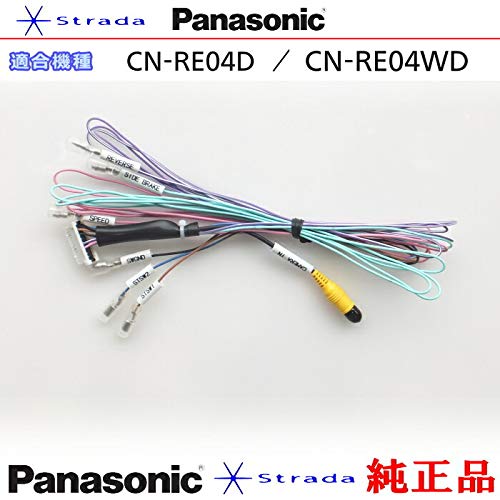
Image 2.2: The interface code with branding for Panasonic Strada and compatibility information for models CN-RE04D and CN-RE04WD.

Image 2.3: A closer view of the PZ30 interface code, highlighting its function as a vehicle interface code for power signal input, ground, speaker output, and remote signal output.
3. Compatibility
This Vehicle Interface Code PZ30 is compatible with the following Panasonic navigation system models:
- Panasonic CN-RE04D
- Panasonic CN-RE04WD
Ensure your navigation system is one of the listed compatible models before attempting installation.
4. Installation Guide
4.1. General Precautions
- Always disconnect the vehicle's battery before starting any electrical installation.
- Refer to your vehicle's service manual for specific wiring diagrams and disassembly instructions.
- Ensure all connections are secure and properly insulated to prevent short circuits.
- If you are unsure about any step, consult a qualified professional.
4.2. Connecting the Interface Code
The interface code connects to the main unit of your Panasonic navigation system. The coupler shape is specific to the compatible models. The use of cables may vary slightly depending on the specific model of your navigation system.
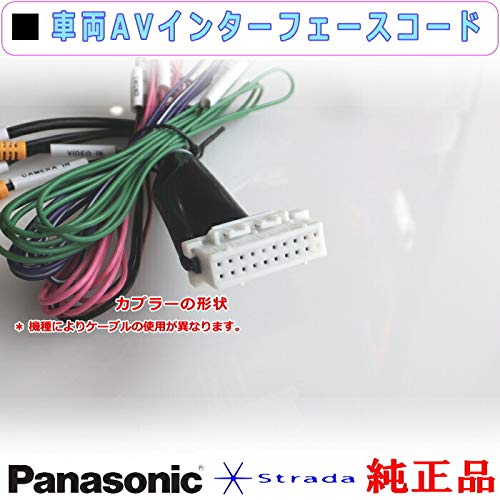
Image 4.1: A close-up view of the coupler (connector) on the interface code. The shape is crucial for proper connection to the navigation unit.
4.3. Wiring Connections
Identify and connect the following wires from the interface code to the corresponding points in your vehicle's wiring harness or accessories:
- CAMERA IN (20cm): Connects to the video input of a separately sold rearview camera.
- SIDE BRAKE (2m): Connects to the vehicle's side brake signal.
- REVERSE (2m): Connects to the vehicle's reverse gear signal.
- SPEED (2m): Connects to the vehicle's speed pulse signal.
- STSW1 (Brown, 45cm): Steering Switch 1 Code.
- STSW2 (Blue/Yellow, 45cm): Steering Switch 2 Code.
- SWGRD (Black, 45cm): Steering Switch 3 Code (Ground).
Important Note:
The standard included parts of this interface code do not provide external video output. If you intend to use a rear monitor, flip-down monitor, or similar external display, please ensure you use genuine Panasonic products that support external video output.

Image 4.2: A detailed diagram showing the various connections, their functions, and cable lengths for the PZ30 interface code.
5. Operating
Once the interface code is correctly installed and connected, the functions it enables will be accessible through your Panasonic CN-RE04D or CN-RE04WD navigation system.
- Rearview Camera: When the vehicle is shifted into reverse, the image from the connected rearview camera should automatically display on your navigation screen.
- Steering Wheel Controls: If connected, your vehicle's steering wheel controls should now operate compatible functions on your navigation system (e.g., volume, track change).
- Vehicle Signals: The side brake and speed signals provide necessary data to the navigation system for features like safe driving prompts and accurate navigation positioning.
Refer to your Panasonic navigation system's main instruction manual for detailed operation of these features.
6. Maintenance
The Panasonic Vehicle Interface Code PZ30 requires minimal maintenance. Ensure that all connections remain secure and free from moisture or physical damage. Periodically check for any loose wires or signs of wear. Do not attempt to disassemble or modify the interface code, as this may void any warranty and could cause damage to your vehicle's electrical system or navigation unit.
7. Troubleshooting
If you encounter issues after installing the interface code, consider the following:
- No Rearview Camera Image:
- Check if the CAMERA IN wire is securely connected to both the interface code and the rearview camera.
- Verify that the REVERSE signal wire is correctly connected to the vehicle's reverse light circuit.
- Ensure the rearview camera itself is powered and functioning correctly.
- Steering Wheel Controls Not Working:
- Confirm that STSW1, STSW2, and SWGRD wires are correctly connected to the vehicle's steering wheel control wiring.
- Check your navigation system's settings to ensure steering wheel control functionality is enabled and configured.
- General Malfunction:
- Recheck all connections for looseness or incorrect wiring.
- Ensure the main coupler to the navigation unit is fully seated.
- Temporarily disconnect and reconnect the vehicle's battery (after ensuring all power is off) to reset the system.
If problems persist, it is recommended to consult a professional installer or Panasonic customer support.
8. Specifications
| Component | Function | Length |
|---|---|---|
| CAMERA IN | Rearview Camera Video Input | 20 cm |
| SIDE BRAKE | Side Brake Signal | 2 m |
| REVERSE | Reverse Gear Signal | 2 m |
| SPEED | Vehicle Speed Pulse Signal | 2 m |
| STSW1 (Brown) | Steering Switch 1 Code | 45 cm |
| STSW2 (Blue/Yellow) | Steering Switch 2 Code | 45 cm |
| SWGRD (Black) | Steering Switch 3 Code (Ground) | 45 cm |
Manufacturer: Panasonic
Part Number: PZ30-RE04D
ASIN: B086VHMXG6
9. Warranty and Support
As a genuine Panasonic product, this interface code is manufactured to high standards. For specific warranty information, please refer to the documentation included with your Panasonic navigation system or contact Panasonic customer support directly. Keep your proof of purchase for warranty claims.
For further assistance or technical support, please visit the official Panasonic website or contact their customer service department.