
1. Product Overview
The KIWIFOTOS DK-30 Long Soft Viewfinder Eyecup is specifically designed as a replacement for the Nikon DK-30 eyecup, compatible with the Nikon Z50 camera. Constructed from durable ABS and soft silicone material, this eyecup enhances viewing comfort and provides protection for the camera's viewfinder.

Image 1.1: The DK-30 eyecup, highlighting its soft and flexible silicone construction.
2. Key Features
- Enhanced Comfort: Made from soft, thick silicone, the eyecup conforms to the shape of your eye, providing a comfortable fit for both naked eye users and those wearing glasses.
- Stray Light Reduction: Effectively blocks unwanted stray light from entering the viewfinder, improving contrast and reducing glare for a clearer view.
- Viewfinder Protection: Shields the viewfinder from impacts, scratches, dirt, moisture, and dust.
- Easy Installation: Designed for simple slide-on and click installation.
- Flip Screen Compatibility: Does not interfere with the camera's flip screen functionality.

Image 2.1: The DK-30 eyecup mounted on a camera, emphasizing its protective and comfort features.
3. Compatibility
This eyecup is a direct replacement for the Nikon DK-30 and is specifically compatible with the Nikon Z50 camera.
4. Setup and Installation
- Remove Original Eyecup: Gently slide off or detach the existing eyecup from your Nikon Z50 camera's viewfinder.
- Align New Eyecup: Position the KIWIFOTOS DK-30 eyecup over the camera's viewfinder, ensuring proper alignment with the grooves.
- Slide and Click: Carefully slide the new eyecup into place until it clicks securely onto the viewfinder. Ensure it is firmly attached and does not wobble.
Video 4.1: Installation guide for the Kiwifotos DK-30 Long Eyecup on a Nikon Z50 Camera. This video demonstrates the process of attaching the eyecup to the camera's viewfinder.

Image 4.2: Visual representation of the easy slide-on installation process for the eyecup.
5. Operating Instructions
Once installed, the eyecup is ready for use. Simply bring your eye to the viewfinder as usual. The extended soft silicone will provide a comfortable seal around your eye, blocking ambient light and allowing for a clearer view of your camera's display and composition.
- For Eyeglass Users: The soft silicone material is designed to be gentle on eyeglasses, preventing scratches while still providing an effective light seal.
- Flip Screen Operation: The design ensures that the camera's flip screen can be fully articulated and used without obstruction from the eyecup.
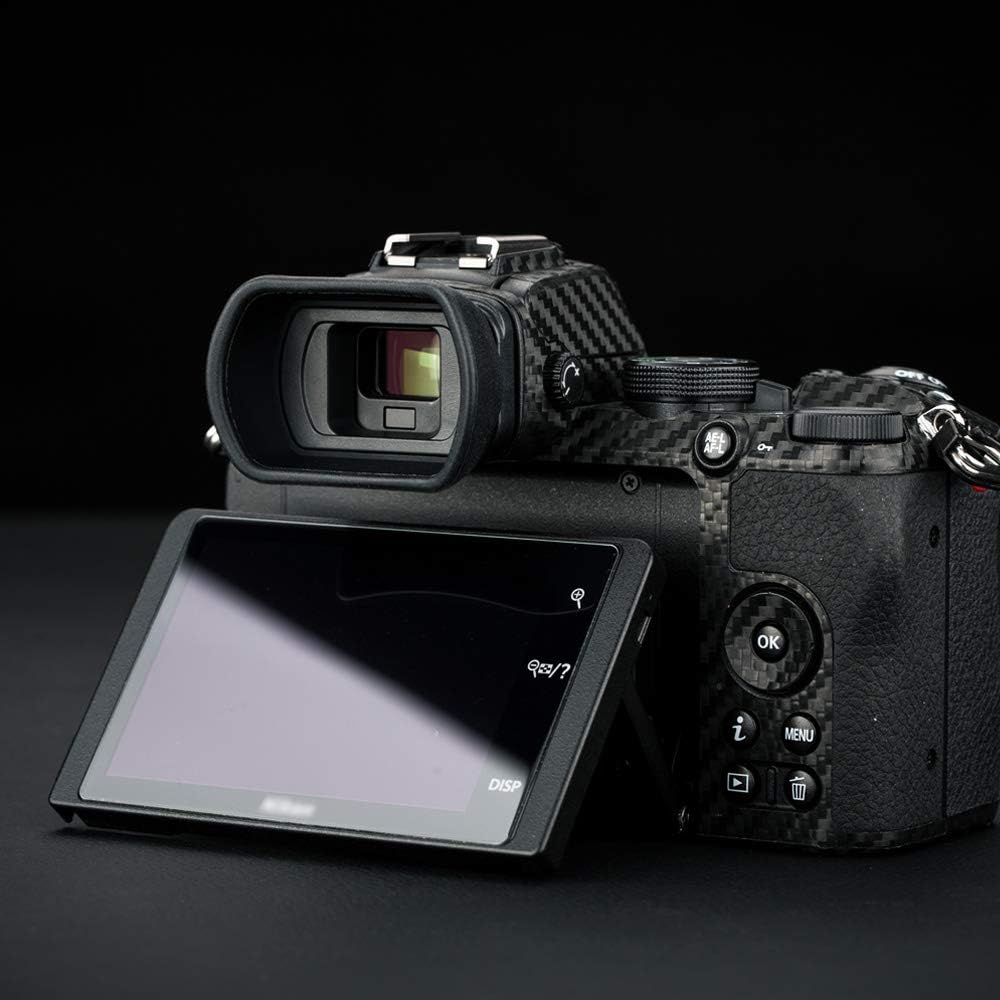
Image 5.1: The eyecup installed on a Nikon Z50, showing the camera's flip screen fully extended without interference.
6. Maintenance
To ensure the longevity and performance of your eyecup:
- Cleaning: Wipe the silicone and ABS parts with a soft, damp cloth. Avoid harsh chemicals or abrasive materials that could damage the surface.
- Storage: When not in use for extended periods, store the eyecup in a clean, dry place away from direct sunlight and extreme temperatures.
- Inspection: Periodically check the eyecup for any signs of wear or damage. Replace if necessary to maintain optimal performance and protection.
7. Troubleshooting
- Eyecup feels loose: Ensure the eyecup is correctly aligned and fully clicked into place. Remove and re-install if necessary.
- Stray light still visible: Confirm the eyecup is seated flush against the viewfinder. Adjust its position to create a complete seal around your eye.
- Interference with flip screen: The DK-30 is designed not to interfere with the flip screen. If interference occurs, check for proper installation.
8. Specifications
| Model Number | DK30 |
| Material | ABS & Silicone |
| Compatibility | Nikon Z50 Camera (Replaces Nikon DK-30) |
| Item Weight | 0.634 ounces |
| Package Dimensions | 3.19 x 2.01 x 1.65 inches |

Image 8.1: Dimensional specifications of the DK-30 eyecup.
9. Warranty and Support
For warranty information or technical support, please refer to the manufacturer's official website or contact their customer service directly. Keep your purchase receipt as proof of purchase.