1. Introduction
The eldoLED POWERdrive 106/S is a high-performance, 100W constant current LED driver designed for advanced lighting applications. It features DMX/RDM/DALI control interfaces, providing flexible integration into various lighting systems. This driver offers four independent control channels with 4x 57V outputs, making it suitable for precise control of constant current LED luminaires. This manual provides essential information for the safe installation, operation, and maintenance of your POWERdrive 106/S unit.
2. Safety Information
Please read and understand all safety instructions before installing or operating the POWERdrive 106/S. Failure to follow these instructions may result in electric shock, fire, or other hazards.
- Installation must be performed by a qualified electrician in accordance with all local and national electrical codes.
- Ensure the main power supply is disconnected before any installation, wiring, or maintenance procedures.
- Do not expose the device to moisture or extreme temperatures. This product is intended for indoor use only.
- Ensure proper ventilation around the driver to prevent overheating.
- Verify that the input voltage and current ratings match the specifications of your electrical system.
- Connect only constant current LED loads to the output terminals. Do not connect constant voltage LEDs or other incompatible loads.
- Do not attempt to open or modify the driver housing. There are no user-serviceable parts inside.
3. Package Contents
The POWERdrive 106/S package typically includes:
- 1x eldoLED POWERdrive 106/S Constant Current LED Driver Unit
4. Product Features
- Power Output: 100W total output power.
- Control Interfaces: DMX, RDM, and DALI for versatile system integration.
- Control Channels: 4 independent control channels.
- Output Type: Constant Current (CC) for precise LED control.
- Output Voltage: 4x 57V outputs.
- Housing: Durable square metal enclosure.
- Advanced Configuration: On-board programming for per-output mA targets, adjustable dim curves, and 8/16-bit operation modes.
5. Setup and Installation
5.1 Mounting
Mount the POWERdrive 106/S securely in a location that allows for adequate airflow and is protected from moisture and excessive heat. Use appropriate fasteners for the mounting surface. Ensure the driver is easily accessible for wiring and maintenance.
5.2 Wiring
All wiring should be performed by a qualified professional. Refer to the detailed wiring diagrams provided with your product documentation or on the eldoLED website for specific connection instructions. General wiring steps include:
- Input Power: Connect the AC mains power supply to the designated input terminals. Ensure correct polarity and grounding.
- Control Signal: Connect the DMX, RDM, or DALI control lines to the respective input terminals. Follow standard protocols for bus termination if required.
- LED Outputs: Connect your constant current LED luminaires to the four output channels. Observe correct polarity for each LED string. Ensure the total current and voltage requirements of the connected LEDs do not exceed the driver's specifications.
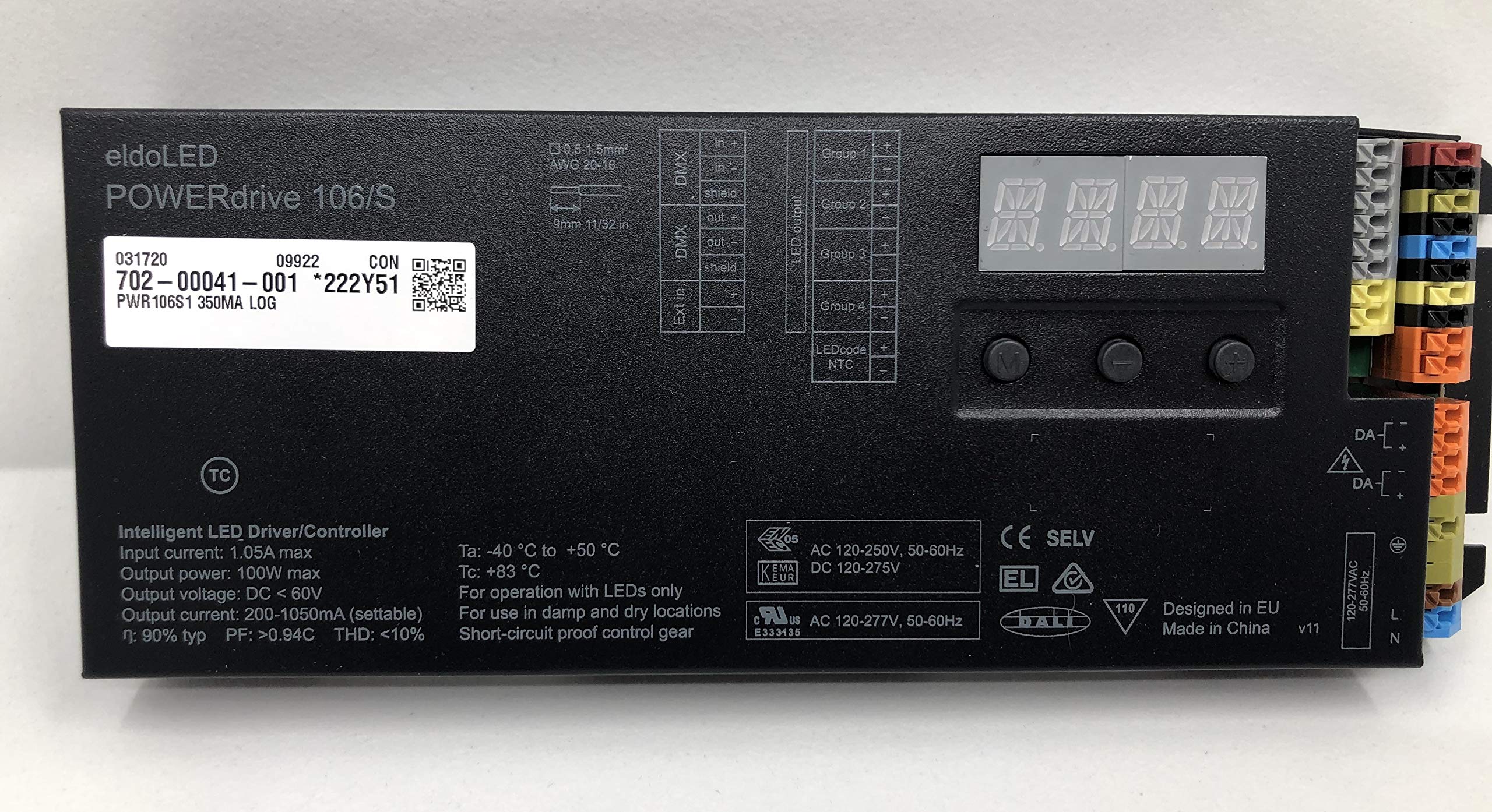
Figure 1: The eldoLED POWERdrive 106/S constant current LED driver, showcasing its square metal housing and connection terminals.
6. Operation
6.1 Control Interfaces
The POWERdrive 106/S supports DMX, RDM, and DALI protocols for controlling connected LED luminaires. Consult the specific protocol documentation for details on addressing, command structures, and data transmission.
- DMX (Digital Multiplex): Standard for lighting control, allowing individual or group control of channels.
- RDM (Remote Device Management): Extends DMX to allow bidirectional communication for device configuration and monitoring.
- DALI (Digital Addressable Lighting Interface): A dedicated lighting control protocol for individual control of lighting fixtures.
6.2 Configuration
The POWERdrive 106/S can be configured using eldoLED's proprietary software tools. This allows for customization of parameters such as:
- Setting specific constant current output targets for each of the four channels.
- Adjusting dimming curves to achieve desired light output characteristics.
- Selecting between 8-bit and 16-bit operation modes for dimming resolution.
Refer to the eldoLED software documentation for detailed instructions on configuring your driver.
7. Maintenance
The POWERdrive 106/S is designed for reliable operation with minimal maintenance. However, periodic checks can help ensure optimal performance and longevity:
- Cleaning: Keep the driver housing clean and free of dust and debris. Use a dry, soft cloth for cleaning. Do not use liquid cleaners.
- Ventilation: Ensure that ventilation openings are not obstructed to maintain proper heat dissipation.
- Connections: Periodically inspect all wiring connections to ensure they are secure and free from corrosion or damage.
8. Troubleshooting
If you encounter issues with your POWERdrive 106/S, consider the following troubleshooting steps:
- No Power: Check the main power supply, circuit breaker, and all power connections to the driver.
- LEDs Not Responding: Verify that the control signal (DMX/RDM/DALI) is correctly connected and active. Check the addressing of the driver and the connected luminaires.
- Flickering or Irregular Output: Inspect LED output wiring for loose connections or shorts. Ensure the connected LED load is compatible with the driver's specifications. Check for interference on the control lines.
- Overheating: Ensure the driver has adequate ventilation and is not operating in an environment exceeding its specified temperature range.
If problems persist after attempting these steps, contact eldoLED technical support for further assistance.
9. Technical Specifications
| Model Number | PWR106S |
| Brand | eldoLED |
| Power Output | 100W |
| Control Interfaces | DMX, RDM, DALI |
| Control Channels | 4 |
| Output Type | Constant Current |
| Output Voltage | 4x 57V |
| Housing | Square Metal |
| UPC | 715706905725 |
| Manufacturer | Acuity |
10. Warranty and Support
The eldoLED POWERdrive 106/S is covered by a manufacturer's warranty. For specific warranty terms and conditions, please refer to the documentation included with your product or visit the official eldoLED website. For technical support, troubleshooting assistance, or to inquire about service, please contact eldoLED customer support through their official channels.


