
Green Cell INV16
Green Cell INV16 Power Inverter User Manual
Model: INV16 | Brand: Green Cell
Introduction
This manual provides essential information for the safe and efficient operation of your Green Cell INV16 Power Inverter. Please read this manual thoroughly before using the device and keep it for future reference.
The Green Cell INV16 is a versatile power inverter designed to convert 12V DC power from a car battery or similar source into 230V AC power, allowing you to operate standard household appliances and charge electronic devices on the go. It features a pure sine wave output, ensuring compatibility with sensitive electronics, and includes multiple safety protections.
Safety Instructions
Always observe the following safety precautions to prevent injury or damage to the inverter and connected devices:
- Do not expose the inverter to water, rain, or excessive moisture.
- Ensure proper ventilation around the inverter to prevent overheating.
- Do not open the inverter casing. There are no user-serviceable parts inside.
- Connect the inverter only to a 12V DC power source.
- Ensure the total power consumption of connected devices does not exceed the inverter's rated output (500W).
- Keep out of reach of children.
- Disconnect the inverter from the power source when not in use.
Product Overview
The Green Cell INV16 Power Inverter is designed for portability and efficiency, providing reliable AC power from a DC source. Key components include:
- AC Output Socket (230V)
- USB Charging Port
- ON/OFF Power Switch
- Power Fault Indicator
- DC Input Terminals (Positive and Negative)
- Cooling Fan

Figure 1: Front and Rear Panel Layout of the INV16 Inverter. This image illustrates the various ports and controls, including the AC output, USB port, power switch, DC input terminals, and cooling fan.
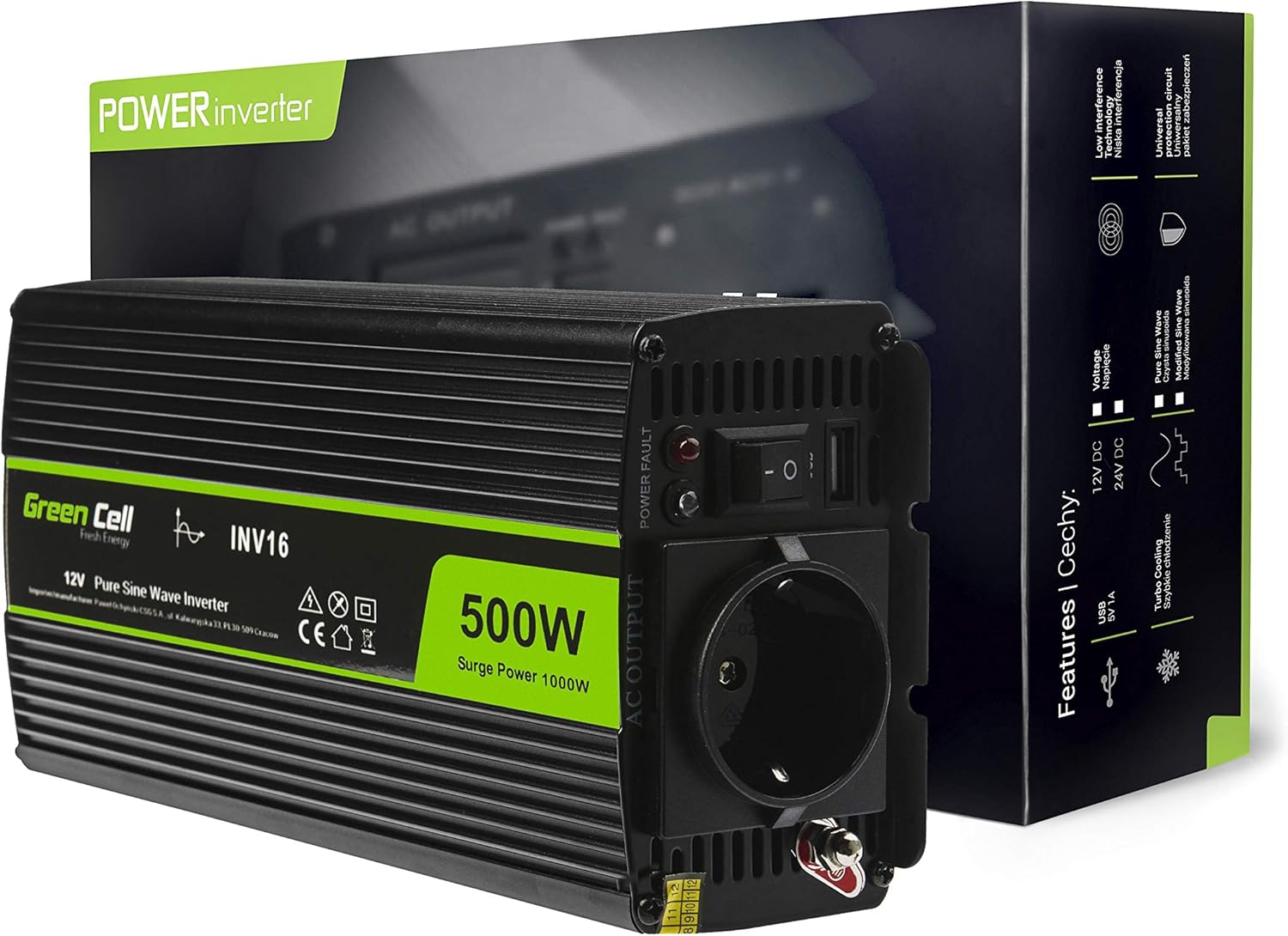
Figure 2: Green Cell INV16 Power Inverter. This image shows the inverter unit alongside its product packaging, emphasizing its 500W power output and pure sine wave capability.
Setup
- Placement: Choose a dry, well-ventilated area for the inverter. Ensure there is sufficient space around the unit for air circulation, especially around the cooling fan. Avoid placing it in direct sunlight or near heat sources.
- Power Source Connection:
- Ensure the inverter's power switch is in the "OFF" position.
- Connect the positive (+) red cable from your 12V DC power source (e.g., car battery) to the positive (+) terminal on the inverter.
- Connect the negative (-) black cable from your 12V DC power source to the negative (-) terminal on the inverter.
- Ensure all connections are secure and tight to prevent loose contacts and voltage drops.
- Grounding: For safety, connect the grounding screw on the inverter to a proper earth ground. In a vehicle, this can be the chassis.

Figure 3: Smart Cooling System and DC Input. This image highlights the inverter's cooling fan and the DC input terminals, crucial for proper setup and operation.
Operating Instructions
- Powering On: Once the inverter is securely connected to the 12V DC power source, switch the ON/OFF button to the "ON" position. The power indicator light should illuminate.
- Connecting Devices:
- Plug your 230V AC appliances into the AC output socket on the inverter.
- For charging smaller devices, connect them to the USB port.
- Ensure the total wattage of all connected devices does not exceed 500W.
- Pure Sine Wave Output: This inverter provides a pure sine wave output, making it suitable for sensitive electronics like laptops, medical equipment, and audio systems, which require a clean and stable power supply.
- Powering Off: Before disconnecting any devices or the inverter from its power source, switch the ON/OFF button to the "OFF" position.

Figure 4: Pure Sine Wave Capability. This image visually represents the pure sine wave output, indicating its suitability for sensitive electronic devices.

Figure 5: Versatile Use Cases. This image demonstrates the inverter's utility in different environments, such as campers, cars, and camping sites, highlighting its adaptability for on-the-go power needs.
Maintenance
Regular maintenance ensures the longevity and optimal performance of your Green Cell INV16 Power Inverter:
- Cleaning: Periodically wipe the exterior of the inverter with a soft, dry cloth. Do not use liquid cleaners or solvents.
- Ventilation: Ensure the cooling fan and ventilation openings are free from dust and debris. Blocked vents can lead to overheating.
- Connections: Regularly check all cable connections to ensure they are secure and free from corrosion.
- Storage: When not in use for extended periods, store the inverter in a cool, dry place, away from direct sunlight and extreme temperatures.
Troubleshooting
If you encounter issues with your inverter, refer to the following common problems and solutions:
| Problem | Possible Cause | Solution |
|---|---|---|
| Inverter does not turn on. | No power from DC source; loose connections; blown fuse. | Check DC power source (e.g., car battery voltage); tighten connections; check and replace internal fuse if necessary (consult professional). |
| No AC output. | Overload protection activated; low battery voltage; overheating. | Reduce connected load; charge or replace DC battery; allow inverter to cool down, ensure proper ventilation. |
| Inverter shuts down frequently. | Overheating; excessive load; low input voltage. | Ensure adequate ventilation; reduce load; check DC input voltage. |
| Fan is constantly running or very loud. | High internal temperature; heavy load. | This is normal under heavy load or high ambient temperatures. Ensure vents are clear. |

Figure 6: Built-in Safety Features. This image highlights the comprehensive safety mechanisms integrated into the inverter, including protection against short circuits, overvoltage, and thermal issues, which are crucial for troubleshooting.
Specifications
| Feature | Specification |
|---|---|
| Model | INV16 |
| Brand | Green Cell |
| Input Voltage | 12V DC |
| Output Voltage | 230V AC |
| Continuous Power | 500W |
| Surge Power | 1000W |
| Output Waveform | Pure Sine Wave |
| USB Output | Yes |
| Color | Black |
| Weight | 1073 Grams |
| Compatible Devices | Laptop, Tablet, Refrigerators, TV sets, Solar panels, Stoves, Central heating pumps |
Warranty and Support
The Green Cell INV16 Power Inverter comes with a 2-year warranty from the date of purchase, covering defects in materials and workmanship under normal use. Please retain your proof of purchase for warranty claims.
For technical support, troubleshooting assistance, or warranty inquiries, please contact Green Cell customer service through their official website or the retailer where you purchased the product. Refer to the product packaging or Green Cell's official website for the most current contact information.