
Introduction
The Umiitto Freeze Door Alarm is a versatile security device designed to enhance the safety of your home or property. It effectively deters intruders with a loud 108dB alarm and provides timely notifications for open doors or windows, making it ideal for monitoring refrigerators, freezers, cabinets, and entry points. This manual provides detailed instructions for setup, operation, and maintenance.
Key Features
- Loud 108dB Alarm: Effectively deters intruders and alerts occupants.
- Multi-functional: Offers 4 distinct modes – General Alarm, Constant Alarm, Time Delay (Closing-door Alert), and Doorbell.
- Wide Application: Suitable for doors, windows, safe boxes, cabinets, freezers, refrigerators, pool sliding doors, and more.
- Easy Installation: Simple peel-and-stick application.
- Low Power Consumption: Designed for long-term protection, operating for over 2 years on a single set of batteries.
Package Contents
- Umiitto Freeze Door Alarm Unit (x2 for 2Pack)
- Magnetic Sensor Unit (x2 for 2Pack)
- Adhesive Pads for Installation
- AAA Batteries (included)
- User Manual (this document)
Setup and Installation
Follow these steps for proper installation and setup of your Umiitto Freeze Door Alarm.
1. Battery Installation
The alarm unit requires 2 AAA batteries.

Figure 1: Battery compartment. Insert 2 AAA batteries as shown.
- Open the battery compartment cover on the back of the main alarm unit.
- Insert 2 AAA batteries, ensuring correct polarity (+/-).
- Close the battery compartment cover securely.
2. Mounting the Alarm
The alarm unit and magnetic sensor must be mounted on the door/window frame and the door/window itself, respectively. Ensure the two parts are aligned and within 10mm (0.39 inches) of each other when the door/window is closed.
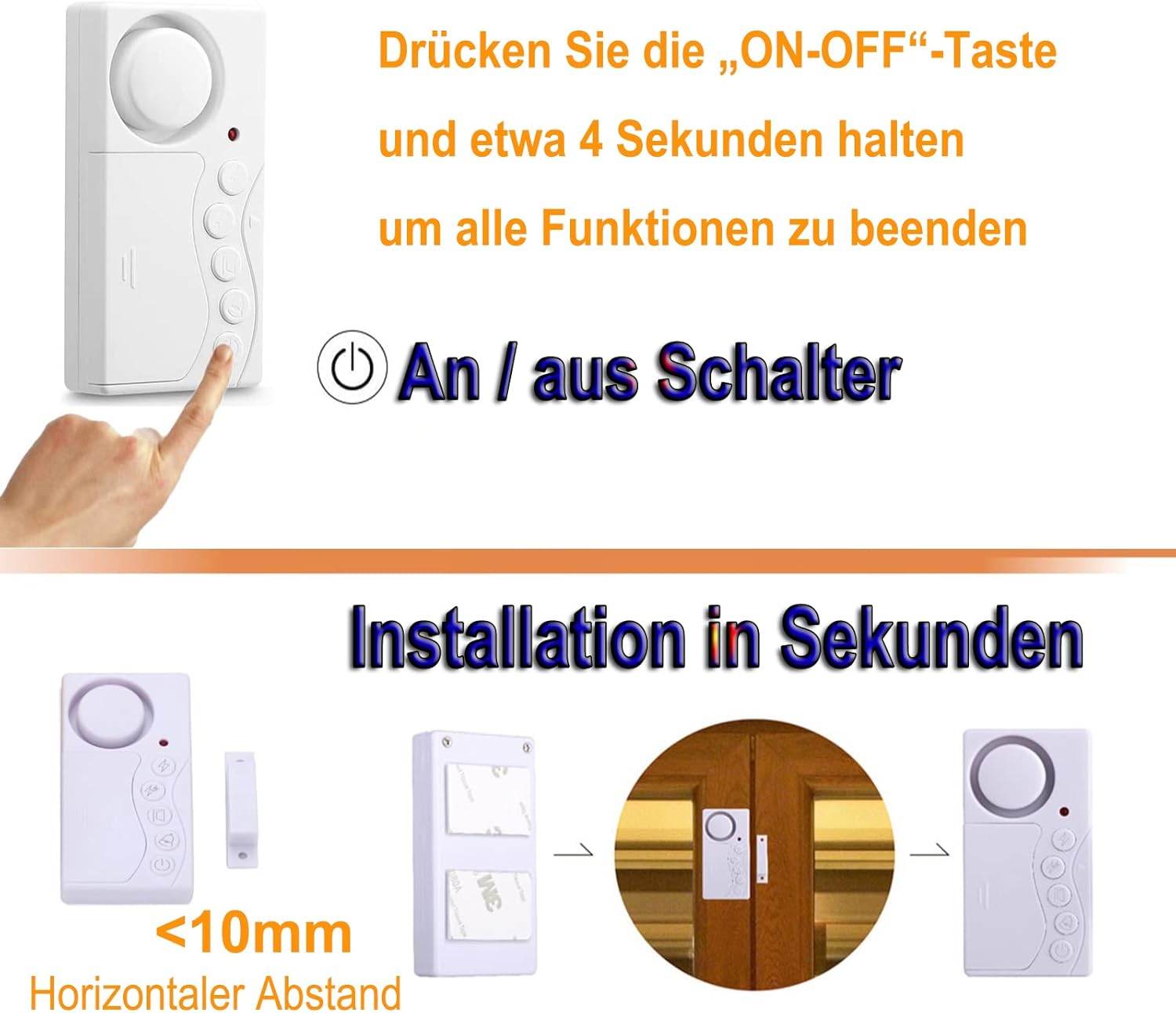
Figure 2: Proper alignment and distance for installation.
- Clean the surface where you intend to install the alarm. Ensure it is dry and free of dust or grease.
- Peel off the protective film from one side of the adhesive pad and attach it to the back of the main alarm unit. Repeat for the magnetic sensor.
- Affix the main alarm unit to the door/window frame.
- Affix the magnetic sensor to the door/window itself, ensuring it aligns with the main unit and the gap between them is less than 10mm when the door/window is closed.
Installation Demonstration Video
Video 1: This video demonstrates the physical installation and basic operation of the Umiitto Door Window Alarm, showing how to attach the main unit and magnetic sensor, and how the alarm sounds when triggered.
Operating Modes
The Umiitto Freeze Door Alarm features four distinct operating modes, selectable via the buttons on the unit.

Figure 3: Alarm unit buttons and functions.
1. General Alarm Mode
In this mode, the alarm will sound continuously when the door/window is opened and will stop only when the door/window is closed. This mode is ideal for general security, reminding you to close doors and windows to prevent hazards for children, pets, or to maintain temperature in refrigerators/freezers.

Figure 4: General Alarm Mode applications.
2. Constant Alarm Mode
This mode provides a continuous, loud alarm once triggered by an open door/window. The alarm will not stop until you manually press the corresponding button on the unit. This mode is designed for deterring intruders and providing maximum security.

Figure 5: Constant Alarm Mode for intruder deterrence.
3. Time Delay Mode (Closing-door Alert)
This mode allows for a customizable delay (3, 15, 30, or 60 seconds) before the alarm sounds when a door/window is left open. It's perfect for refrigerators, freezers, or frequently used doors where you need a short grace period before being alerted. The alarm will sound after the set delay if the door is still open.

Figure 6: Time Delay Mode for various uses.
4. Doorbell Mode
In Doorbell Mode, the unit will emit a pleasant chime sound ("Ding Dong") each time the door/window is opened. This is useful for storefronts, offices, or homes where you want to be notified of people entering or leaving without a loud alarm.

Figure 7: Doorbell Mode for entry notification.
Switching Modes and Power On/Off
To switch between modes, press the corresponding button on the alarm unit. To power the unit ON or OFF, press and hold the "ON-OFF" button for approximately 4 seconds.
Specifications
| Feature | Specification |
|---|---|
| Model Number | KS-SF19 |
| Alarm Volume | 108 dB |
| Sensor Technology | Contact Sensor |
| Power Source | 2 x AAA Batteries (included) |
| Product Dimensions | 3.35 x 1.69 x 0.39 inches |
| Item Weight | 2.54 ounces |
| Manufacturer | Umiitto |
Troubleshooting
Alarm not sounding or too quiet:
- Check battery levels and replace if necessary.
- Ensure the main unit and magnetic sensor are aligned correctly and the gap is less than 10mm when the door/window is closed.
- Verify the alarm is in the desired operating mode (General Alarm, Constant Alarm, or Time Delay).
False alarms:
- Re-check the alignment and gap between the main unit and magnetic sensor. Ensure they are securely mounted and do not shift.
- Ensure the mounting surface is stable and not subject to vibrations.
Difficulty switching modes:
- Ensure you are pressing the correct button for the desired mode.
- For power ON/OFF, remember to press and hold the button for approximately 4 seconds.
If issues persist, please contact Umiitto customer support.
Care and Maintenance
- Clean the alarm unit and sensor regularly with a soft, dry cloth. Do not use abrasive cleaners or solvents.
- Avoid exposing the device to extreme temperatures, direct sunlight, or high humidity.
- Replace batteries promptly when the low battery indicator (if present, or if performance degrades) appears to ensure continuous operation.
Warranty and Support
Umiitto is committed to providing high-quality products. For any questions, concerns, or technical assistance regarding your Freeze Door Alarm, please refer to the contact information provided with your purchase or visit the official Umiitto website.