
VLM Group Protocol TerraCopter EVO USB Charger
USB Charger Instruction Manual
Brand: VLM Group | Model: Protocol TerraCopter EVO USB Charger
1. Introduction
This manual provides essential information for the safe and efficient use of your VLM Group USB Charger, designed specifically for the Protocol TerraCopter EVO R/C Car and Drone with Camera. Please read this manual thoroughly before operation to ensure proper functionality and longevity of your device.

Figure 1: VLM Group USB Charger for Protocol TerraCopter EVO.
2. Safety Information
Always observe the following safety precautions to prevent injury or damage to the charger and connected devices:
- Do not expose the charger to moisture or extreme temperatures.
- Use only with compatible batteries and devices as specified.
- Do not attempt to disassemble or modify the charger.
- Keep out of reach of children.
- Unplug the charger from the power source when not in use or during electrical storms.
- Ensure proper ventilation during charging.
3. Package Contents
Verify that all items are present in your package:
- 1 x VLM Group USB Charger
- (Note: Battery and camera are typically included with the Protocol TerraCopter EVO, not the charger itself, but are compatible components.)
4. Setup
Follow these steps to set up your USB charger:
- Connect to Power Source: Insert the USB-A end of the charger into a compatible USB power source (e.g., computer USB port, USB wall adapter, power bank). The input requirement is 5V-1-2A.
- Connect Battery: Locate the battery for your Protocol TerraCopter EVO. Connect the white connector of the battery to the corresponding white connector on the charger. Ensure the connection is firm and secure.

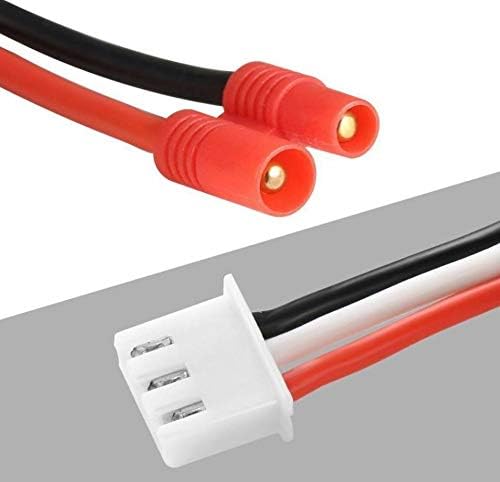
Figure 2: Charger's connector (left) and compatible battery connectors (right).
The charger is designed for 2-cell, 7.4V batteries. Always ensure the battery voltage matches the charger's output specifications to prevent damage.
Setup Demonstration Video
Video 1: This video demonstrates the physical appearance and connection points of the USB charger, showing how to handle the charger and its connectors. It highlights the USB-A plug and the white battery connector.
5. Operating Instructions
Once the charger is connected to a power source and the battery, the charging process will begin automatically. The charger typically features an indicator light (not explicitly stated, but common for chargers) to show charging status:
- Red Light (or similar): Indicates the battery is currently charging.
- Green Light (or light off): Indicates the battery is fully charged.
Charging time will vary depending on the battery's capacity and its current charge level. Always disconnect the battery once fully charged to prevent overcharging, although modern chargers often have built-in protection.
6. Maintenance
Proper maintenance ensures the longevity of your charger:
- Clean the charger with a soft, dry cloth. Do not use liquid cleaners.
- Store the charger in a cool, dry place away from direct sunlight and moisture.
- Avoid bending or kinking the cables excessively to prevent internal wire damage.
7. Troubleshooting
If you encounter issues with your charger, refer to the following common problems and solutions:
| Problem | Possible Cause | Solution |
|---|---|---|
| Charger indicator light not on. | No power to USB port, loose connection, faulty charger. | Try a different USB port or power adapter. Ensure all connections are secure. If problem persists, charger may be faulty. |
| Battery not charging. | Incorrect battery connection, incompatible battery, faulty battery. | Ensure battery connector is fully inserted and correctly oriented. Verify battery compatibility (7.4V). Test with a different battery if available. |
| Slow charging. | Low power USB source. | Use a USB power adapter that provides at least 1A output for optimal charging speed. |
8. Specifications
| Feature | Detail |
|---|---|
| Input Voltage | DC 5V, 1-2A (USB) |
| Output Voltage | DC 7.4V, 800mA |
| Connectivity Technology | USB |
| Connector Type | USB-A (input), White 3-pin connector (output) |
| Compatible Devices | Protocol TerraCopter EVO R/C Car and Drone with Camera (7.4V batteries) |
| Package Dimensions | 6 x 5 x 1 inches |
| Item Weight | 4 ounces |
9. Warranty and Support
For warranty information or technical support regarding your VLM Group USB Charger, please refer to the product packaging or contact the manufacturer directly. Keep your purchase receipt as proof of purchase.
Manufacturer: VLM Group