
1. Introduction
The INFURIDER YF-1500 is a professional-grade non-contact infrared thermometer designed for accurate temperature measurement in industrial settings. It features a wide temperature range, dual laser targeting, and adjustable emissivity, making it suitable for various high-temperature applications. This device is intended for industrial use only and is not suitable for measuring human or animal body temperature.
Key features include:
- Wide Temperature Range: -58℉ to 2732℉ (-50℃ to 1500℃)
- High Accuracy: ±2%
- Distance to Spot Ratio (D:S): 30:1
- Dual Laser Pointers for precise targeting
- Adjustable Emissivity (0.1-1.0)
- MAX/MIN/AVG/DIF Temperature Display Modes
- High/Low Temperature Alarm
- Automatic Shut Down and Low Battery Indication
- Switchable ℃/℉ Units
- Data Hold and Data Record Functions
- Backlight LCD Screen and Flashlight
2. Product Overview
Familiarize yourself with the components of your INFURIDER YF-1500 infrared thermometer.
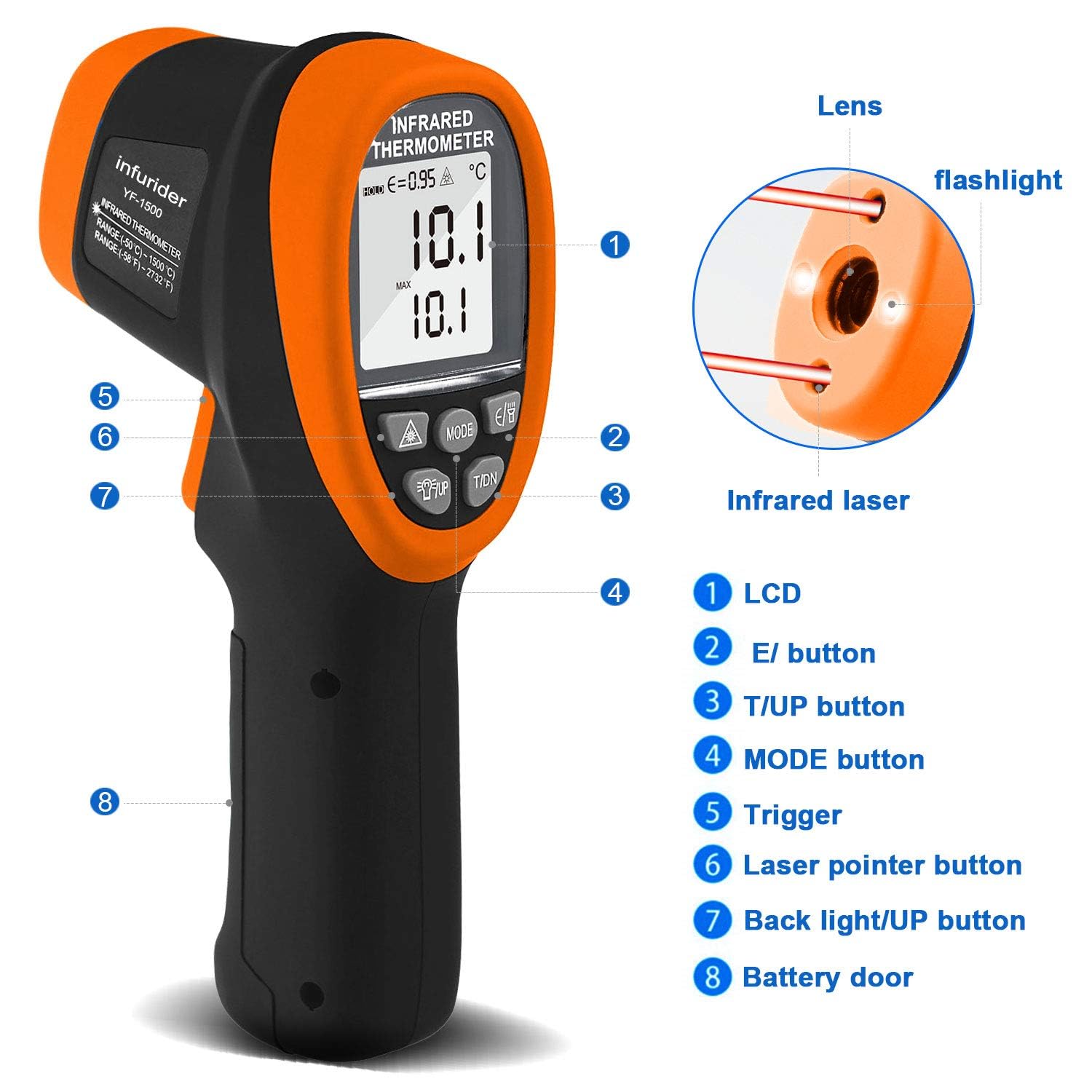
Figure 1: INFURIDER YF-1500 Infrared Thermometer Components. This image shows the front and side view of the thermometer, highlighting key parts such as the LCD, E/ button, T/UP button, MODE button, Trigger, Laser pointer button, Back light/UP button, and Battery door. It also points out the lens, flashlight, and infrared laser.
Key Components:
- LCD Display: Shows temperature readings, mode indicators, emissivity, and battery status.
- E/ Button: Used for adjusting emissivity.
- T/UP Button: Used for temperature unit selection (℃/℉) and navigating menus.
- MODE Button: Cycles through measurement modes (MAX, MIN, AVG, DIF).
- Trigger: Activates the infrared sensor and laser for measurement.
- Laser Pointer Button: Toggles the dual laser pointers on/off.
- Backlight/UP Button: Activates the LCD backlight and serves as an 'up' button in menu navigation.
- Battery Door: Provides access to the battery compartment.
3. Setup
3.1 Battery Installation
The INFURIDER YF-1500 requires a 9V battery for operation. A screwdriver is typically included for opening the battery compartment.
- Locate the battery door at the bottom of the handle (refer to Figure 1, item 8).
- Use a small screwdriver to open the battery compartment.
- Insert a new 9V battery, ensuring correct polarity.
- Close the battery compartment securely.
Note: If the low battery indicator appears on the LCD, replace the battery promptly to ensure accurate readings.
4. Operating Instructions
4.1 Basic Temperature Measurement
- Point the thermometer at the target object.
- Press and hold the Trigger (Figure 1, item 5) to begin measurement. The dual laser pointers will indicate the measurement area.
- The temperature reading will appear on the LCD within 0.25 seconds.
- Release the trigger to hold the reading on the display. The device will automatically shut down after a period of inactivity to conserve battery.
4.2 Distance to Spot Ratio (D:S)
The YF-1500 has a D:S ratio of 30:1. This means that at a distance of 30 units from the target, the measurement spot diameter will be 1 unit. For example, at 30 cm distance, the spot size is 1 cm. A higher D:S ratio allows for accurate measurement of smaller targets from a greater distance, ensuring safety from heat sources.

Figure 2: Distance to Spot Ratio. This diagram visually explains how the measurement spot size increases with distance, demonstrating the 30:1 ratio for safe and accurate temperature readings.
4.3 Emissivity Adjustment
Emissivity (ε) is a measure of an object's ability to emit infrared energy. Different materials have different emissivity values. For accurate readings, adjust the emissivity setting (0.1-1.0) to match the surface material being measured.
- Press the E/ button (Figure 1, item 2). The emissivity value will flash on the LCD.
- Use the UP (Figure 1, item 7) and DOWN (Figure 1, item 3) buttons to adjust the emissivity value.
- Press the E/ button again or wait a few seconds for the setting to be saved.
Refer to a standard emissivity table for common materials if unsure.
4.4 Measurement Modes (MAX/MIN/AVG/DIF)
The YF-1500 offers various measurement modes to suit different needs:

Figure 3: Measurement Modes. This image displays the thermometer's LCD screen cycling through MAX, MIN, AVG, and DIF temperature readings, illustrating the different data display options.
- Press the MODE button (Figure 1, item 4) repeatedly to cycle through the available modes:
- MAX: Displays the maximum temperature recorded during a continuous scan.
- MIN: Displays the minimum temperature recorded during a continuous scan.
- AVG: Displays the average temperature recorded during a continuous scan.
- DIF: Displays the difference between the maximum and minimum temperatures recorded during a continuous scan.
- To exit a mode, press the MODE button until the desired display returns.
4.5 High/Low Temperature Alarm
You can set high and low temperature alarms to alert you when readings exceed or fall below a specified threshold.
- Press the MODE button until 'HAL' (High Alarm) or 'LAL' (Low Alarm) appears on the display.
- Use the UP and DOWN buttons to set the desired temperature threshold.
- Press the MODE button again to confirm the setting.
- When the measured temperature exceeds the high alarm or falls below the low alarm, an audible alert will sound.
4.6 ℃/℉ Unit Switching
To switch between Celsius (℃) and Fahrenheit (℉):
- Press the T/UP button (Figure 1, item 3) to toggle between the two units.
4.7 Laser and Backlight Control
The device includes dual laser pointers for precise targeting and an LCD backlight for visibility in low-light conditions.
- Press the Laser Pointer Button (Figure 1, item 6) to turn the dual lasers on or off.
- Press the Backlight/UP Button (Figure 1, item 7) to turn the LCD backlight on or off.
5. Maintenance
5.1 Cleaning
- Clean the lens with a soft, damp cloth. Do not use abrasive cleaners or solvents.
- Wipe the device body with a damp cloth.
- Ensure the device is dry before storage.
5.2 Storage
- Store the thermometer in a cool, dry place, away from direct sunlight and extreme temperatures.
- Remove the battery if the device will not be used for an extended period to prevent leakage.
6. Troubleshooting
If you encounter issues with your INFURIDER YF-1500, consider the following:
- No Power: Check battery installation and replace with a fresh 9V battery if necessary.
- Inaccurate Readings: Ensure the emissivity setting matches the target material. Verify the D:S ratio is appropriate for your measurement distance and target size. Clean the lens if it is dirty.
- Display Issues: If the LCD is dim, replace the battery. If the display is erratic, try removing and reinserting the battery.
- Laser Not Working: Ensure the laser pointer button is pressed. Check battery level.
For further assistance, please contact INFURIDER customer support.
7. Specifications
| Feature | Specification |
|---|---|
| Temperature Range | -58℉~2732℉ (-50℃~1500℃) |
| Accuracy | ±2% |
| Distance to Spot Ratio (D:S) | 30:1 |
| Response Time | 0.25 seconds |
| Emissivity | Adjustable 0.1-1.0 |
| Laser Type | Class II, Optical power <0.5mW |
| Wavelength | 8-14um |
| Power Source | 9V Battery (Included) |
| Display Type | LCD with Backlight |
| Auto Shut Down | Yes |
| Product Dimensions | 23.8 x 16.4 x 8.2 cm |
| Weight | 500 g |
8. Safety Information
IMPORTANT: This infrared thermometer is designed for industrial applications only. It is NOT intended for medical use or for measuring human or animal body temperature. Using it for such purposes may lead to inaccurate readings and potentially incorrect health assessments.
- Laser Safety: This device uses a Class II laser. Do not stare directly into the laser beam or point it at eyes. Avoid direct eye exposure.
- Operating Environment: Do not use the device in environments with explosive gas, vapor, or dust.
- Maintenance: Do not attempt to disassemble or modify the device. Repairs should only be performed by qualified personnel.
- Electrical Safety: Keep the device away from water and other liquids.

Figure 4: Proper Use vs. Improper Use. This image clearly illustrates that the INFURIDER YF-1500 is not for human or animal temperature measurement, showing an incorrect use case on a child and a correct use case on an oven.
9. Warranty and Support
INFURIDER provides lifetime technical support for the YF-1500 Non-Contact Infrared Thermometer. For any technical inquiries, troubleshooting assistance, or warranty claims, please contact INFURIDER customer service through their official channels or the retailer where the product was purchased.


