
1. Introduction
This manual provides detailed instructions for the proper setup, operation, and maintenance of your Stream Electronics Remote Control, model ADN-306. This remote is specifically designed for use with the Pioneer AVH-1450 Car DVD Player, offering convenient control over its various functions. Please read this manual thoroughly before using the remote control to ensure optimal performance and longevity.
2. Setup
2.1 Battery Installation
The remote control requires batteries for operation. A battery is included with your purchase. Follow these steps to install or replace the battery:
- Locate the battery compartment on the back of the remote control.
- Slide the battery compartment cover downwards or in the direction indicated by an arrow to open it.
- Insert the battery, ensuring the positive (+) and negative (-) terminals align correctly with the markings inside the compartment.
- Close the battery compartment cover by sliding it back into place until it clicks securely.
Note: Always use the specified battery type. Dispose of used batteries responsibly according to local regulations.
3. Operating Instructions
This section details the functions of each button on your remote control. Refer to the image below for button identification.
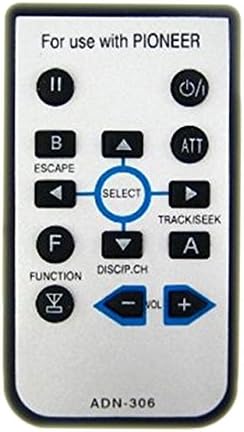
Figure 3.1: Front view of the Stream Electronics Remote Control (Model ADN-306).
This image displays the remote control with its various buttons. The top section indicates "For use with PIONEER". Key buttons include a power/standby button, play/pause, escape, attention (ATT), track/seek controls, function, disc/channel, and volume controls. A central directional pad with a "SELECT" button is also visible. The model number "ADN-306" is printed at the bottom.
3.1 Button Functions
| Button Label | Function |
|---|---|
| ① (Power/Standby) | Turns the Pioneer AVH-1450 Car DVD Player on or off, or puts it into standby mode. |
| ② (Play/Pause) | Toggles between play and pause for media playback. |
| B / ESCAPE | Used to go back to the previous menu or exit a current function. |
| ATT | Activates or deactivates the audio attenuator function. |
| Directional Arrows (Up, Down, Left, Right) | Navigates through menus and options. |
| SELECT | Confirms a selection or enters a menu option. |
| TRACK/SEEK (Left/Right Arrows) | Skips to the previous or next track/chapter, or seeks within a track. |
| F / FUNCTION | Accesses various function modes or settings. |
| DISCIP.CH (Down Arrow) | Likely for Disc Playback or Channel selection, depending on the current mode of the player. |
| A (Up Arrow) | Likely for specific menu navigation or selection within the player's interface. |
| VOL - / VOL + | Decreases or increases the audio volume. |
For detailed functionality of each button in specific operating modes, please refer to the user manual of your Pioneer AVH-1450 Car DVD Player.
4. Maintenance
4.1 Cleaning the Remote Control
To maintain the appearance and functionality of your remote control, follow these cleaning guidelines:
- Wipe the surface of the remote control with a soft, dry cloth.
- For stubborn dirt, lightly dampen the cloth with water or a mild, non-abrasive cleaner. Do not spray cleaner directly onto the remote.
- Avoid using harsh chemicals, solvents, or abrasive cleaning pads, as these can damage the remote's finish or internal components.
4.2 Battery Replacement
Replace the battery when the remote control's range decreases significantly or it stops responding. Refer to section 2.1 for battery installation instructions.
5. Troubleshooting
If you experience issues with your remote control, try the following troubleshooting steps:
- Remote not responding:
- Check if the battery is inserted correctly with the correct polarity.
- Replace the battery with a new one.
- Ensure there are no obstructions between the remote control and the Pioneer AVH-1450's infrared receiver.
- Make sure you are within the effective operating range of the remote control.
- Buttons not working:
- Clean the remote control's surface, especially around the buttons, to remove any dirt or debris that might be preventing proper contact.
- Intermittent operation:
- This often indicates a low battery. Replace the battery.
If the problem persists after trying these steps, please refer to the warranty and support information.
6. Specifications
- Model: ADN-306
- Compatibility: Pioneer AVH-1450 Car DVD Player
- Power Source: 1 x CR2025 or equivalent button cell battery (Battery Included)
- Manufacturer: Stream Electronics
- Date First Available: August 16, 2010
7. Warranty and Support
7.1 Warranty Information
This Stream Electronics remote control comes with a 60-day warranty from the date of purchase. This warranty covers manufacturing defects and ensures the product is free from defects in material and workmanship under normal use during the warranty period. Please retain your proof of purchase for warranty claims.
7.2 Customer Support
For technical assistance, troubleshooting beyond this manual, or warranty inquiries, please contact Stream Electronics customer support. Refer to the contact information provided with your purchase or visit the official Stream Electronics website for support details.