
1. Introduction
This manual provides essential instructions for the proper installation, operation, maintenance, and troubleshooting of your Technical Precision Replacement Battery for the Panasonic KX-5433 Cordless Phone. Please read this manual thoroughly before using the product to ensure optimal performance and safety.
The Technical Precision replacement battery is designed to provide reliable power for your compatible Panasonic cordless phone model KX-5433.
2. Safety Information
- Do not disassemble, crush, puncture, or short-circuit the battery.
- Keep the battery away from fire, heat, and direct sunlight.
- Do not expose the battery to water or other liquids.
- Use only the charger specified for your Panasonic KX-5433 cordless phone.
- Dispose of used batteries according to local regulations. Do not dispose of in household waste.
- Keep out of reach of children.
3. Setup and Installation
Follow these steps to install the replacement battery in your Panasonic KX-5433 cordless phone:
- Power Off: Ensure your cordless phone handset is powered off and disconnected from its charging base.
- Locate Battery Compartment: Turn the handset over and locate the battery compartment cover. This is typically on the back of the handset.
- Remove Cover: Slide or unclip the battery compartment cover to open it.
- Remove Old Battery: Carefully disconnect the old battery's connector from the handset's socket. Remove the old battery from the compartment.
- Insert New Battery: Place the Technical Precision replacement battery into the compartment, ensuring it fits correctly.
- Connect Battery: Align the new battery's connector with the handset's socket and gently push until it clicks into place. Do not force the connection.
- Replace Cover: Close the battery compartment cover securely.
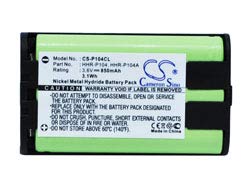
Image showing the Technical Precision Replacement Battery for Panasonic KX-5433 Cordless Phone, highlighting its compact design and connectors.
4. Operating Instructions
After installing the new battery, it is crucial to properly charge it before first use.
- Initial Charge: Place the handset on its charging base. Allow the battery to charge continuously for at least 12-15 hours, even if the phone indicates a full charge sooner. This initial charge helps to condition the battery for optimal performance.
- Regular Charging: For daily use, return the handset to its charging base when not in use. This ensures the battery remains charged and ready.
- Battery Indicator: Monitor your phone's battery indicator. Recharge the battery when the indicator shows low power to prevent complete discharge, which can shorten battery life.
5. Maintenance
Proper care and maintenance will extend the life of your replacement battery:
- Temperature: Avoid exposing the battery to extreme temperatures (very hot or very cold), as this can degrade performance and shorten lifespan. Store and use the phone at room temperature.
- Cleaning: Keep the battery contacts and the phone's charging contacts clean and free of dust or debris. Use a dry, soft cloth for cleaning.
- Storage: If the phone will not be used for an extended period, remove the battery and store it in a cool, dry place. Charge the battery periodically (e.g., every 3-6 months) to prevent deep discharge.
6. Troubleshooting
If you encounter issues with your replacement battery, consider the following common solutions:
- Phone Not Turning On: Ensure the battery is correctly installed and fully charged. Verify that the battery connector is securely attached.
- Short Battery Life: Ensure the initial 12-15 hour charge was completed. Over time, all rechargeable batteries experience reduced capacity. If the issue persists shortly after installation, ensure the phone's charging base is functioning correctly.
- Charging Issues: Check that the handset is properly seated on the charging base and that the base is connected to a working power outlet. Clean the charging contacts on both the handset and the base.
- Intermittent Power: Re-seat the battery to ensure a firm connection.
If these steps do not resolve the issue, please refer to the customer support section.
7. Specifications
| Feature | Specification |
|---|---|
| Brand | Technical Precision |
| Model Number | KX-5433 CORDLESS PHONE BATTERY |
| Voltage | 3 Volts |
| Reusability | Rechargeable |
| Unit Count | 1.0 Count |
| Recommended Use | Phone |
| Manufacturer | Technical Precision |
| ASIN | B086C8PDJF |
8. Warranty and Customer Support
Technical Precision products are manufactured to high-quality standards. This replacement battery typically comes with a limited warranty against defects in materials and workmanship. Please retain your proof of purchase for warranty claims.
For further assistance, technical support, or warranty inquiries, please contact Technical Precision customer service through the retailer where the product was purchased or visit the official Technical Precision website for contact information.