
Technical Precision MR-JBAT Replacement Battery
Technical Precision Replacement for MR-JBAT
Model: MR-JBAT Replacement Battery
Brand: Technical Precision
Introduction
This instruction manual provides essential information for the safe and effective use of the Technical Precision Replacement for MR-JBAT battery. This product is designed as a direct replacement for the original MR-JBAT battery, ensuring compatibility and reliable performance in your electronic device. Please read this manual thoroughly before installation and operation to ensure proper handling and to maximize the lifespan of your battery.
Safety Information
Always observe the following safety precautions when handling and installing the battery:
- Do not disassemble, crush, puncture, or short-circuit the battery.
- Keep the battery away from heat sources, direct sunlight, and flammable materials.
- Do not expose the battery to water or other liquids.
- Store the battery in a cool, dry place when not in use.
- Dispose of used batteries according to local regulations. Do not dispose of in household waste.
- If the battery leaks, avoid contact with skin and eyes. If contact occurs, rinse immediately with water and seek medical attention.
- Use only with compatible devices as specified by the original equipment manufacturer.
What's in the Box
Upon opening the package, you should find the following item:
- 1 x Technical Precision Replacement for MR-JBAT Battery
Setup and Installation
Before proceeding with installation, ensure your device is powered off and disconnected from any power source. Refer to your device's original manual for specific battery compartment access instructions.
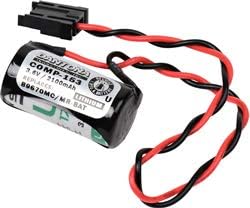
This image displays the Technical Precision Replacement for MR-JBAT battery. It is a compact, cylindrical lithium battery with a black and red wire harness terminating in a black connector. The label on the battery indicates 'COMP-163', '3.6V / 2100mAh', and 'LITHIUM', confirming it replaces '89670MC/MR BAT'.
- Power Off Device: Ensure the electronic device is completely powered off and unplugged from any external power source.
- Locate Battery Compartment: Identify and open the battery compartment of your device. This may involve removing screws or latches.
- Remove Old Battery: Carefully disconnect the old battery from its connector. Note the orientation of the connector to ensure correct installation of the new battery.
- Insert New Battery: Connect the Technical Precision Replacement for MR-JBAT battery to the device's battery connector. Ensure the connector is firmly seated and correctly oriented.
- Position Battery: Place the new battery securely within the battery compartment. Ensure no wires are pinched or obstructing the compartment closure.
- Close Compartment: Close and secure the battery compartment cover.
- Power On Device: Reconnect your device to power if necessary and power it on to confirm the new battery is functioning correctly.
Operating Instructions
The Technical Precision Replacement for MR-JBAT battery functions as a power source for your compatible electronic device. Once installed, the device will operate as it did with the original battery. For specific operating instructions related to your device, please consult its original user manual.
- Initial Charge: If your device charges the battery, it is recommended to fully charge the battery before its first extended use.
- Battery Life: Battery life will vary depending on device usage, settings, and environmental conditions.
- Charging Cycles: Lithium batteries have a finite number of charge cycles. Avoid frequent deep discharges to prolong battery life.
Maintenance
Proper maintenance can extend the life of your battery:
- Cleaning: Keep the battery and its contacts clean and dry. Use a soft, dry cloth to wipe away any dust or debris.
- Storage: If storing the battery for an extended period, ensure it is charged to approximately 50% and stored in a cool, dry place. Avoid extreme temperatures.
- Avoid Overcharging/Over-discharging: Modern devices typically have built-in protection, but it is good practice to avoid leaving the battery on charge indefinitely after it's full, or letting it completely drain to 0% frequently.
Troubleshooting
If you encounter issues with your replacement battery, consider the following:
| Problem | Possible Cause | Solution |
|---|---|---|
| Device does not power on after battery installation. | Battery not properly connected; battery is completely discharged; device issue. | Ensure battery connector is fully seated. Try charging the device. Test with original battery if available to rule out device malfunction. |
| Battery life is shorter than expected. | High device usage; device settings (e.g., screen brightness); battery degradation over time. | Adjust device settings to conserve power. Ensure battery is fully charged. Consider if the battery has reached the end of its lifespan. |
| Battery does not charge. | Charging cable/adapter issue; device charging port issue; battery fault. | Verify charging cable and adapter are working. Clean device charging port. If possible, test with another battery or charger. |
Specifications
| Feature | Detail |
|---|---|
| Product Name | Technical Precision Replacement for MR-JBAT |
| Battery Type | Lithium (as per image OCR) |
| Voltage | 3.6V (as per image OCR) |
| Capacity | 2100mAh (as per image OCR) |
| Replaces | MR-JBAT, 89670MC/MR BAT (as per product title and image OCR) |
| Manufacturer | Technical Precision |
| Unit Count | 1.0 Count |
| Reusability | Rechargeable |
Warranty and Support
For warranty information and customer support, please refer to the seller's policies or contact Technical Precision directly through their official channels. Keep your purchase receipt as proof of purchase.
For additional assistance, you may visit the Technical Precision Store on Amazon.