
1. Introduction
This manual provides comprehensive instructions for the installation, operation, maintenance, and troubleshooting of your SuppliesMAX Remanufactured Inkjet Cartridge Combo Pack (NO. 02) (C877MP). These cartridges are designed as a compatible replacement for various HP PhotoSmart series printers. Please read this manual carefully to ensure optimal performance and longevity of your cartridges.
2. Product Overview
The SuppliesMAX Remanufactured Inkjet Cartridge Combo Pack (NO. 02) (C877MP) includes six individual ink cartridges: Black, Cyan, Magenta, Yellow, Light Cyan, and Light Magenta. These cartridges are remanufactured to meet or exceed original equipment manufacturer (OEM) specifications, utilizing new and recycled components. They are produced in ISO-9001, ISO-9002, and ISO-14001 quality certified facilities to ensure reliable performance.

Image 1: SuppliesMAX Remanufactured Inkjet Cartridge Combo Pack, showing the product box and the six individual ink cartridges.
2.1 Package Contents
- 1 x Black Ink Cartridge (C8771WN equivalent) - Approximately 660 page yield
- 1 x Cyan Ink Cartridge (C8772WN equivalent) - Approximately 400 page yield
- 1 x Magenta Ink Cartridge (C8773WN equivalent) - Approximately 370 page yield
- 1 x Yellow Ink Cartridge (C8774WN equivalent) - Approximately 500 page yield
- 1 x Light Cyan Ink Cartridge (C8775WN equivalent) - Approximately 220 page yield
- 1 x Light Magenta Ink Cartridge (C8775WN equivalent) - Approximately 220 page yield
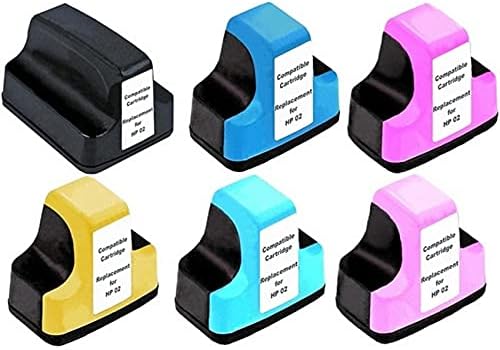
Image 2: A close-up view of the six individual SuppliesMAX remanufactured ink cartridges, each labeled as a compatible replacement for HP 02.
2.2 Compatible Printer Models
This combo pack is compatible with the following HP PhotoSmart printer models:
- HP PhotoSmart 3110, 3210, 3210V, 3210XI, 3310, 3310XI
- HP PhotoSmart 8230, 8250
- HP PhotoSmart C5140, C5150, C5180, C6100 Series, C6150, C6175, C6180, C6183, C6188, C6240, C6250, C6280, C6283, C6288, C7150, C7180, C7250, C7275, C7280, C7283, C7288, C8150, C8180, C8183
- HP PhotoSmart D6160, D6180, D7145, D7155, D7160, D7260, D7345, D7355, D7360, D7460
3. Setup Instructions
Follow these steps to properly install your new SuppliesMAX remanufactured ink cartridges:
- Preparation: Before opening the cartridge packaging, ensure your printer is turned on and ready for ink cartridge replacement. Refer to your printer's manual for specific instructions on accessing the ink cartridge carriage.
- Unpack the Cartridge: Carefully remove one cartridge from its sealed packaging. Avoid touching the electrical contacts or the print nozzle.
- Remove Protective Clip/Tape: Gently remove any orange protective clips or sealing tape from the cartridge. Be careful not to damage the cartridge or spill any ink.
- Install in Printer: Open the printer's ink cartridge access door. Wait for the print carriage to move to the replacement position. Insert the new cartridge into its corresponding color slot. Ensure it clicks firmly into place.
- Close Access Door: Close the ink cartridge access door. The printer may perform an alignment process automatically.
- Repeat for all Cartridges: Repeat these steps for each cartridge you need to replace.
Note: Do not remove the protective clip or tape until you are ready to install the cartridge. Leaving the cartridge exposed for extended periods can lead to ink drying out.
4. Operating Instructions
Once installed, your SuppliesMAX remanufactured ink cartridges operate similarly to OEM cartridges. The printer will manage ink levels and print operations. For best results:
- Print Regularly: To prevent ink from drying in the print nozzles, it is recommended to print at least once a week.
- Use Printer Software: Utilize your printer's software for tasks such as checking ink levels, performing print head cleaning, or print head alignment.
- Print Quality Settings: Adjust print quality settings in your printer's preferences based on your document type (e.g., draft for text, best for photos).
5. Maintenance
Proper maintenance ensures consistent print quality and extends cartridge life:
- Storage: Store unused cartridges in their original sealed packaging in a cool, dry place away from direct sunlight and extreme temperatures.
- Handling: Handle cartridges by their plastic body. Avoid touching the print nozzles or electrical contacts.
- Print Head Cleaning: If you notice streaking or faded prints, perform a print head cleaning cycle through your printer's utility software. This can clear clogged nozzles.
- Print Head Alignment: If prints appear misaligned, perform a print head alignment through your printer's utility software.
6. Troubleshooting
Here are solutions to common issues you might encounter:
6.1 Cartridge Not Recognized
- Reinstall Cartridge: Remove the cartridge and reinstall it, ensuring it is seated firmly until it clicks.
- Clean Contacts: With a lint-free cloth, gently wipe the copper electrical contacts on the cartridge and inside the printer carriage. Allow them to dry completely before reinserting.
- Restart Printer: Turn off your printer, unplug it from the power source for a few minutes, then plug it back in and turn it on.
6.2 Poor Print Quality (Streaks, Fading, Incorrect Colors)
- Run Cleaning Cycle: Perform a print head cleaning cycle via your printer's software. You may need to run it multiple times.
- Check Ink Levels: Verify ink levels using your printer's software. Replace any empty or very low cartridges.
- Print Head Alignment: Perform a print head alignment if text or images appear blurry or misaligned.
- Paper Type: Ensure you are using the correct paper type and quality for your printing task.
6.3 "Non-Genuine" or "Compatible Cartridge" Message
It is common for printers to display messages indicating that a non-OEM cartridge has been installed. This is a standard notification and does not typically affect the functionality of the cartridge. You can usually dismiss these messages and continue printing.
7. Specifications
| Feature | Detail |
|---|---|
| Product Type | Remanufactured Inkjet Cartridge Combo Pack |
| Model Number | C877MP (NO. 02) |
| Brand | SuppliesMAX |
| Ink Colors Included | Black, Cyan, Magenta, Yellow, Light Cyan, Light Magenta |
| Black Page Yield | Approx. 660 pages (at 5% coverage) |
| Color Page Yields | Cyan: Approx. 400 pages Magenta: Approx. 370 pages Yellow: Approx. 500 pages Light Cyan/Light Magenta: Approx. 220 pages each (at 5% coverage) |
| Manufacturing Standards | ISO-9001, ISO-9002, ISO-14001 Certified |
| Compatible Devices | HP PhotoSmart Series Printers (refer to Section 2.2 for full list) |
| Item Weight | Approximately 7 pounds (for the combo pack) |
8. Warranty and Support
SuppliesMAX remanufactured cartridges are designed to provide high-quality printing. The use of SuppliesMAX cartridges will not void your printer's warranty. For any issues not covered in this manual, please refer to the contact information provided by your retailer or on the product packaging for further assistance.