
Kraken Bass 4350102403
Kraken Bass Fishing Scale Instruction Manual
Model: 4350102403
1. Product Overview
The Kraken Bass Fishing Scale is an essential electronic digital weigh scale designed for anglers. It provides accurate weight readings for your catch, featuring a high-visibility LCD display and a built-in measuring tape. This portable and easy-to-store device includes auto-lock features and unit conversion capabilities, making it a versatile tool for various outdoor activities.

Figure 1: Front view of the Kraken Bass Fishing Scale with its digital display.
2. Setup
The Kraken Bass Fishing Scale requires 2 AAA batteries (not included) for operation. Follow these steps to install the batteries:
- Locate the battery compartment on the back of the scale.
- Gently slide off the battery compartment cover.
- Insert 2 AAA batteries, ensuring correct polarity (+/-) as indicated inside the compartment.
- Replace the battery compartment cover, ensuring it clicks securely into place.
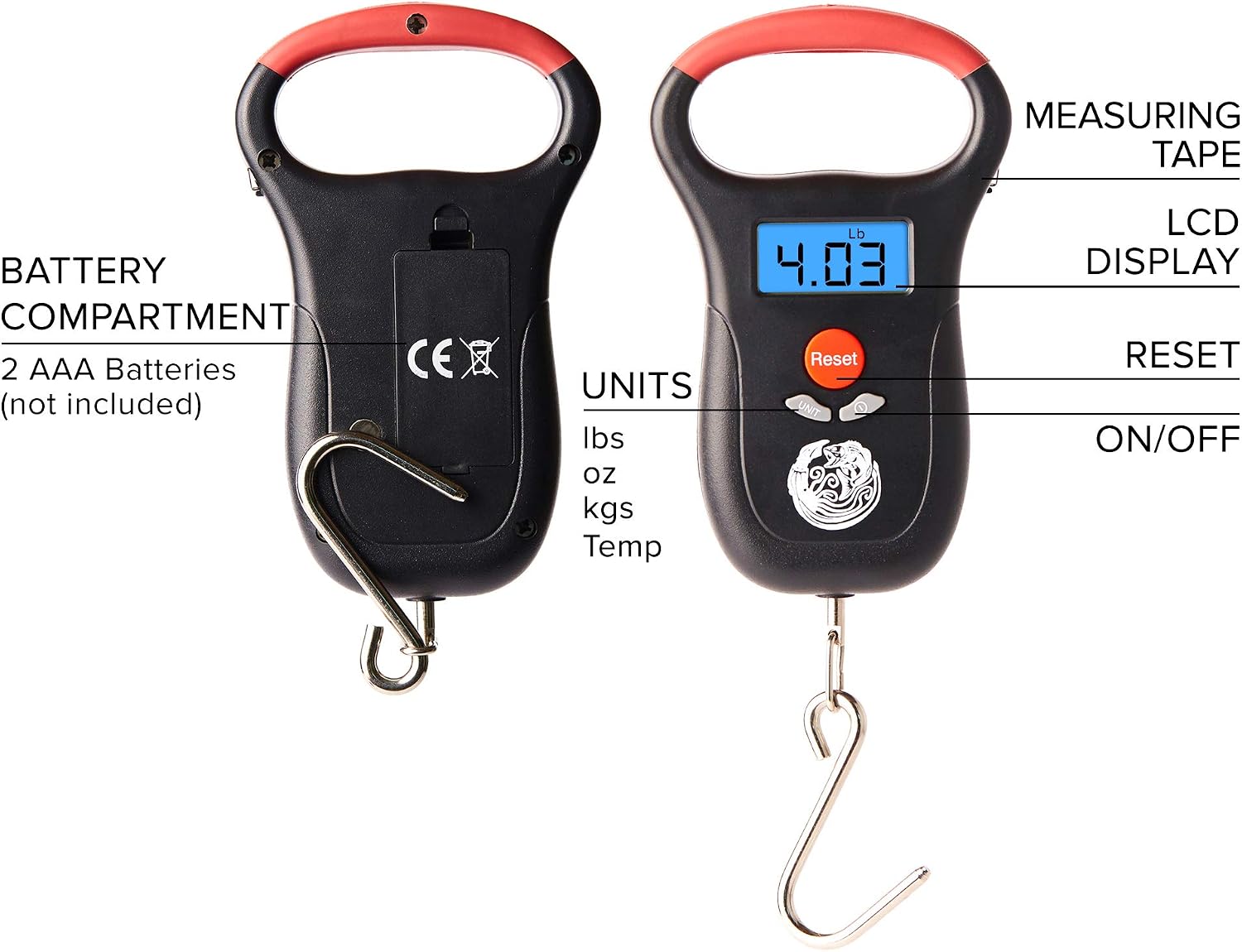
Figure 2: Rear view showing the battery compartment and labeled components of the scale.
Note: Batteries are not included with the product. Ensure to use fresh batteries for optimal performance. Check for any signs of corrosion if the scale is not functioning correctly.
3. Operating Instructions
The Kraken Bass Fishing Scale is designed for user-friendly operation. Here are the instructions for its primary functions:
3.1 Power On/Off
- To power on the scale, press the ON/OFF button. The LCD display will illuminate.
- To power off the scale, press and hold the ON/OFF button for a few seconds. The scale also features an auto-off function to conserve battery life.
3.2 Unit Conversion
The scale supports multiple weighing units. To change the unit:
- Press the UNIT button repeatedly to cycle through available units: kilograms (kg), pounds (lbs), ounces (oz), and temperature (temp).

Figure 3: The scale's display and buttons for unit selection.
3.3 Weighing Fish
- Ensure the scale is powered on and set to your desired unit.
- Carefully attach the fish to the stainless steel hook.
- Lift the scale by its handle, allowing the fish to hang freely. The weight will be displayed on the LCD screen.
- The scale features a data lock function, which will hold the stable weight reading on the display, even after the fish is removed.
3.4 Using the Built-in Measuring Tape
The scale includes a convenient built-in measuring tape for length measurements:
- Locate the measuring tape slot on the side of the scale.
- Gently pull out the tape measure to the desired length. The maximum range is 1 meter (39 inches).
- Measure the length of your catch or other items.
- Release the tape measure, and it will retract automatically.
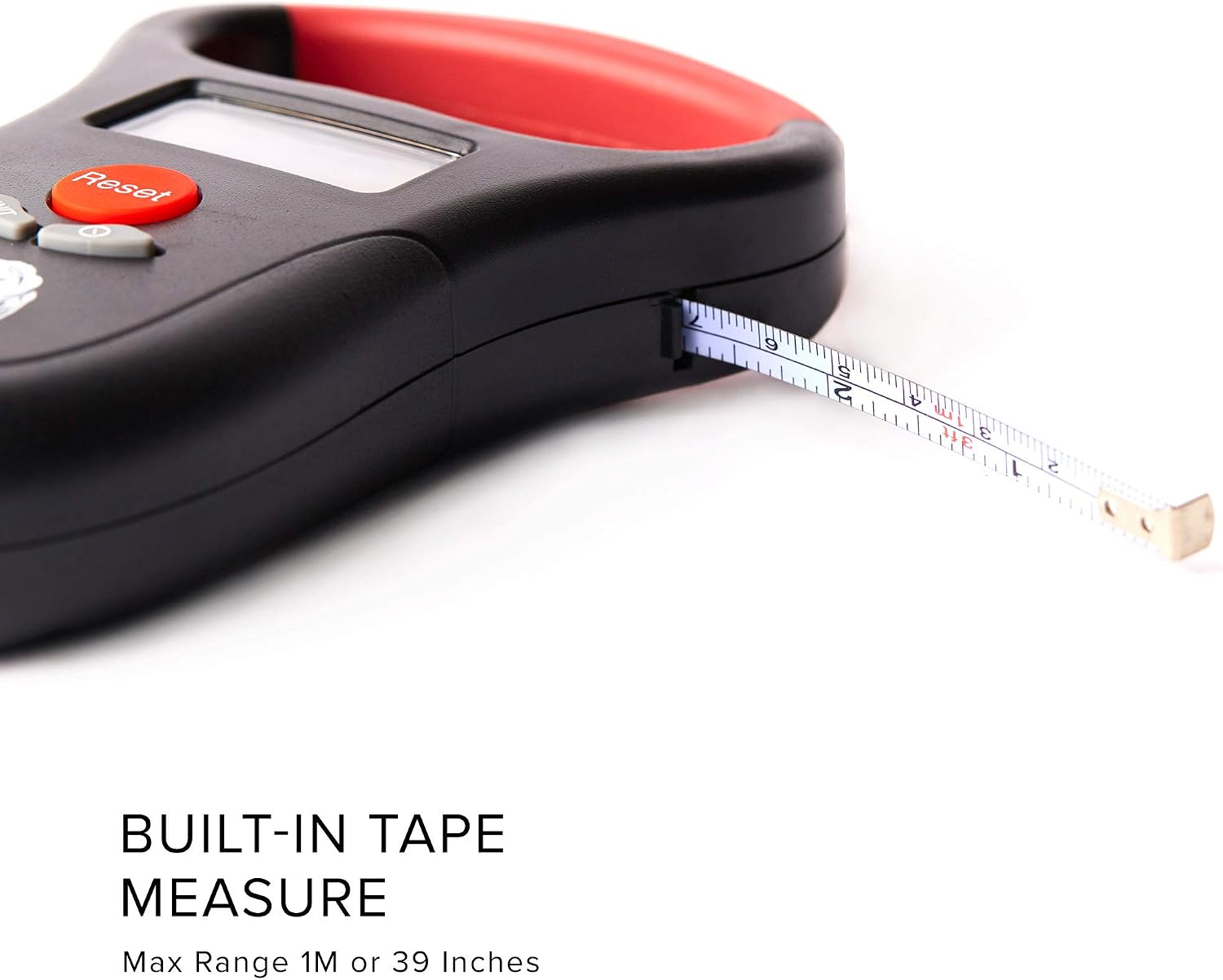
Figure 4: The built-in tape measure extended from the side of the scale.
4. Maintenance
To ensure the longevity and accuracy of your Kraken Bass Fishing Scale, follow these maintenance guidelines:
- Cleaning: Wipe the scale with a damp cloth after each use, especially after contact with water or fish. While the scale is waterproof, avoid submerging it for extended periods.
- Storage: Store the scale in a dry place away from extreme temperatures. The compact size allows for easy storage in a tackle box or backpack.
- Battery Care: Remove batteries if the scale will not be used for an extended period to prevent battery leakage and corrosion.
- Hook Care: The stainless steel hook is rust-resistant. Clean and dry it thoroughly after each use to maintain its condition.
5. Troubleshooting
If you encounter issues with your Kraken Bass Fishing Scale, refer to the following common problems and solutions:
| Problem | Possible Cause | Solution |
|---|---|---|
| Scale does not power on. | Dead or incorrectly installed batteries. | Replace with new AAA batteries, ensuring correct polarity. Check for any battery corrosion in the compartment. |
| Inaccurate readings. | Scale not stable during measurement; external interference. | Ensure the scale is held steady and the item being weighed is not touching any surfaces. Avoid strong electromagnetic fields. |
| Display shows "Lo" or similar low battery indicator. | Low battery power. | Replace the AAA batteries. |
6. Specifications
- Brand: Kraken Bass
- Model: 4350102403
- Color: Black
- Material: Stainless Steel (Hook)
- Weight Limit: 110 Pounds (50 Kg)
- Display Type: LCD
- Readout Accuracy: 5g or 10g
- Special Features: Data Lock, Auto-Off Function, Built-in Measuring Tape, Thermometer Function, Blue Backlight, Waterproof
- Power Source: 2 x AAA Batteries (not included)
- Item Package Dimensions (L x W x H): 7.36 x 4.57 x 1.54 inches
- Item Weight: 0.19 Kilograms

Figure 5: Key dimensions of the Kraken Bass Fishing Scale.
7. Warranty and Support
Specific warranty information for the Kraken Bass Fishing Scale is not provided in the product details. For any support inquiries or to report issues, please refer to the contact information provided by the retailer or manufacturer at the point of purchase.
Legal Disclaimer: Batteries not included.
8. Usage Scenarios
The Kraken Bass Fishing Scale is a versatile tool suitable for various applications beyond just fishing:
- Fishing: Accurately weigh your catch to track personal bests or comply with tournament regulations.
- Backpacking/Hiking: Weigh gear to optimize pack weight for long treks.
- Hunting: Measure game weight for record-keeping or transport.
- Luggage: Check luggage weight before travel to avoid airline excess baggage fees.

Figure 6: The Kraken Bass Fishing Scale in various practical applications.

Figure 7: A user demonstrating the scale's use for weighing a fish.
Ask a question about this manual
Ask about setup, troubleshooting, compatibility, parts, safety, or missing instructions. Manuals+ will review the question and use this page’s manual context to help answer it.