
1. Introduction
This manual provides instructions for the proper use and maintenance of your FIADO XG-8 TWS Bluetooth 5.0 Earbuds. These earbuds offer a true wireless audio experience with Bluetooth 5.0 technology, ensuring stable connections and efficient power consumption. The compact design allows for easy portability and comfortable use.
2. Package Contents
Please verify that all items are present in your package:
- FIADO XG-8 TWS Bluetooth Earbuds (Left and Right)
- Wireless Charging Case
- Charging Cable
- User Manual (this document)
3. Product Overview
The FIADO XG-8 earbuds are designed for comfort and ease of use, featuring touch controls and an LED digital display on the charging case for battery status.

Image 3.1: FIADO XG-8 TWS Bluetooth Earbuds shown inside their open charging case. The earbuds are black with a circular touch control area. The charging case is also black, with an LED digital display showing battery levels and charging indicators for each earbud.
Key features include:
- True Wireless Stereo (TWS): Independent left and right earbuds for a completely wireless experience.
- Bluetooth 5.0: For stable connectivity and efficient power usage.
- Automatic Pairing: Earbuds connect automatically when removed from the case.
- Touch Control: Manage music and calls directly from the earbuds.
- LED Digital Display: On the charging case to show battery status.
- CVC Digital Noise Reduction: Enhances call clarity.
- Water Resistant: Suitable for various activities, including sports.
4. Setup
4.1. Charging the Earbuds and Charging Case
Before first use, fully charge both the earbuds and the charging case.
- Place the earbuds into the charging case. Ensure they are correctly seated; the LED indicators on the earbuds or case will confirm charging.
- Connect the charging cable to the charging case's port and a USB power source. The LED digital display on the case will show the charging progress.
- A full charge for the earbuds typically takes approximately 1 hour. The charging case will also indicate its battery level.
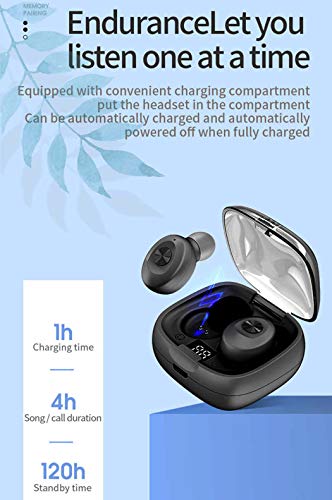
Image 4.1: Diagram illustrating the charging and battery performance. It shows a 1-hour charging time, 4 hours of song/call duration, and 120 hours of standby time for the earbuds.
4.2. Pairing with a Bluetooth Device
The earbuds feature automatic pairing for convenience.
- Initial Pairing:
- Open the charging case and remove both earbuds. They will automatically power on and enter pairing mode.
- On your device (smartphone, tablet, etc.), enable Bluetooth and search for available devices.
- Select "XG-8" (or similar name) from the list of found devices to connect.
- Once connected, you will hear a confirmation tone, and the earbuds' indicator lights will change.
- Automatic Reconnection: After the initial pairing, the earbuds will automatically connect to the last paired device when removed from the charging case.

Image 4.2: Illustration demonstrating the "Rapid second Take out and use" feature, showing a hand taking an earbud from the charging case and a smartphone screen displaying music playback, indicating automatic connection.

Image 4.3: Graphic highlighting key features: Bluetooth 5.0, Automatic Pairing, LED Digital Display, HiFi Sound Quality, and Smart Compatibility, with the earbuds and charging case in the background.
5. Operating the Earbuds
The FIADO XG-8 earbuds feature touch controls for easy management of audio and calls.
5.1. Power On/Off
- Power On: Remove the earbuds from the charging case. They will power on automatically.
- Power Off: Place the earbuds back into the charging case. They will power off and begin charging automatically.
5.2. Music Playback
- Play/Pause: Tap either earbud once.
- Next Track: Double-tap the right earbud.
- Previous Track: Double-tap the left earbud.
- Volume Control: (Specific touch controls for volume are not detailed in product information. Typically, this is controlled via the connected device or a long press on an earbud.)
5.3. Call Management
- Answer/End Call: Tap either earbud once.
- Reject Call: Press and hold either earbud for approximately 2 seconds.
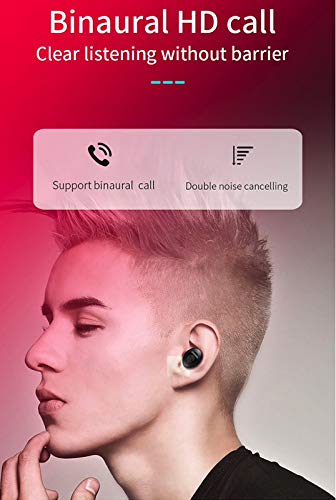
Image 5.1: Graphic illustrating "Binaural HD call" and "Double noise cancelling" features, emphasizing clear listening during calls.
5.4. Voice Assistant
- Activate Voice Assistant: Triple-tap either earbud (if supported by your device and earbuds).
5.5. Single Earbud Use
You can use either the left or right earbud independently. Simply remove one earbud from the case, and it will connect to your device. The other earbud can remain in the case or be used by another person if desired.
6. Maintenance
6.1. Cleaning
- Regularly clean the earbuds and charging case with a soft, dry, lint-free cloth.
- Do not use abrasive cleaners, alcohol, or chemical solvents.
- Ensure charging contacts on both earbuds and the case are clean and free of debris to maintain proper charging.
6.2. Storage
- When not in use, store the earbuds in their charging case to protect them and keep them charged.
- Store in a cool, dry place, away from extreme temperatures and direct sunlight.
6.3. Water Resistance
The earbuds are water resistant. However, they are not waterproof. Avoid submerging them in water or exposing them to heavy rain. Dry them thoroughly if they get wet before placing them back in the charging case.
7. Troubleshooting
If you encounter issues with your FIADO XG-8 earbuds, please refer to the following common solutions:
| Problem | Possible Solution |
|---|---|
| Earbuds not pairing with device. |
|
| Only one earbud is working. |
|
| Earbuds not charging. |
|
| Poor sound quality. |
|
8. Specifications
| Feature | Detail |
|---|---|
| Model | XG8-2 |
| Wireless Communication Technology | Bluetooth 5.0 |
| Control Type | Touch, Call Control |
| Form Factor | In-Ear |
| Material | Plastic |
| Special Features | Microphone Included, Sweatproof |
| Water Resistance Level | Water Resistant |
| Battery Cell Composition | Lithium Polymer |
| Charging Time (Earbuds) | Approx. 1 hour |
| Song/Call Duration | Approx. 4 hours |
| Standby Time | Approx. 120 hours |
| Item Weight | 200 g (including packaging) |
| Manufacturer | FIADO |
9. Warranty and Support
Your FIADO XG-8 TWS Bluetooth Earbuds come with a 6-month warranty from the date of purchase. This warranty covers manufacturing defects. Please retain your proof of purchase for warranty claims.
For technical support or warranty inquiries, please contact your retailer or the manufacturer directly. Contact information can typically be found on the product packaging or the official FIADO website.