
Introduction
This manual provides detailed instructions for the safe and effective use of your ThruNite TC20 3800 Lumens LED Tactical Flashlight. Please read this manual thoroughly before operating the device and retain it for future reference.

Image: The ThruNite TC20 flashlight, shown alongside its USB charging cable and a rechargeable battery, highlighting its compact design and essential accessories.
Package Contents
Upon opening your ThruNite TC20 package, please verify that all the following items are included:
- 1x ThruNite TC20 Natural White Flashlight
- 1x Rechargeable Battery (pre-installed or separate)
- 1x USB Charging Cable
- 1x Lanyard
- 1x Holster
- 2x Spare O-rings
- 1x Spare Side Switch Cap

Image: A comprehensive view of all items included in the ThruNite TC20 package, neatly arranged. This includes the flashlight, battery, USB cable, lanyard, holster, and spare parts.
Product Overview
The ThruNite TC20 is a high-performance tactical flashlight designed for various applications, featuring a powerful XHP70B LED and a user-friendly interface.
Key Components:
- LED: Utilizes XHP70 2nd generation LED for high brightness.
- Side Switch: Controls power and mode selection.
- USB Charging Port: Integrated for convenient recharging.
- Reflector: Orange peel reflector for a balanced beam.

Image: A detailed close-up view of the CREE XHP70B LED, the primary light source of the ThruNite TC20 flashlight, showcasing its central position within the reflector.
Setup
Battery Installation:
- Unscrew the tail cap of the flashlight.
- Insert the included rechargeable battery with the positive (+) end facing towards the head of the flashlight.
- Screw the tail cap back on securely.
Initial Charging:
It is recommended to fully charge the battery before first use to ensure optimal performance.
- Locate the USB charging port on the flashlight body.
- Connect the included USB cable to the flashlight's charging port and to a USB power source (e.g., computer, wall adapter).
- The indicator light on the flashlight will show charging status (refer to the Charging section for details).
Operating Instructions
The ThruNite TC20 features a single side switch for all operations.
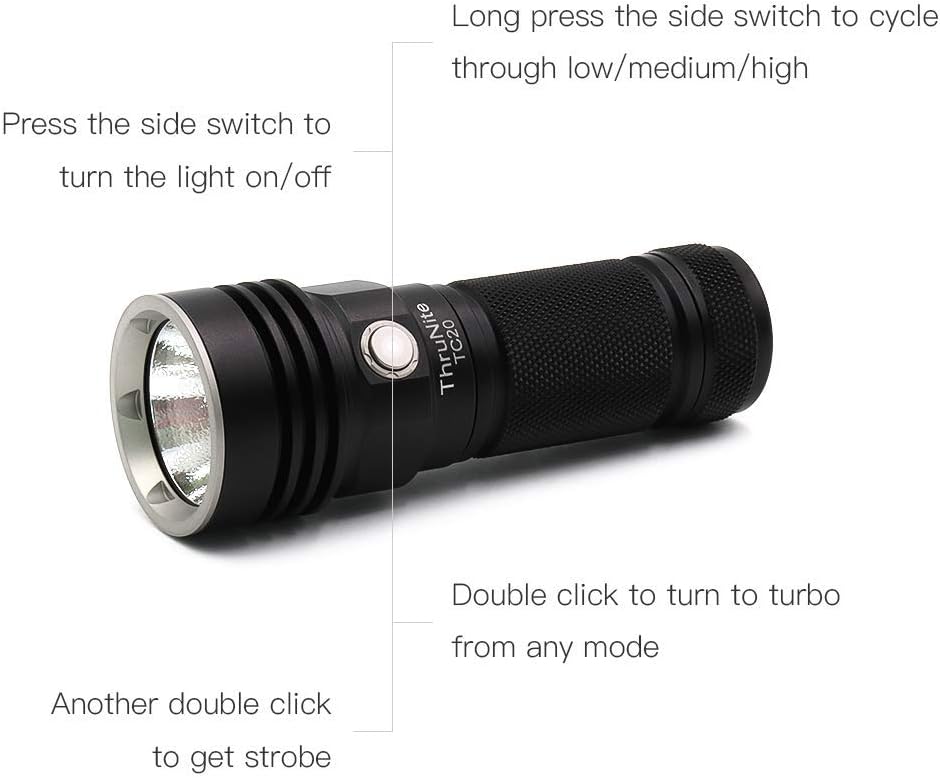
Image: An illustrative diagram of the ThruNite TC20 flashlight, clearly labeling the functions of its side switch: single click for on/off, long press to cycle through low/medium/high modes, double click for turbo, and another double click for strobe.
Basic Operation:
- Turn On/Off: Single click the side switch to turn the light on or off.
- Cycle Modes (Low/Medium/High): When the light is on, long press the side switch to cycle through Low, Medium, and High brightness levels. Release the switch to select the desired mode. The flashlight will memorize the last used mode (except Turbo and Strobe).
- Turbo Mode: From any mode (on or off), double click the side switch to activate Turbo mode.
- Strobe Mode: From Turbo mode, double click the side switch again to activate Strobe mode.
- Firefly Mode: When the light is off, long press the side switch for approximately 1 second to activate Firefly mode (ultra-low brightness).
Charging
The ThruNite TC20 features a built-in USB 2A charging port for convenient recharging of the included battery.
Charging Process:
- Open the rubber cover protecting the USB charging port on the flashlight body.
- Connect the small end of the included USB cable to the flashlight's port.
- Connect the larger end of the USB cable to a standard USB power source (e.g., computer, USB wall adapter, power bank).
- During charging, the indicator light on the side switch will illuminate red.
- Once charging is complete, the indicator light will turn blue.
- After charging, ensure the rubber cover is securely closed to maintain water resistance.
Low Voltage Indication:
The flashlight will remind you to charge when the battery voltage is low. The indicator light will flash red to signal that the battery needs recharging.

Image: The ThruNite TC20 flashlight is shown connected to a laptop via its USB charging cable, demonstrating the integrated charging capability.
Maintenance
Proper maintenance ensures the longevity and optimal performance of your ThruNite TC20 flashlight.
- Cleaning: Clean the flashlight body with a soft, damp cloth. Do not use abrasive cleaners or solvents.
- Threads and O-rings: Periodically lubricate the threads and O-rings with silicone grease to maintain water resistance and smooth operation. Replace worn O-rings with the provided spares.
- Battery Care: If the flashlight will not be used for an extended period, remove the battery to prevent potential leakage. Store the battery in a cool, dry place.
- Water Resistance: Ensure the rubber cover for the USB port and the tail cap are securely tightened to maintain the IPX8 waterproof rating.
Troubleshooting
If you encounter issues with your ThruNite TC20 flashlight, refer to the following common problems and solutions:
| Problem | Possible Cause | Solution |
|---|---|---|
| Flashlight does not turn on. | Battery is dead or incorrectly inserted. | Charge the battery or re-insert it with the positive (+) end facing the head. |
| Light flickers or turns off unexpectedly. | Loose tail cap or dirty contacts. Low battery. | Tighten the tail cap. Clean battery contacts with a clean cloth. Charge the battery. |
| Cannot cycle through modes. | Side switch malfunction or user error. | Ensure you are long-pressing the switch for mode cycling. If issue persists, contact support. |
| Charging indicator not working. | USB cable or power source issue. | Try a different USB cable or power source. Ensure the cable is fully inserted. |
Specifications
Detailed technical specifications for the ThruNite TC20 flashlight:
- LED: XHP70 2nd generation LED
- Brightness: Up to 3800 Lumens
- Beam Distance: Up to 350 yards
- Power Source: Battery Powered (Lithium Ion)
- Voltage: 3.7 Volts
- Special Features: IPX8 Waterproof, Rechargeable, Super Bright
- Material: Aluminum
- Color: Black
- Product Dimensions: 1.65"D x 1.32"W x 4.68"H
- Included Components: 1x Rechargeable Battery, 1x USB Cable, 1 x Lanyard, 1 x Holster, 2 x Spare Orings, 1 x Spare Side Switch Cap
- Manufacturer: ThruNite
- Model Number: TC20 NW
Warranty and Support
For warranty information or technical support, please refer to the official ThruNite website or contact their customer service directly. Details regarding specific warranty periods and claim procedures are typically provided with your purchase documentation or on the manufacturer's website.
ThruNite Store: Visit the ThruNite Store on Amazon


