
1. Introduction
Thank you for choosing the HOOTEK 4-Port USB Wall Charger. This device is designed to provide efficient and safe charging for multiple electronic devices simultaneously. Please read this manual carefully before use to ensure proper operation and to maximize the lifespan of your product.
2. What's in the Box
- 1 x HOOTEK 4-Multi Port USB Charger (Model: PT-WC-24)
3. Product Features
- 4-Port Design: Recharge up to 4 smartphones or tablets simultaneously.
- High Output: Each port provides a maximum output of 5V/4.8A (total 40W/4.8A).
- Certified Safety: CE/FCC/RoHS certified with built-in protections against overheating, over-current, and over-charging.
- Wide Compatibility: Compatible with a broad range of devices including iPhones, Samsung Galaxy, Google Pixel, LG, HTC, OnePlus, Motorola, Sony, tablets, MP3 players, and more.
- Portable Design: Compact and lightweight, ideal for travel and everyday use.

Image: The HOOTEK 4-Port USB Wall Charger connected to a wall outlet, simultaneously charging an iPhone and an iPad, demonstrating its multi-device charging capability.
4. Setup
- Unpack the HOOTEK 4-Port USB Wall Charger from its packaging.
- Ensure the wall outlet is easily accessible and in good condition.
- Plug the charger directly into a standard AC 100-240V wall outlet.
- Connect your USB charging cables (not included) to the charger's USB ports.
- Connect the other end of the USB cables to your devices to begin charging.

Image: A black and white HOOTEK 4-Port USB Wall Charger, illustrating its compact design and four USB-A output ports.
5. Operating Instructions
The HOOTEK 4-Port USB Wall Charger is designed for simple plug-and-play operation. Once plugged into a power outlet, it is ready to charge your devices.
- Connect up to four devices using their respective USB charging cables.
- The charger will automatically detect the connected devices and deliver the optimal charging current up to 2.4A per port, with a total maximum output of 4.8A across all ports.
- Charging will automatically stop once your devices are fully charged to prevent overcharging.

Image: The HOOTEK 4-Port USB Wall Charger depicted in different usage scenarios, including home, workplace, business trips, and general travel, highlighting its versatility.
6. Safety Information
Your safety is paramount. The HOOTEK 4-Port USB Wall Charger incorporates multiple safety features to protect your devices and ensure safe operation.
- Over-heated Protection: Prevents the charger from reaching unsafe temperatures.
- Over-current Protection: Safeguards against excessive current flow to connected devices.
- Over-charging Protection: Automatically stops charging when the device battery is full.
- Short Circuit Protection: Protects against electrical shorts.
- Certifications: CE, FCC, and RoHS certified for quality and safety standards.
Always use the charger in a dry environment. Do not expose it to water or extreme temperatures. Avoid dropping or disassembling the charger.

Image: A diagram illustrating the 'Smart IC Technology' of the HOOTEK 4-Port USB Wall Charger, highlighting its safety features including over-current, short circuit, over-temperature, and over-voltage protection.
7. Specifications
| Feature | Detail |
|---|---|
| Model Number | PT-WC-24 |
| Input Voltage | AC100-240V 50/60Hz |
| Output | DC 5V-4.8A (2.4A Max Per Port) |
| Total USB Ports | 4 |
| Wattage | 40 Watts |
| Material | Plastic outer shell |
| Item Weight | 2.11 Ounces (approx. 60g) |
| Dimensions | 55mm (2.16in) height, 33mm (1.29in) width, 16.8mm (0.66in) plug length |
| Power Plug Type | Type A - 2 pin (North American) |
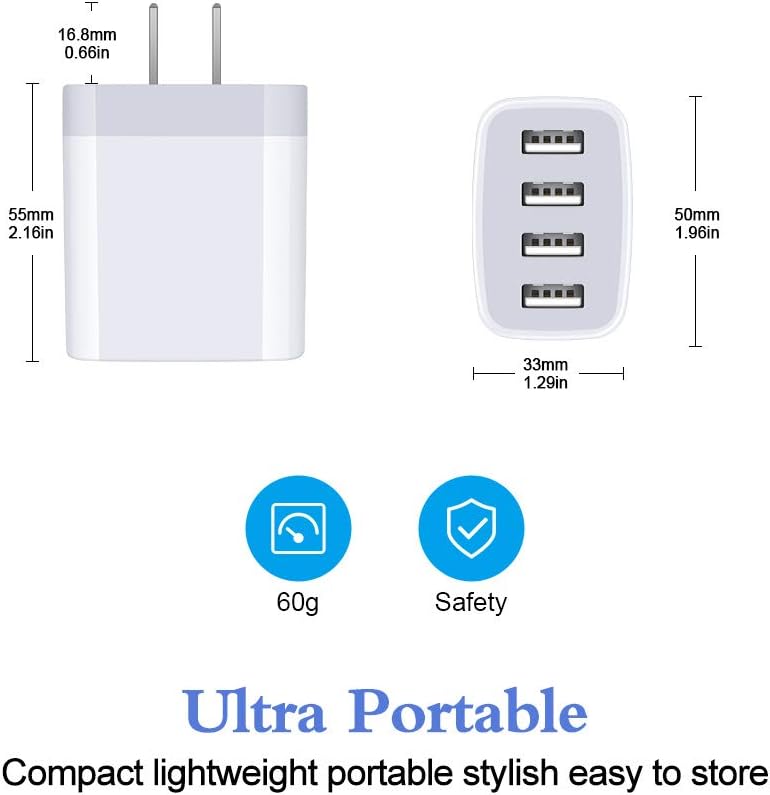
Image: A technical drawing illustrating the precise dimensions of the HOOTEK 4-Port USB Wall Charger in millimeters and inches.

Image: The HOOTEK 4-Port USB Wall Charger highlighted as 'Ultra Portable', indicating its light weight of 60 grams and a safety certification icon.

Image: The HOOTEK 4-Port USB Wall Charger with a 'Travel Ready' label, emphasizing its compact design and universal 110-240V input for international travel.
8. Maintenance
- Keep the charger clean by wiping it with a dry, soft cloth.
- Do not use liquid cleaners or abrasive materials.
- Store the charger in a cool, dry place when not in use.
- Avoid wrapping cables tightly around the charger, as this can damage the cables or the charger itself.
9. Troubleshooting
| Problem | Possible Cause / Solution |
|---|---|
| Device not charging | Ensure the charger is securely plugged into a working wall outlet. Check if the USB cable is properly connected to both the charger and the device. Try a different USB cable or device to isolate the issue. |
| Slow charging | Ensure your device supports fast charging. Using a low-quality or damaged USB cable can reduce charging speed. If multiple devices are connected, the total current is shared, which might result in slower charging for individual devices. |
| Charger feels warm | It is normal for the charger to become slightly warm during operation, especially when charging multiple devices. If it becomes excessively hot, disconnect it immediately and contact customer support. |
10. Warranty and Support
HOOTEK provides a 12-month hassle-free warranty for this product. If you encounter any issues or have questions, please contact our customer service for prompt assistance. Our support team is available 24 hours to help you.
For warranty claims or technical support, please refer to the contact information provided on the product packaging or the official HOOTEK website.