
1. Introduction
This manual provides essential information for the proper use and maintenance of your Litetec Universal Hard Carrying Case, Model LD-012. This case is designed to offer robust protection and convenient portability for various electronic devices, including the Blackmagic Design ATEM Mini Live Stream Switcher and the Nintendo Switch console along with its accessories.
Constructed from durable PU, EVA, and flannelette materials, the case is engineered to protect your equipment from wear, scratches, and dust, ensuring its longevity and functionality during transport and storage.
2. Product Features
- Robust Protection: Made with PU, EVA, and flannelette materials to safeguard against wear and scratches.
- Lightweight and Portable: Designed for easy transport without adding significant bulk.
- Dust-Proof and Anti-Scratch: Helps maintain the condition of your stored devices.
- Secure Closure: Features a reliable zipper closure to keep contents secure.
- Integrated Handle: A top handle provides comfortable carrying.
3. Setup and Device Placement
Follow these steps to properly set up and place your devices within the carrying case:
- Open the Case: Unzip the main closure of the case completely to reveal the interior compartments.
- Identify Compartments: The case features a main compartment and an internal mesh pocket, often with a divider or elastic straps for securing items.
- Place Main Device: Carefully place your primary device (e.g., Blackmagic Design ATEM Mini or Nintendo Switch) into the main padded section of the case. Ensure it fits snugly without excessive force.
- Organize Accessories: Utilize the mesh pocket or any elastic straps for smaller accessories such as cables, power adapters, or game cartridges. This helps prevent items from shifting during transport.
- Close Securely: Once all items are placed, carefully close the zipper, ensuring no fabric or items are caught in the zipper teeth.

Figure 1: The Litetec Universal Hard Carrying Case opened, displaying its internal structure with a mesh pocket in the lid and a main compartment with a divider.
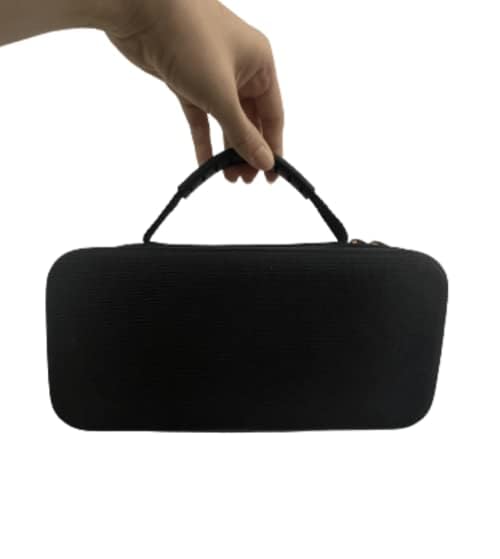
Figure 2: A closer look at the interior of the case, highlighting the soft flannelette lining designed to prevent scratches and an elastic strap for securing items.
4. Operating Instructions
Using your Litetec carrying case is straightforward:
- Carrying: Use the integrated top handle for easy and comfortable transportation.
- Storage: When not in use, store the case in a cool, dry place away from direct sunlight to preserve its material integrity.
- Protection: The hard shell and soft interior are designed to absorb minor impacts and prevent surface damage. Avoid dropping the case from significant heights or exposing it to extreme pressure.

Figure 3: The case being held by its top handle, demonstrating its portability.
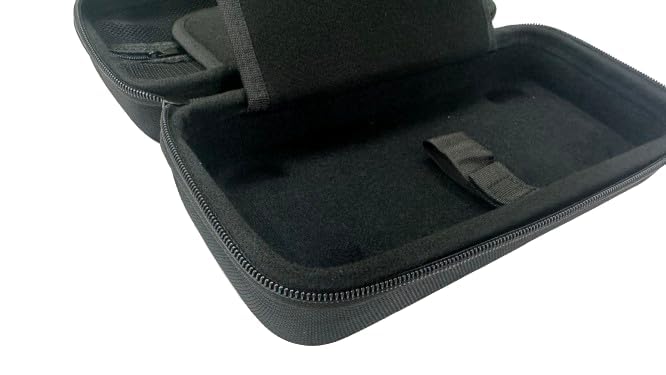
Figure 4: The Litetec Universal Hard Carrying Case in its closed state, highlighting its compact and protective design.
5. Maintenance and Care
To ensure the longevity and appearance of your Litetec carrying case, follow these maintenance guidelines:
- Cleaning the Exterior: Wipe the exterior surface with a soft, damp cloth. For stubborn dirt, a mild soap solution can be used, followed by wiping with a clean, damp cloth and air drying. Avoid harsh chemicals or abrasive cleaners.
- Cleaning the Interior: Gently vacuum or use a lint roller to remove dust and debris from the flannelette interior. Spot clean any stains with a slightly damp cloth and mild soap, then allow to air dry completely before closing the case.
- Zipper Care: Periodically check the zipper for any debris. If the zipper becomes stiff, a small amount of zipper lubricant (e.g., beeswax or silicone spray) can be applied carefully.
- Avoid Overfilling: Do not overfill the case, as this can strain the zipper and compromise the structural integrity of the case.
6. Troubleshooting
If you encounter any issues with your carrying case, consider the following common solutions:
- Zipper is Stuck:
- Check for any fabric or foreign objects caught in the zipper teeth. Gently pull them free.
- Apply a small amount of lubricant (e.g., pencil graphite, beeswax, or zipper lubricant) to the teeth and try to move the slider slowly.
- Case Does Not Close Properly:
- Ensure the case is not overfilled. Remove some items if necessary.
- Verify that all items inside are positioned correctly and not obstructing the zipper path.
- Case Appears Deformed:
- The case is designed to resist deformation under normal use. If deformation occurs, ensure it has not been subjected to extreme heat or prolonged heavy pressure. Allow it to rest in its natural shape in a cool, dry environment.
7. Specifications
| Feature | Detail |
|---|---|
| Model Number | LD-012 |
| Shell Type | Hard |
| Closure Type | Zipper |
| Handle Type | Top Handle |
| Number of Compartments | 1 (with internal mesh pocket/divider) |
| Compatible Platforms | Nintendo Switch, Blackmagic Design ATEM Mini |
| Case Material | PU + EVA + Flannelette |
| Product Dimensions (L x W x H) | 10.63 x 5.51 x 3.94 inches (26 x 13 x 9 cm) |
| Item Weight | 11.99 ounces (approx. 340 grams) |
| Color | Black |
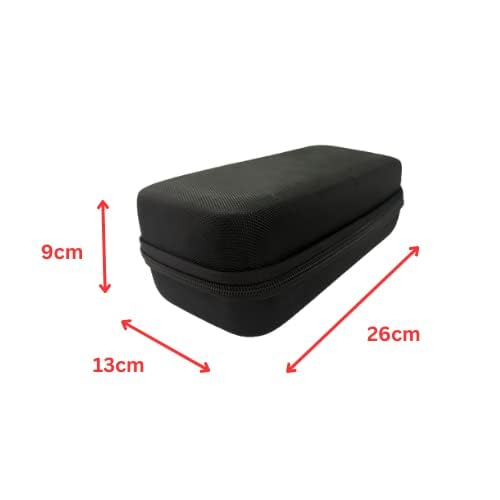
Figure 5: Dimensional diagram of the Litetec Universal Hard Carrying Case.
8. Warranty and Support
Specific warranty information for the Litetec Universal Hard Carrying Case (Model LD-012) is not provided within this document. For details regarding warranty coverage, returns, or technical support, please refer to the retailer's policy where the product was purchased or contact Litetec Universal directly through their official support channels.
Always retain your proof of purchase for any warranty claims.