
Welcome
Thank you for choosing the Taylor Glass Top Digital Food Scale. This manual provides essential information for the proper setup, operation, and maintenance of your new scale. Designed for accuracy and ease of use, this scale is an ideal tool for precise portioning in cooking, baking, and diet management.

Figure 1: Taylor Glass Top Digital Food Scale
Important Safeguards
- Always use the scale on a hard, flat surface to ensure accuracy.
- Do not immerse the scale in water or other liquids.
- Clean the scale with a damp cloth; avoid abrasive cleaners.
- Do not overload the scale beyond its maximum capacity of 11 lb (5 kg).
- Keep out of reach of children.
- Remove batteries if the scale will not be used for an extended period.
Setup
Unpacking
- Carefully remove the scale from its packaging.
- Inspect the scale for any signs of damage. Do not use if damaged.
- Retain packaging for future storage or shipping.
Battery Installation
- Locate the battery compartment on the underside of the scale.
- Open the battery compartment cover.
- Insert two (2) AAA batteries, ensuring correct polarity (+/-).
- Close the battery compartment cover securely.

Figure 2: Battery Compartment
Operating Instructions
Power On/Off
- To turn on: Press the 'TARE/⏻' button. The display will show '0.0' or '0 g'.
- To turn off: Press and hold the 'TARE/⏻' button for a few seconds until the display turns off. The scale also features an automatic shut-off function to conserve battery life.
Unit Selection
- Press the 'UNIT' button to cycle through the available measurement units: pounds/ounces (lb:oz), grams (g), fluid ounces (fl.oz), and milliliters (ml).
- Select the desired unit before weighing your items.
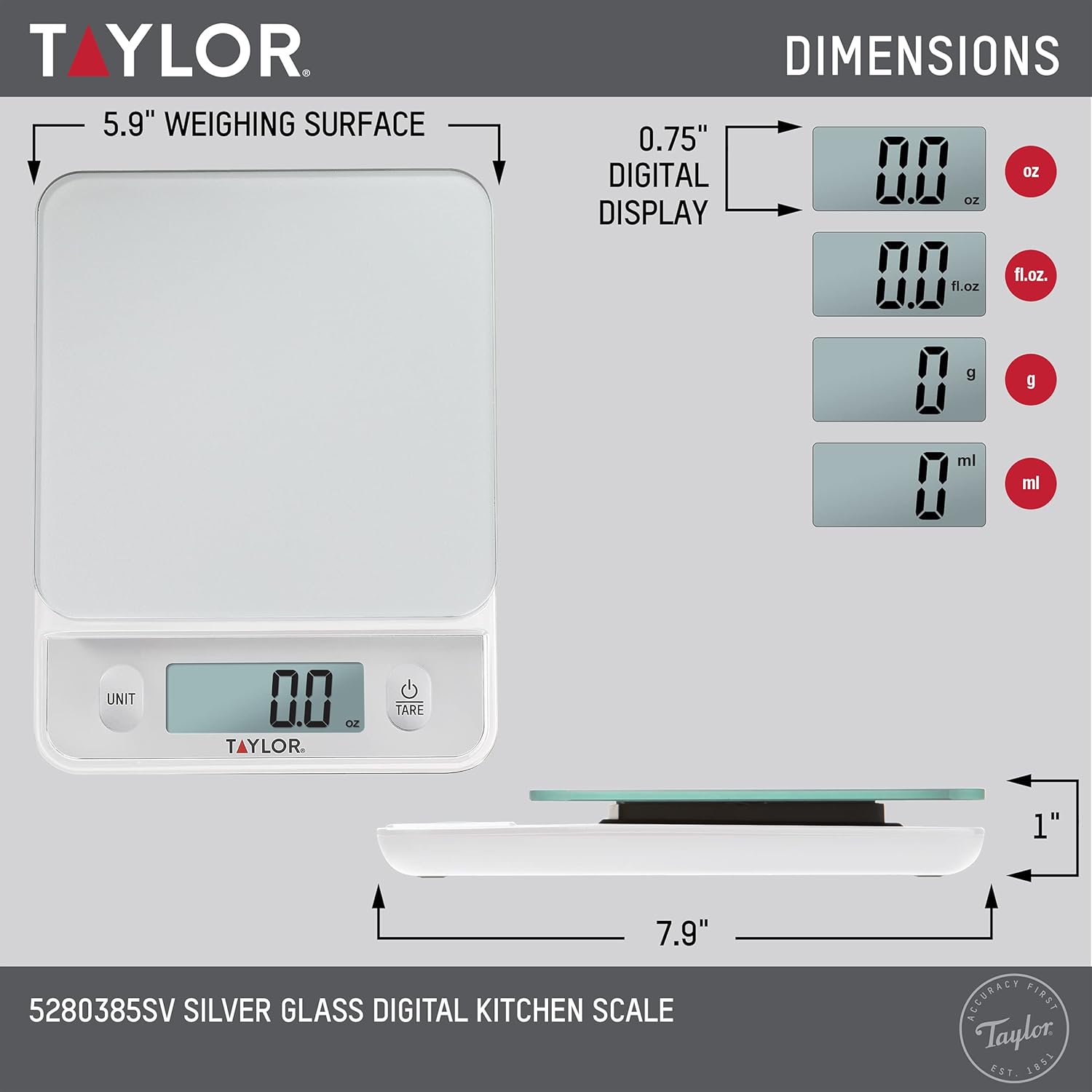
Figure 3: Digital Display with Unit Options
Tare Function
The tare function allows you to weigh multiple ingredients in the same container or to exclude the weight of a container from your measurement.
- Place an empty container on the scale. The display will show its weight.
- Press the 'TARE/⏻' button. The display will reset to '0.0'.
- Add your first ingredient to the container. The display will show the weight of only the ingredient.
- To add another ingredient, press 'TARE/⏻' again to reset the display to '0.0', then add the next ingredient. Repeat as needed.

Figure 4: Using the Tare Function
Weighing Items
- Ensure the scale is on a flat, stable surface and powered on with the display showing '0.0'.
- Place the item(s) directly onto the glass platform or into a container (using the tare function).
- Read the weight displayed on the large digital screen.

Figure 5: Scale in Use with Food Items
Maintenance and Care
- The tempered glass surface is easy to clean and naturally stain-resistant.
- Wipe the scale clean with a soft, damp cloth after each use.
- Avoid using harsh chemicals or abrasive cleaning pads, as these can damage the surface.
- The smooth touch buttons are designed to prevent dirt accumulation, making them easy to wipe clean.
- Do not submerge the scale in water.
Troubleshooting
- Display shows 'Lo': Batteries are low and need to be replaced.
- Display shows 'Err': Scale is overloaded. Remove items immediately to prevent damage.
- Inaccurate readings: Ensure the scale is on a flat, stable surface. Check battery levels. Avoid placing items off-center.
- Scale does not turn on: Check if batteries are installed correctly and are not depleted.
Product Specifications
| Feature | Detail |
|---|---|
| Model Number | 5280385SV |
| Capacity | 11 lb x 0.1 oz / 5 kg x 0.001 kg / 5000 g x 1 g |
| Units of Measurement | lb:oz, kg, g, fl.oz, ml |
| Display Type | LCD, Touchscreen |
| Power Source | 2 x AAA Batteries (Included) |
| Special Features | Tare Function, Auto Shut Off |
| Product Dimensions | 5.9 x 7.87 x 1.18 inches |
| Weight | 1.17 Pounds |
| Manufacturer | Lifetime Brands Inc. |
Warranty Information
This Taylor Glass Top Digital Food Scale is covered by a One (1) Year Limited Warranty from the date of purchase. This warranty covers defects in materials and workmanship under normal use. For full warranty details and conditions, please refer to the documentation included with your product or contact customer support.
Customer Support
Should you have any questions, require assistance, or need to make a warranty claim, please contact Taylor customer support. Contact information can typically be found on the product packaging or the manufacturer's official website. Please have your model number (5280385SV) available when contacting support.

