1. Product Overview
The HUAWEI B818-263 is an advanced LTE router designed to provide high-speed internet connectivity. It supports 4G+ networks, offering theoretical downlink speeds of up to 1.6 Gbps and uplink speeds of up to 150 Mbps. This device is equipped with 4x4 MIMO antenna technology and carrier aggregation for enhanced performance and stability.
The router features a sleek, minimalist design and provides multiple connectivity options, including wired Ethernet ports and dual-band Wi-Fi. It is an ideal solution for home and small office environments requiring reliable and fast wireless broadband.

Figure 1: Front view of the HUAWEI B818-263 LTE Router, showing the HUAWEI logo and indicator lights for Tel, Status, LAN, WiFi, and Mode.
2. Package Contents
Before you begin, please verify that all items are present in your package:
- HUAWEI B818-263 LTE Router
- Power Adapter
- Flat LAN Cable
- Quick Start Guide (Printed)

Figure 2: The product packaging for the HUAWEI 4G Router 3 Prime (B818-263).
3. Setup Guide
3.1 SIM Card Installation
- Ensure the router is powered off.
- Locate the micro SIM card slot at the bottom of the router.
- Insert your micro SIM card into the slot with the gold contacts facing down and the notched corner oriented correctly, until it clicks into place.
3.2 Connecting the Router
- Power Connection: Connect the power adapter to the router's power port and then plug it into a wall outlet.
- LAN Connections: Use the provided LAN cable to connect your computer or other network devices to one of the two Gigabit RJ45 LAN ports on the rear of the router. One of these ports can also function as a WAN port for an external internet source.
- USB Connection: If desired, connect a USB storage device to the USB 2.0 port for network sharing.
- External Antennas (Optional): For improved signal reception, connect compatible external antennas to the two external antenna ports on the rear.
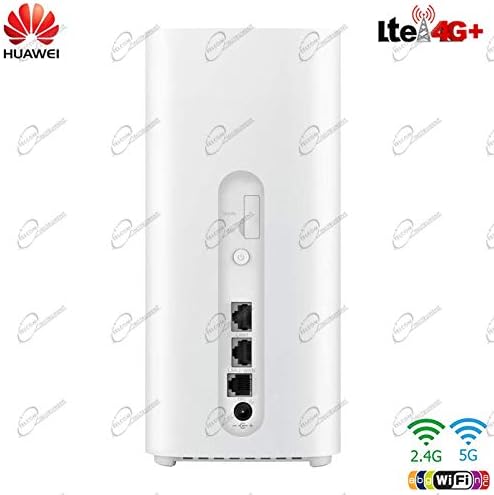
Figure 3: Rear view of the HUAWEI B818-263 LTE Router, highlighting the various ports and connections.
4. Operating Instructions
4.1 Powering On and Indicator Lights
After connecting the power, press the power button on the rear of the router. The indicator lights on the front panel will illuminate, providing status information:
- Power: Indicates power status.
- Status: Indicates network connection status.
- LAN: Indicates activity on the LAN ports.
- WiFi: Indicates Wi-Fi status.
- Mode: Indicates the current operating mode or signal strength.
4.2 Accessing the Web Management Interface
To configure advanced settings, access the router's web management interface:
- Connect your computer to the router via Wi-Fi or an Ethernet cable.
- Open a web browser and enter the router's default IP address (usually 192.168.8.1 or 192.168.1.1) into the address bar.
- Enter the default username and password (found on the label at the bottom of the router or in the Quick Start Guide) to log in.
- Follow the on-screen instructions to complete the initial setup, including changing the default Wi-Fi name and password.
4.3 Network Connectivity
- Wi-Fi: The router supports 802.11ac dual-band Wi-Fi. Connect your wireless devices using the Wi-Fi name (SSID) and password provided on the router's label or configured during setup.
- Ethernet: Use the LAN ports to connect wired devices such as desktop computers, smart TVs, or gaming consoles for stable, high-speed connections.
- USB Sharing: Access files on a connected USB storage device from any device on your network via the router's file sharing feature.
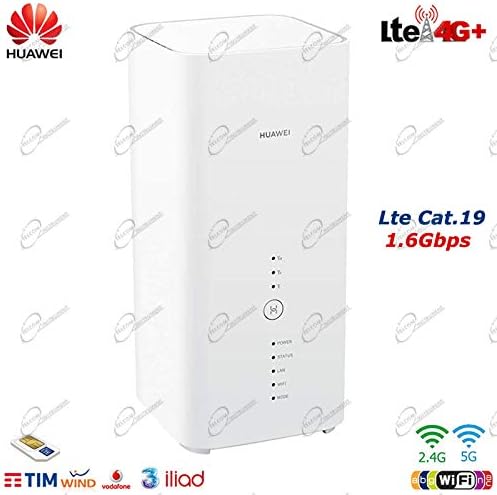
Figure 4: Angled view of the HUAWEI B818-263, highlighting its high-speed LTE capabilities.
5. Maintenance
To ensure optimal performance and longevity of your HUAWEI B818-263 router, follow these maintenance guidelines:
- Cleaning: Regularly wipe the router with a soft, dry cloth. Avoid using liquid cleaners or aerosols.
- Ventilation: Ensure the router is placed in a well-ventilated area, away from direct sunlight and heat sources, to prevent overheating.
- Firmware Updates: Periodically check the router's web management interface for available firmware updates. Keeping the firmware updated ensures the best performance, security, and compatibility.
- Restarting: If you experience network issues, try restarting the router by unplugging the power adapter for 10 seconds and then plugging it back in.
6. Troubleshooting
If you encounter problems with your router, refer to the following common issues and solutions:
- No Power:
- Ensure the power adapter is securely connected to the router and a working power outlet.
- Check if the Power indicator light is on.
- No Internet Connection:
- Check the Status indicator light. If it's red or off, there might be an issue with the SIM card or network signal.
- Ensure the SIM card is correctly inserted and active.
- Verify your APN settings in the web management interface.
- Try moving the router to a location with better cellular signal.
- Slow Internet Speed:
- Check the Mode indicator light for signal strength. More bars indicate better signal.
- Reduce the number of connected devices or bandwidth-intensive activities.
- Ensure your router's firmware is up to date.
- Consider using external antennas if signal strength is consistently low.
- Cannot Access Web Management Interface:
- Ensure your device is connected to the router's network (Wi-Fi or Ethernet).
- Verify you are entering the correct IP address (e.g., 192.168.8.1).
- Try clearing your browser's cache or using a different browser.
If problems persist, consult the official HUAWEI support resources or contact your service provider.
7. Technical Specifications
| Feature | Specification |
|---|---|
| Brand | HUAWEI |
| Model Number | B818-263 (51060ELY) |
| Color | White |
| Connectivity Technology | Ethernet, Wireless (LTE/4G+, Wi-Fi) |
| Wireless Communication Standard | 802.11ac |
| Frequency Class | Dual Band |
| Data Transfer Rate (Max) | 1.6 Gbps (Downlink), 150 Mbps (Uplink) |
| LTE Frequency Bands Supported | B1, B3, B7, B8, B20, B28, B32, B38, B42 |
| Antenna Technology | 4x4 MIMO, Carrier Aggregation |
| Ports | 2x Gigabit RJ45 LAN (one WAN capable), 1x USB 2.0, 2x External Antenna ports, 1x Micro SIM slot |
| Recommended Use | Home |
8. Warranty and Support
For warranty information, please refer to the warranty card included with your product or contact your point of purchase. HUAWEI provides customer support for its products. For technical assistance, troubleshooting beyond this manual, or service inquiries, please visit the official HUAWEI support website or contact their customer service hotline in your region.
Note: Availability of spare parts and software updates may vary. Please check with the manufacturer for the latest information.