
1. Introduction and Overview
The JOYO Nasscar R-10 Analog Delay Effect Pedal is designed to deliver a warm and natural vintage sound, inspired by classic Bucket Brigade Device (BBD) circuits. This pedal is ideal for guitarists seeking sentimental and classic delay tones, particularly suitable for guitar solos. It features a robust R series design with comprehensive tones and functions, ensuring transparent tone quality through True Bypass circuitry.

Image 1: The JOYO Nasscar R-10 Analog Delay Pedal, showcasing its golden finish and illuminated blue side lights.
2. Key Features
- Analog BBD Circuitry: Delivers warm, natural, and classic delay tones.
- True Bypass: Ensures transparent tone and a clean signal path when the effect is disengaged.
- Durable Construction: Features an aluminum alloy casing with a stoving varnish finish for stable, sturdy, and rust-resistant performance.
- Iconic Design: Whole new appearance with iconic ambience lights that blend futuristic and retro styles.
3. Controls and Functions
The Nasscar R-10 pedal features three primary control knobs to shape your delay sound:
- DELAY Knob: Controls the delay time, from short slap-back echoes to longer, more expansive repeats.
- F.BACK (Feedback) Knob: Adjusts the number of repeats. Turn clockwise for more repeats, counter-clockwise for fewer.
- MIX Knob: Blends the wet (effected) signal with the dry (unaffected) signal. Adjust to find the perfect balance for your sound.

Image 2: Close-up view of the JOYO Nasscar R-10 pedal, highlighting the three control knobs: DELAY, F.BACK, and MIX.
4. Setup and Connections
To ensure proper operation and avoid unexpected noise, follow these connection guidelines:
- Connect your guitar to the INPUT jack on the right side of the pedal.
- Connect the OUTPUT jack on the left side of the pedal to your amplifier or the next pedal in your signal chain.
- Connect a DC 9V power adapter (center minus) to the DC 9V input. Ensure the power adapter meets the working current requirement of the pedal (30mA). We recommend using an original JOYO power adapter or another reliable brand.
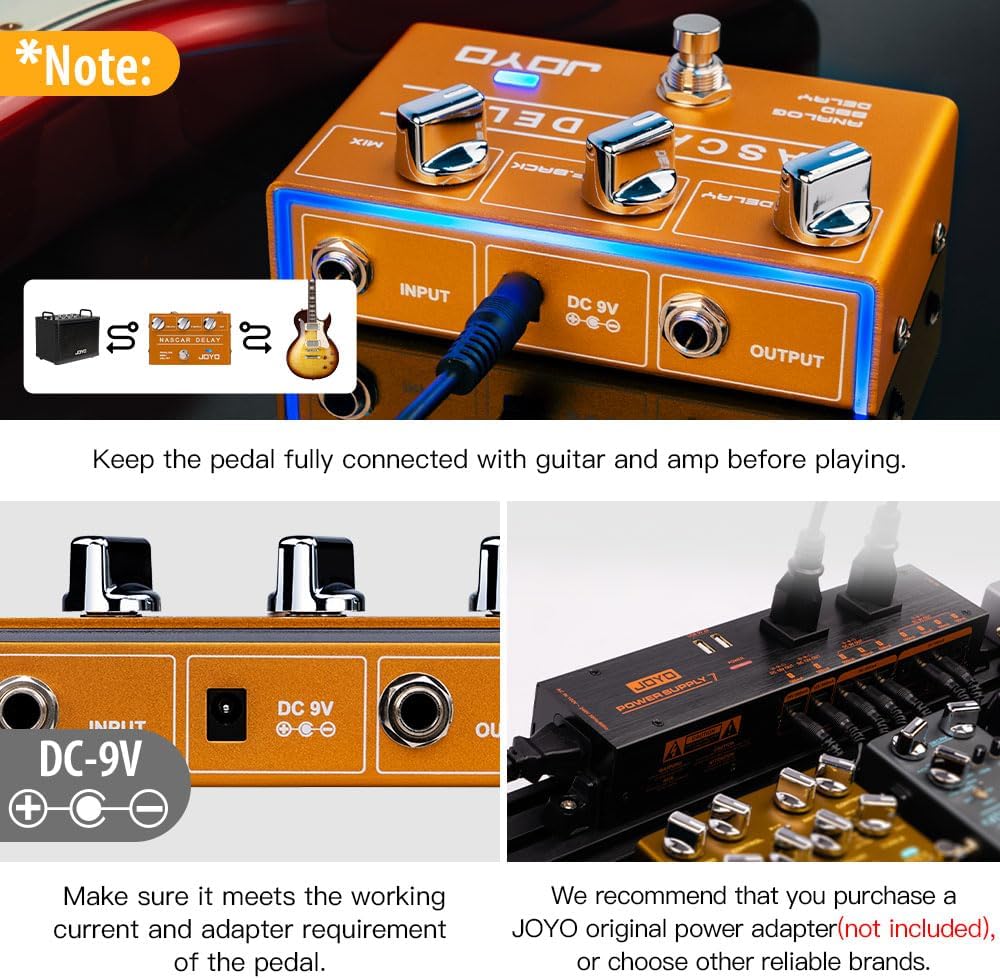
Image 3: Rear view of the pedal, illustrating the input, output, and power connections. Ensure all connections are secure before use.
5. Operating Instructions
Once connected, press the footswitch to engage or disengage the delay effect. The LED indicator will illuminate when the effect is active. Experiment with the DELAY, F.BACK, and MIX knobs to find your desired sound. For a visual demonstration of the pedal's capabilities, please refer to the official seller video below.
Video 1: Official demonstration of the JOYO Nascar Analog Delay Effect Pedal (R10) by JoyoDirect, showcasing its sound and features.
6. Specifications
| Input Impedance | 1MΩ |
| Output Impedance | 470Ω |
| Working Voltage | DC 9V (center minus) |
| Rated Current Consumption | 30mA |
| Item Weight | 0.86 lb / 13.69 ounces |
| Product Dimensions (L x W x H) | 4.92" x 3.09" x 1.89" |
| Audio Output Effects | Analog |
| Signal Format | Analog |

Image 4: The pedal displaying its physical dimensions and key specifications.
7. Maintenance
To ensure the longevity and optimal performance of your JOYO Nasscar R-10 pedal:
- Keep the pedal clean by wiping it with a soft, dry cloth.
- Avoid exposing the pedal to extreme temperatures, humidity, or direct sunlight.
- Disconnect the power supply when the pedal is not in use for extended periods.
- Store the pedal in a safe place to prevent physical damage.
8. Troubleshooting
If you experience issues with your pedal, consider the following:
- No Sound: Ensure all cables (guitar, amplifier, power) are securely connected. Check if the pedal is receiving power (LED should be on when engaged).
- Unexpected Noise: Verify that your power adapter meets the specified DC 9V (center minus) and current requirements (30mA). Using an incorrect or unstable power supply can introduce noise.
- Effect Not Engaging: Check the footswitch. If the LED does not light up when pressed, there might be a power issue or a faulty footswitch.
9. What's in the Box
Your JOYO Nasscar R-10 Analog Delay Pedal package includes:
- Guitar Effect Pedal (Power supply not included)
- User Manual
10. Warranty and Support
JOYO provides a one-year after-sales service for this product. If you encounter any product issues, please contact the seller through your order details. Please note that claims of items not as described, returns of different items, or items with missing parts will be reported to Amazon after verification.


