
1. Product Overview
The HACHANLUN RFID NFC Card Copier is a portable device designed for reading, writing, and duplicating various RFID and NFC cards. It supports a wide range of frequencies for both ID and IC cards, making it suitable for diverse applications such as access control, time attendance, and identification systems. This manual provides detailed instructions for setup, operation, and troubleshooting.

Figure 1: Front view of the HACHANLUN RFID NFC Card Copier, showing the screen and control buttons.
2. Product Features
- Wide Frequency Support: Reads and writes ID cards at 125KHz, 250KHz, 500KHz, 375KHz, 625KHz, 750KHz, 875KHz, 1000KHz, and IC cards at 13.56MHz (ISO1443A/B), including HID Prox cards.
- Broad Card Compatibility: Supports writable cards such as HID 1386/1326/1346, T5577, EM4305, Mifare UID cards, EM4100/EM4200, Mifare classic, Ultralight, and Ntag203.
- User-Friendly Interface: Features a 3.2-inch screen display and provides voice operation prompts for ease of use.
- Portability: Designed for mobile use, powered by 4 AAA batteries.
- PC Connectivity: Includes decoding software for Windows, enabling advanced functions like cracking half-encrypted 13.56MHz cards via USB connection.
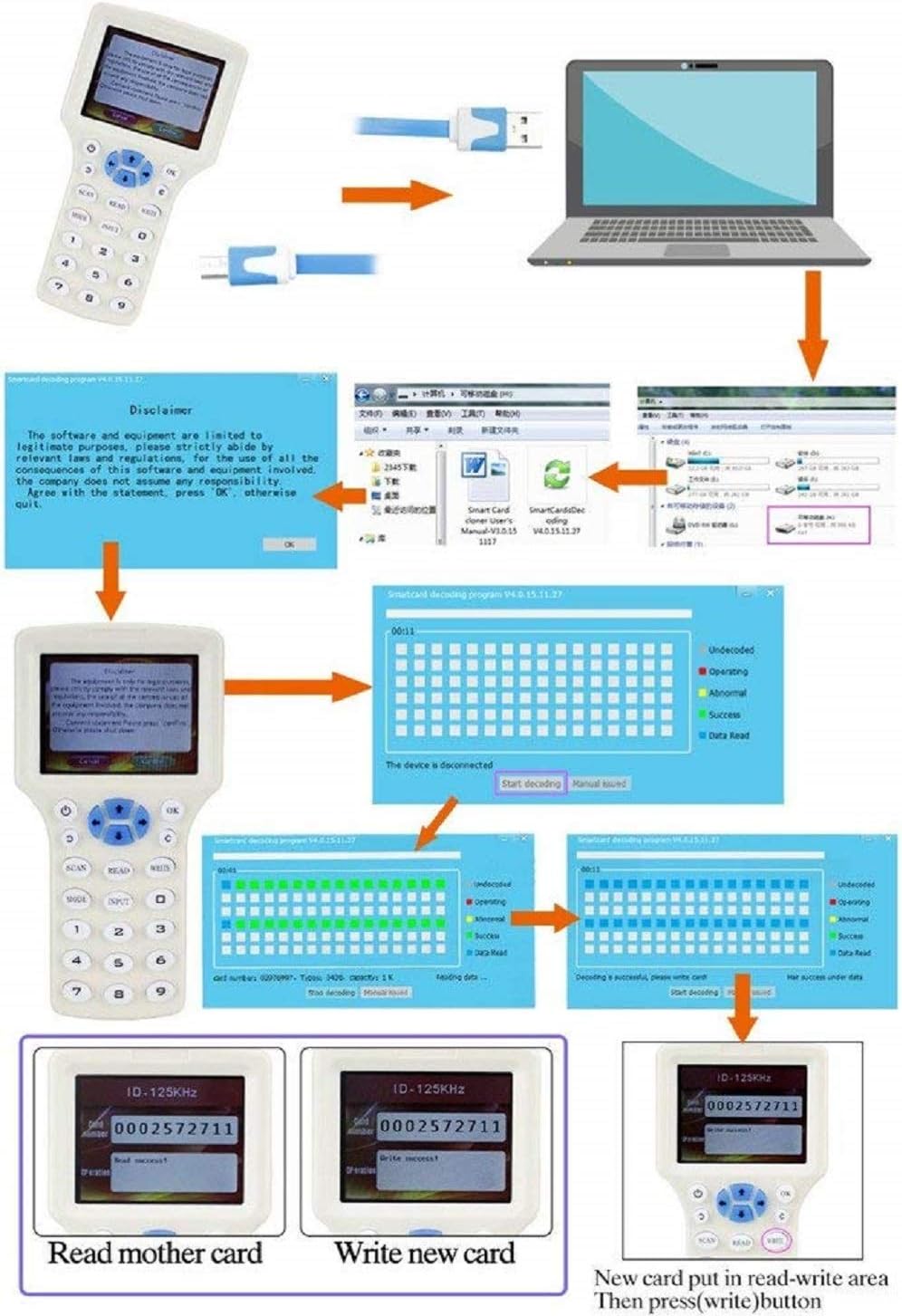
Figure 2: Examples of the device's screen displaying different supported frequencies for ID and IC cards.
3. Setup
3.1 Battery Installation
- Locate the battery compartment on the back of the device.
- Open the battery compartment cover.
- Insert 4 AAA batteries, ensuring correct polarity (+/-).
- Close the battery compartment cover securely.

Figure 3: Rear view of the device, illustrating the battery compartment, loudspeaker, and induction card region.
3.2 Connecting to a Computer (for Software Functions)
- Ensure the device is powered off.
- Connect the device to your computer using the provided USB cable.
- Power on the device. The screen will display a "Disclaimer" page.
- On your computer, a removable disk should appear. Open this disk to access the manual and decoding software.
- Follow the on-screen prompts to agree to the disclaimer on both the computer and the device to establish a successful connection.

Figure 4: The RFID NFC Card Copier shown alongside its USB connection cable.
4. Operating Instructions

Figure 5: Detailed view of the device's buttons and their corresponding functions, along with screen display examples.
4.1 Copying Unencrypted 125KHz and 13.56MHz RFID Cards
- Press the "on/off" button to power on the device.
- Place the original 125KHz or 13.56MHz card on the back of the copier, specifically on the induction card region.
- The copier will display a "Disclaimer" page. Press the "OK" button to proceed.
- With the original card still in place, press the "SCAN" button. The copier will automatically scan the card and display its number.
- Remove the original card. Place a writable blank card (e.g., EM4305 for 125KHz, UID for 13.56MHz) on the back of the copier.
- Press the "WRITE" button. The data from the original card will be written to the new card, and a "Write Success" message will be displayed.
4.2 Cracking and Copying Encrypted 13.56MHz Cards
This process requires connecting the copier to a computer and using the provided decoding software. Note that this method may work for some half-encrypted cards but not all fully encrypted cards.
- Connect the copier to your computer via the USB cable.
- Press the "on/off" button on the copier. The copier will display a "Disclaimer" page. Do NOT press any button on the copier at this stage.
- On your computer, open the removable disk that appears. Locate and run the decoding software.
- Within the software, click "OK" to agree to the disclaimer. Then, agree to the copier's "Disclaimer" page. This will establish a successful connection.
- Place your original encrypted 13.56MHz card on the Read/Write area on the back of the copier.
- In the software, press the "SCAN" button to begin cracking the card's passwords. This process may take 2 to 5 minutes.
- Once the passwords are successfully cracked, remove the original card. Place a blank UID card in the Read/Write area.
- In the software, press the "WRITE" button to write the cracked data to the new UID card.
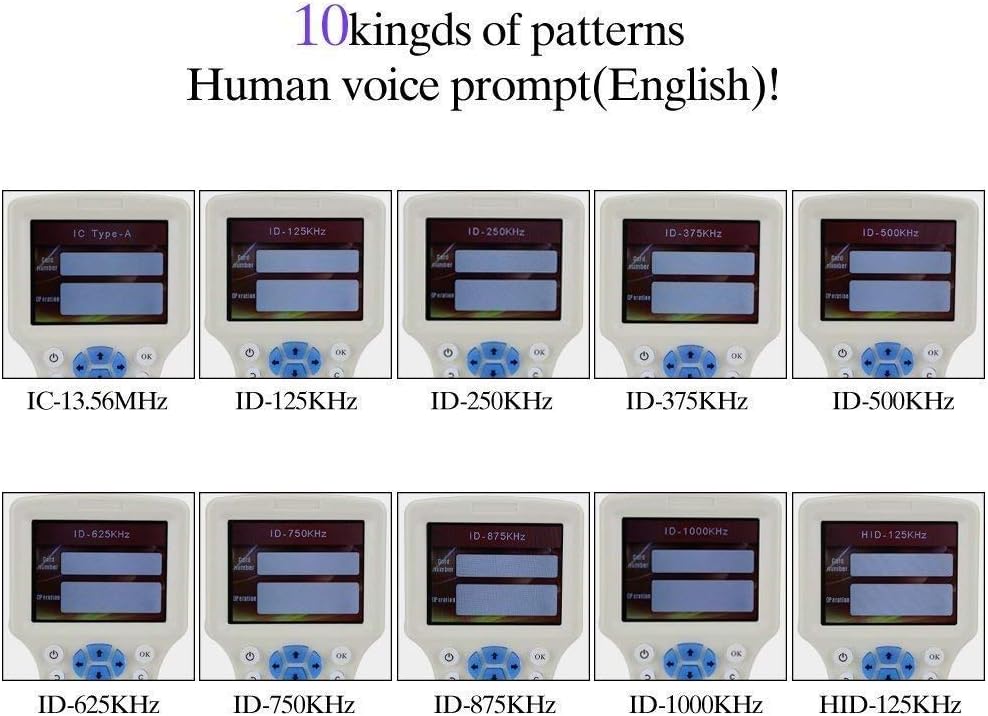
Figure 6: Step-by-step visual guide for connecting the device to a PC and using the decoding software to crack and write encrypted cards.
5. Specifications
| Feature | Detail |
|---|---|
| Brand | HACHANLUN |
| Model Name | RFID NFC |
| Supported Frequencies (ID) | 125KHz, 250KHz, 500KHz, 375KHz, 625KHz, 750KHz, 875KHz, 1000KHz |
| Supported Frequencies (IC) | 13.56MHz (ISO1443A/B), 125KHz Prox Card |
| Compatible Writable Cards | HID 1386/1326/1346, T5577, EM4305, Mifare UID, EM4100/EM4200, Mifare Classic, Ultralight, Ntag203 |
| Display | 3.2-inch screen |
| Power Source | 4 x AAA Batteries |
| Connectivity | Wired (USB) |
| Hardware Platform | PC |
| Operating System Compatibility | Windows (for decoding software), iOS, Android (as listed in specifications, likely for general compatibility, not direct device OS) |
| UPC | 768067047498 |
6. Troubleshooting
- Device does not power on:
Ensure that 4 AAA batteries are correctly installed with proper polarity. Replace batteries if they are depleted.
- Cannot read or write a card:
Verify that the card is placed correctly on the induction card region on the back of the device. Ensure the card type (ID or IC) matches the selected mode. Confirm that the card is unencrypted or partially encrypted, as the device does not work for fully encrypted cards without specific software cracking.
- Software connection issues with PC:
Ensure the USB cable is securely connected to both the device and the computer. Power on the device after connecting the USB cable. Follow all on-screen prompts to agree to the disclaimer on both the computer and the device.
- Encrypted 13.56MHz cards cannot be cracked:
While the device and software can attempt to crack half-encrypted cards, it is important to note that not all encrypted cards can be successfully cracked. The success rate depends on the encryption complexity. Ensure you are following the cracking procedure precisely as outlined in Section 4.2.
- Voice prompts are not in English:
The device is stated to have human voice prompts in English. If this is not the case, check for any language settings within the device menu or software, if available.
7. Maintenance
- Keep the device clean by wiping it with a soft, dry cloth. Avoid using abrasive cleaners or solvents.
- Store the device in a cool, dry place away from direct sunlight and extreme temperatures.
- If the device will not be used for an extended period, remove the batteries to prevent leakage.
- Avoid dropping the device or subjecting it to strong impacts.
8. Safety Information
- Do not attempt to disassemble or modify the device. This may void the warranty and pose safety risks.
- Keep the device away from water and other liquids to prevent electric shock or damage.
- Dispose of batteries according to local regulations. Do not dispose of batteries in fire.
- This device is intended for its specified purpose only. Do not use it for any unauthorized or illegal activities.
9. Warranty and Support
For information regarding warranty coverage, technical support, or service, please refer to the documentation provided at the time of purchase or contact the seller/manufacturer directly. Keep your purchase receipt as proof of purchase.


