
Introduction
The Titan T9200 Canister Vacuum is designed for efficient and thorough cleaning across various surfaces, from bare floors to carpets. This manual provides essential information for the safe and effective use, maintenance, and troubleshooting of your vacuum cleaner. Please read it carefully before operating the appliance.
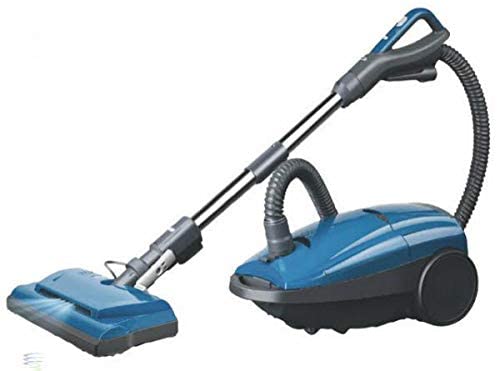
Image: The Titan T9200 Canister Vacuum, showcasing its compact design and power nozzle attachment.
Setup Instructions
Follow these steps to assemble your Titan T9200 Canister Vacuum before first use.
- Unpacking: Carefully remove all components from the packaging. Ensure all parts listed in the packing contents are present.
- Canister Bag Installation: Open the canister lid and insert a new HEPA vacuum bag, ensuring it is properly seated in the bag dock. Close the lid securely.
- Hose Attachment: Connect the flexible hose to the suction inlet on the canister body. Ensure it clicks firmly into place.
- Wand and Power Nozzle Assembly: Attach the telescopic wand to the end of the hose handle. Then, connect the power nozzle to the other end of the telescopic wand. Ensure all connections are secure.
- Accessory Tools: Familiarize yourself with the onboard tools. These typically include a crevice tool, dusting brush, and upholstery tool.
Operating Instructions
This section details how to operate your vacuum cleaner effectively.
Powering On and Off
- Power Cord: Extend the 26-foot power cord and plug it into a standard 120V AC electrical outlet.
- Power Button: Press the power button located on the canister body to turn the vacuum on. Press it again to turn it off.
- Auto Cord Rewind: To retract the power cord, gently pull the cord slightly and then release it. The cord will automatically rewind into the canister.
Surface Cleaning
- Height Adjustment: The power nozzle features a four-level height adjustment. Adjust the nozzle height to suit the carpet pile or bare floor surface for optimal cleaning performance.
- Brush Roll On/Off: For bare floors, ensure the brush roll is turned off to prevent scattering debris and protect delicate surfaces. For carpets and rugs, turn the brush roll on for deep cleaning. The switch is typically located on the power nozzle or handle.
- Using Attachments: Disconnect the power nozzle and attach the desired accessory tool directly to the hose handle or telescopic wand for cleaning upholstery, crevices, or dusting.
Maintenance
Regular maintenance ensures the longevity and optimal performance of your vacuum cleaner.
Bag Replacement
- Full Bag Indicator: The vacuum is equipped with a full bag sensor. When the indicator shows the bag is full, replace it immediately to maintain suction power.
- Procedure: Open the canister lid, carefully remove the full bag, and dispose of it. Insert a new genuine HEPA vacuum bag, ensuring it is fully seated and the seals/gaskets on the bag dock are clean and free of debris.
Filter Maintenance
- HEPA Filtration: The T9200 uses HEPA filtration. Refer to the filter compartment for specific cleaning or replacement instructions. HEPA filters are typically not washable and should be replaced periodically as recommended by the manufacturer.
- Motor Protection Filter: Check and clean or replace the motor protection filter (if applicable) as per the manufacturer's guidelines to prevent dust from entering the motor.
Brush Roll Cleaning
- Hair and Debris Removal: Periodically inspect the power nozzle brush roll for tangled hair, threads, or other debris. Use scissors to carefully cut and remove any obstructions.
- Belt Inspection: Check the brush roll belt for wear or damage. Replace if necessary.
Troubleshooting Guide
Before contacting customer support, refer to this guide for common issues and solutions.
| Problem | Possible Cause | Solution |
|---|---|---|
| Vacuum does not turn on. | Not plugged in; no power to outlet; thermal cut-off activated. | Check power cord connection; test outlet with another appliance; allow vacuum to cool down for 30 minutes if it overheated. |
| Loss of suction. | Full dust bag; clogged hose/filter; brush roll obstructed. | Replace dust bag; check and clear hose/filters; clean brush roll. |
| Power nozzle brush roll not spinning. | Brush roll switch off; belt broken/worn; obstruction. | Ensure brush roll switch is on; inspect and replace belt if needed; remove any obstructions from brush roll. |
| Unusual noise. | Foreign object in brush roll/hose; motor issue. | Turn off and unplug, then check for and remove foreign objects. If noise persists, contact support. |
Specifications
Key technical specifications for the Titan T9200 Canister Vacuum.
- Model: T9200 Canister Vacuum
- Brand: Tacony
- Motor: 12 Amps (800 Watts)
- Voltage: 120 Volts (AC)
- Filtration: HEPA Filtration
- Cleaning Path: 14 Inches
- Cord Length: 26 Feet (Auto Cord Rewind)
- Hose Length: 7 Feet (2.1 Meters)
- Height Adjustment: Four Level
- Weight: 17 Pounds
- Included Components: Brush (refer to packaging for full list of accessories)
- Control Type: Push Button, Touch
- Surface Recommendation: Bare Floors, Carpet
Warranty Information
The Titan T9200 Canister Vacuum comes with a 1-Year Warranty from the date of purchase. This warranty covers manufacturing defects under normal household use. Please retain your proof of purchase for warranty claims. For full terms and conditions, refer to the warranty card included with your product or contact Tacony customer support.
Customer Support
If you require further assistance or have questions not covered in this manual, please contact Tacony customer support. Have your model number (T9200) and purchase information ready when you call.
- Manufacturer: Tacony
- Contact Information: Refer to your product documentation or the manufacturer's official website for current contact information.