
Behringer SL 84C
Behringer SL 84C Dynamic Cardioid Microphone User Manual
Model: SL 84C
Introduction
The Behringer SL 84C is a dynamic vocal microphone designed for clear voice projection with a smooth mid-frequency presence. Its robust construction and unidirectional (cardioid) polar pattern make it suitable for various applications, including live performances, studio recording, and podcasting. This manual provides essential information for setting up, operating, and maintaining your SL 84C microphone.
Package Contents
- Behringer SL 84C Dynamic Cardioid Microphone
- Microphone Stand Adapter
- Protective Carrying Case
- User Manual (this document)
Product Overview
Familiarize yourself with the main components of your Behringer SL 84C microphone.
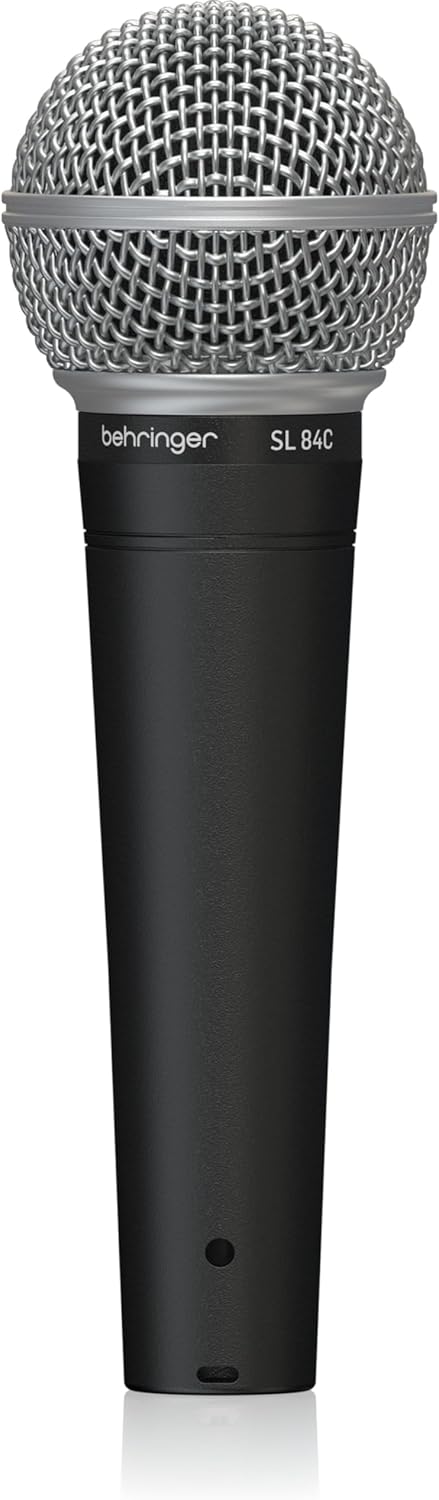
Image 1: Front view of the Behringer SL 84C microphone, showing the Behringer logo and model name on the body, and the silver mesh grille.

Image 2: Back view of the Behringer SL 84C microphone, displaying "DYNAMIC LO Z" and "MADE IN CHINA" text, indicating its dynamic nature and impedance.

Image 3: Side view of the Behringer SL 84C microphone, highlighting the three-pin XLR connector at the base for audio signal output.
Key Components:
- Microphone Grille: Protects the microphone capsule and includes an integrated spherical wind and pop noise filter.
- Microphone Body: The main housing of the microphone, designed for handheld use.
- XLR Connector: A standard three-pin connector at the base for connecting to audio interfaces or mixers.
- Microphone Capsule: Located beneath the grille, responsible for converting sound waves into electrical signals.
Setup
- Connect to an Audio Interface/Mixer: The Behringer SL 84C uses a standard three-pin XLR connector. Connect an XLR cable (not included) from the microphone to an available XLR input on your audio interface, mixer, or compatible recording device.
- Secure the Microphone:
- For handheld use, ensure a firm grip on the microphone body.
- For stand-mounted use, attach the included microphone stand adapter to a standard microphone stand. Then, securely insert the SL 84C microphone into the adapter.
- Positioning: Position the microphone directly in front of the sound source (e.g., vocalist's mouth) for optimal sound capture. Due to its unidirectional (cardioid) polar pattern, the microphone primarily picks up sound from the front, minimizing background noise.
- Gain Adjustment: Adjust the input gain on your audio interface or mixer to achieve an appropriate signal level. Avoid setting the gain too high, which can lead to distortion, or too low, which can result in a weak signal and increased noise.
Note: This dynamic microphone does not require phantom power. Connecting it to a device supplying phantom power will not damage the microphone.
Operating Instructions
The Behringer SL 84C is designed for straightforward operation. Follow these guidelines for best results:
- Speaking/Singing Distance: For a full and rich sound, speak or sing directly into the front of the microphone grille, typically 2-6 inches away. Closer proximity will enhance bass frequencies (proximity effect).
- Handling Noise: While the microphone has some internal shock mounting, excessive handling can introduce noise. For critical applications, using a microphone stand is recommended to minimize handling noise.
- Pop Filter Usage: The integrated spherical wind and pop noise filter helps reduce plosive sounds (like 'p' and 'b'). For podcasting or close-up vocal work, an external pop filter can be added for further plosive reduction.
- Monitoring: Use headphones connected to your audio interface or mixer to monitor your sound in real-time and ensure optimal audio quality.
Features
- Dynamic Vocal Microphone: Engineered for vocal applications, providing clear and articulate sound reproduction.
- Smooth Mid-Frequency Presence: Enhances voice projection, making vocals stand out in a mix.
- Ultra-Wide Frequency Response: Delivers brilliant and transparent sound across a broad spectrum.
- High Signal Output: Ensures your voice cuts through, even in loud environments.
- Integrated Spherical Wind and Pop Noise Filter: Reduces unwanted breath sounds and plosives.
- Three-Pin XLR Connector: Provides highest signal integrity and universal compatibility with professional audio equipment.
- Rugged Metal Construction: Durable design for reliable performance in various settings.
Specifications
| Feature | Specification |
|---|---|
| Model Name | SL 84C Dynamic Cardioid Microphone |
| Microphone Form Factor | Handheld |
| Polar Pattern | Unidirectional (Cardioid) |
| Connectivity Technology | XLR |
| Connector Type | 3-Pin XLR |
| Frequency Response Range | Up to 15 KHz (Ultra-wide) |
| Signal-to-Noise Ratio | 72 dB |
| Material | Metal |
| Item Weight | 215 Grams (7.6 ounces) |
| Product Dimensions (L x W x H) | 6.42 x 1.97 x 6.42 inches |
| Compatible Devices | Audio Mixer, Audio Interface |
| Manufacturer | Music Tribe US |
Troubleshooting
- No Sound/Low Volume:
- Ensure the XLR cable is securely connected at both the microphone and the audio interface/mixer.
- Check the input gain level on your audio interface/mixer and increase it if necessary.
- Verify that the correct input channel is selected on your recording device or software.
- Confirm that the microphone is pointed towards the sound source.
- Distorted Sound:
- Reduce the input gain level on your audio interface/mixer.
- Ensure you are not speaking or singing too loudly or too close to the microphone.
- Excessive Background Noise:
- The SL 84C has a cardioid pattern, which helps reject off-axis sound. Ensure the microphone is positioned to face the desired sound source and away from unwanted noise.
- Minimize ambient noise in your recording environment.
- Use a microphone stand to reduce handling noise.
- Plosive Sounds (Pops):
- Increase the distance between your mouth and the microphone slightly.
- Angle the microphone slightly off-axis from your mouth.
- Consider using an external pop filter for enhanced plosive reduction.
Maintenance
- Cleaning:
- Wipe the microphone body with a soft, dry cloth.
- For the grille, use a soft brush to gently remove any debris. Avoid using liquids directly on the grille or capsule.
- Storage:
- Store the microphone in its protective carrying case when not in use to prevent dust and physical damage.
- Keep the microphone in a cool, dry place away from extreme temperatures and humidity.
- Avoid Drops: While rugged, dropping the microphone can damage the internal capsule. Handle with care.
Warranty and Support
Behringer products are designed for reliability and performance. For specific warranty information and technical support, please refer to the official Behringer website or contact your local distributor. Keep your purchase receipt as proof of purchase for any warranty claims.
For further assistance, visit the Behringer Store on Amazon.
Related documentsSL 84C


Ask a question about this manual
Ask about setup, troubleshooting, compatibility, parts, safety, or missing instructions. Manuals+ will review the question and use this page’s manual context to help answer it.