
XYC MP-D040
XYC 12V Motorcycle ATV UTV Golf Cart Waterproof Bluetooth Speaker System User Manual
Brand: XYC | Model: MP-D040
1. Introduction
This manual provides detailed instructions for the installation, operation, and maintenance of your XYC 12V Waterproof Bluetooth Speaker System, model MP-D040. This audio system is designed for use in various 12V DC vehicles such as motorcycles, ATVs, UTVs, electric bikes, marine boats, and golf carts. It features Bluetooth connectivity, FM radio, USB, TF/SD card playback, and an anti-theft alarm function.
Please read this manual thoroughly before installation and use to ensure proper function and safety.
2. Package Contents
Verify that all the following items are included in your package:
- 1 x Main Host Unit
- 2 x Speakers
- 1 x Host Holder
- 1 x Remote Control
- 2 x Speaker Holders
- 1 Set x Installation Accessories (screws, brackets, wiring)
- 1 x English User Manual
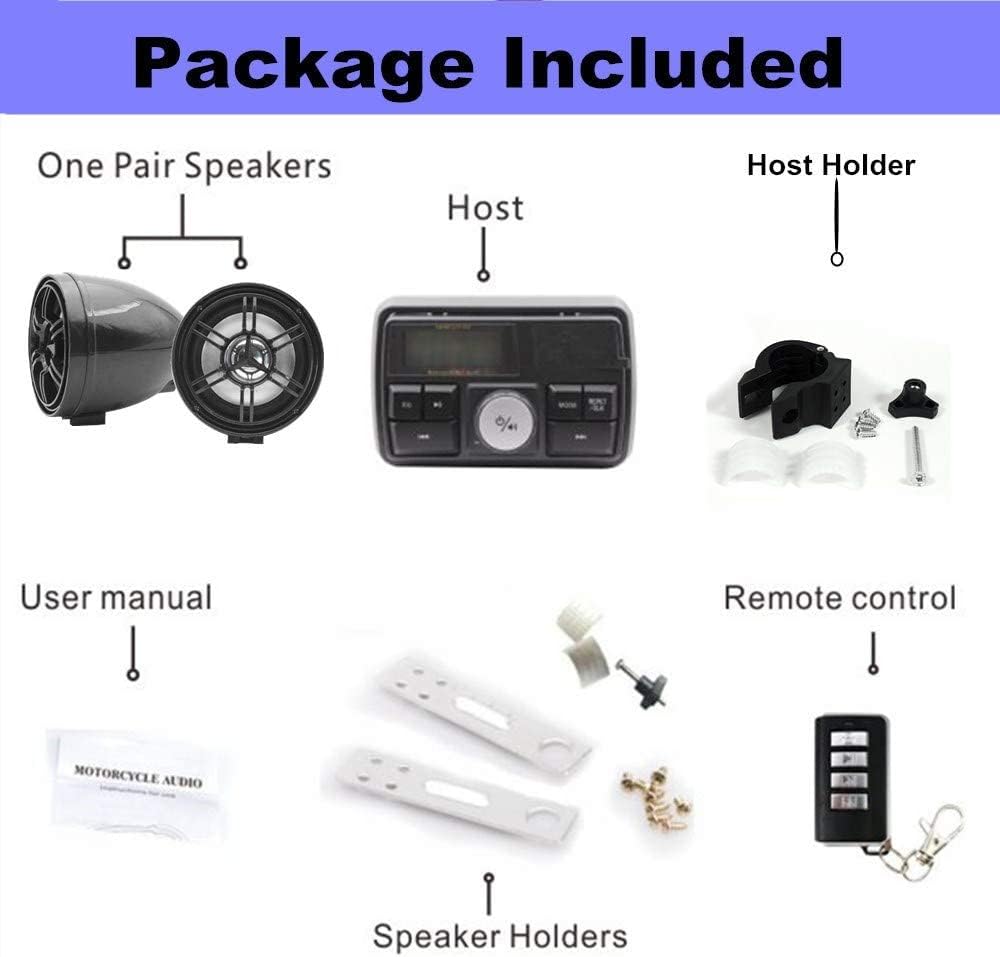
This image displays all items included in the package: the main host unit, a pair of speakers, a host holder, a remote control, speaker holders, installation accessories, and the user manual.
3. Product Overview
The main unit features an LCD screen, control buttons, and various input ports for media playback. The system includes two speakers and a remote control for convenient operation.
3.1 Main Unit Controls and Ports

Front panel of the audio unit showing the LED display, AUX In, USB slot, SD slot, EQ button, Play/Suspend, Previous/Next track buttons, Mute, Repeat/Clock, Mode button, and the central rotary knob for volume and power.
- LED Display: Shows current mode, frequency, track information, and time.
- EQ Button: Adjusts equalizer settings.
- Play/Suspend (►/−): Play or pause media playback.
- PREV (◀◀): Skip to previous track/station.
- NEXT (▶▶): Skip to next track/station.
- MUTE: Mutes audio output.
- REPET/CLK: Repeat playback mode / Clock setting.
- MODE: Switches between FM, Bluetooth, USB, SD, and AUX input modes.
- Rotary Knob: Rotate to adjust volume. Press to switch machine on/off or activate alarm.
- AUX In: 3.5mm audio input jack.
- USB Slot: For USB flash drives.
- SD Slot: For SD/TF memory cards.

A detailed view highlighting the USB interface and SD card slot on the side of the audio unit.
3.2 Remote Control
The included remote control allows for convenient operation of the audio system from a distance.
4. Installation
Proper installation is crucial for the performance and longevity of your audio system. It is recommended to have this unit installed by a professional if you are unfamiliar with vehicle electrical systems.
4.1 Mounting the Main Unit and Speakers
- Choose a suitable location on your vehicle for the main unit and speakers. Ensure the location is secure, allows for easy access to controls, and does not obstruct vehicle operation.
- Use the provided host holder to securely mount the main unit.
- Attach the speakers using the speaker holders and included installation accessories. Ensure speakers are positioned for optimal sound projection.
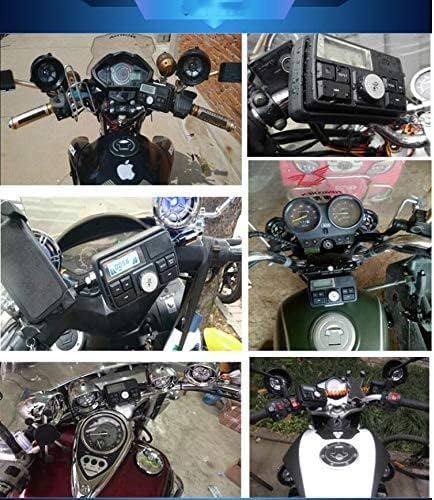
The back of the audio unit, illustrating the attached mounting bracket and the wiring harness for power and speaker connections.

A collage showing the audio system mounted on different motorcycles and vehicles, alongside detailed dimensions of the main unit and speakers.
4.2 Wiring Connections
The system operates on a 12V DC power supply. Connect the wiring harness as follows:
- Red Wire: Connect to the positive (+) terminal of your vehicle's 12V battery.
- Black Wire: Connect to the negative (-) terminal (ground) of your vehicle's 12V battery.
- Speaker Wires: Connect the speaker wires to the corresponding speaker terminals on the main unit. Ensure correct polarity.
Caution: Incorrect wiring can damage the unit or your vehicle's electrical system. Always ensure the power is off before making any connections.
5. Operation
5.1 Power On/Off and Volume Control
- Power On: Press the central rotary knob briefly.
- Power Off: Press and hold the central rotary knob for approximately 3 seconds.
- Volume Adjustment: Rotate the central knob clockwise to increase volume, counter-clockwise to decrease volume.
5.2 Mode Selection
Press the MODE button repeatedly to cycle through available input modes: FM Radio, Bluetooth, USB, SD/TF Card, and AUX In.
5.3 FM Radio Operation
- In FM mode, the display will show the current frequency.
- Press PREV (◀◀) or NEXT (▶▶) briefly to manually tune to the previous or next frequency.
- Press and hold PREV (◀◀) or NEXT (▶▶) to automatically scan for the next available station.
- The system supports a frequency range of 87-108MHz.
5.4 Bluetooth Pairing
- Switch the unit to Bluetooth mode using the MODE button. The display will indicate "Bluetooth Mode" or a similar message.
- On your mobile device, enable Bluetooth and search for available devices.
- Select "XYC Audio" (or similar name) from the list of devices to pair.
- Once paired, you can play audio from your device through the speaker system.
5.5 USB/SD/TF Card Playback
- Insert a USB flash drive into the USB slot or an SD/TF card into the SD slot.
- The unit will automatically switch to USB or SD mode and begin playing audio files. If not, press the MODE button to select the correct input.
- Use PREV (◀◀) and NEXT (▶▶) to navigate tracks.
- Press Play/Suspend (►/−) to pause or resume playback.
- Press REPET/CLK to cycle through repeat modes (e.g., repeat one, repeat all).
5.6 AUX Input
Connect an external audio device (e.g., MP3 player, smartphone) to the 3.5mm AUX In jack using an audio cable. Switch the unit to AUX mode using the MODE button. Audio will play from the connected device.
5.7 Anti-Theft Function
The system includes an anti-theft alarm. To activate or deactivate this function, refer to the specific instructions provided in the remote control section or the quick start guide included with your product. Typically, this involves a dedicated button on the remote or a specific press sequence on the main unit's power button.
6. Specifications
| Feature | Specification |
|---|---|
| Model Number | MP-D040 |
| Power Supply | DC 12V |
| Output Power | 2 x 10 W |
| Speaker Impedance | 4 to 8 Ohms |
| Connectivity Technology | Bluetooth, USB, Auxiliary |
| Supported Media | USB Disk, TF/SD Card |
| FM Frequency Range | 87-108 MHz |
| FM Practical Sensitivity | Less than 11 dB |
| FM Signal-to-Noise Ratio | More than 60 dB |
| Standby Current | Less than 1.2 mA |
| Special Features | Waterproof Design, Anti-Theft Alarm, Remote Control, LED Display |
| Product Dimensions (Main Unit) | 4.65 x 3.62 x 3.74 inches (11.8 x 9.2 x 9.5 cm) |
| Item Weight | 1.78 pounds (0.81 kg) |
| Color | Black |
| Batteries | 1 Lithium Ion battery required (included for remote) |
7. Troubleshooting
If you encounter issues with your audio system, refer to the following common problems and solutions:
- No Power:
- Check all power connections to ensure they are secure and correctly wired to a 12V DC source.
- Verify the vehicle's battery has sufficient charge.
- Check for any blown fuses in the vehicle's electrical system or the unit's wiring.
- No Sound:
- Ensure the volume is turned up and the unit is not muted.
- Check speaker connections for correct polarity and secure attachment.
- Verify the correct input mode (Bluetooth, FM, USB, SD, AUX) is selected.
- Poor FM Radio Reception:
- Ensure the antenna wire is fully extended and positioned away from metal obstructions.
- Move to an area with stronger signal reception.
- Bluetooth Not Connecting:
- Ensure the unit is in Bluetooth pairing mode.
- Make sure Bluetooth is enabled on your mobile device and it is within range.
- Forget the device from your phone's Bluetooth settings and try pairing again.
- USB/SD Card Not Playing:
- Ensure the USB drive or SD card is inserted correctly and fully.
- Verify that the audio files on the media are in a supported format.
- Try a different USB drive or SD card to rule out media corruption.
8. Maintenance
To ensure the longevity and optimal performance of your XYC audio system, follow these maintenance guidelines:
- Cleaning: Use a soft, damp cloth to clean the unit and speakers. Avoid harsh chemicals or abrasive cleaners.
- Waterproof Design: While the unit is waterproof, avoid submerging it or exposing it to high-pressure water jets for extended periods. Ensure all port covers are securely closed when not in use.
- Storage: If storing the vehicle for an extended period, consider disconnecting the unit from the power source to prevent battery drain.
9. Warranty and Support
For warranty information or technical support, please refer to the contact details provided with your purchase documentation or contact the manufacturer directly. Keep your proof of purchase for any warranty claims.
Ask a question about this manual
Ask about setup, troubleshooting, compatibility, parts, safety, or missing instructions. Manuals+ will review the question and use this page’s manual context to help answer it.